
This is the universal build of Microsoft Designer 1.2524204.7002. It contains native libraries for every CPU architecture (arm64-v8a, armeabi-v7a, x86, x86_64), so it installs on any Android device. The trade-off is size — it's larger than per-architecture variants. Pick this one if you're unsure which CPU your phone has, or if you plan to share the APK with multiple devices.
File size: 31.8 MB • Min Android: 28 • Target Android: 35 • Version code: 2070252422 • Framework: Native (Java/Kotlin) • Permissions: 24
Screenshots
File Information
| Package Name | com.microsoft.designer |
|---|---|
| Version Name | 1.2524204.7002 |
| Version Code | 2070252422 |
| Architecture | Universal |
| Min Android Version | Android 28 (API 35) |
| Main Activity | com.microsoft.designer.app.home.view.launch.DesignerLoginActivity |
| Framework | Native (Java/Kotlin) |
| File Size | 31.81 MB |
| Signature (SHA1) | 713B3C8B26CC0D02A516C4E0BBB8FEA4C0E06C5E |
| File Hash (SHA256) | 16a33d6a659602e51b36756f5cc5ec43c8b02a28719b784d97490ef64046348b |
What's New
This update introduces new AI-driven features designed to elevate your creative flow. Now you can effortlessly erase, cut out, move, and focus on specific parts of your images. Plus, rewrite your text with AI and enhance the text in your designs using our stylish templates. Happy designing!
App Description
Microsoft Designer is an AI-powered design tool that helps you create designs and edit photos in seconds.
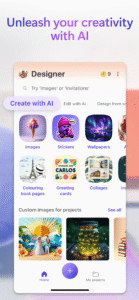
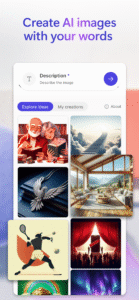
Unleash your creativity—visually create, design, and edit just about anything you can imagine with AI. Use the power of generative AI to create eye-catching images with your words, craft next-level designs that pop like personalized birthday cards, holiday cards, and wallpapers for your phone, and even use AI to edit photos like an expert - erasing unwanted objects from photos. Create what you want, when and where you need it.
Key capabilities:
Images: Create any image you can imagine. Sci-fi art, surreal scenes, funny images? Dream it, describe it, and create it with AI. Your imagination is limitless!
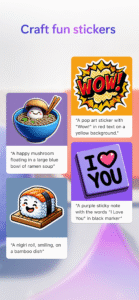
Stickers: Create something that sticks. Make custom stickers that help you stick out on messaging apps, social, and more.
Edit with AI: make your photos and images picture perfect with AI.
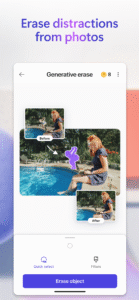
Generative erase: Erase unwanted distractions to make objects you don’t want in your image disappear.
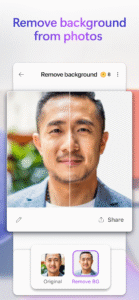
Remove background: Say bye-bye to bad backgrounds. Easily remove unwanted image backgrounds in one step.
Blur background: Bring what’s most important into focus. Blur the background of any image to make your subject pop.
Add filters, adjust brightness, resize: Customize to fit your creative vision, including resizing to turn your creations into a square or custom size that fits just right.
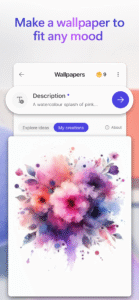
Wallpapers/Backgrounds: Put it all on display. Create custom wallpaper or background to fit your current mood, make a statement, or to keep a special occasion front and center on your phone screen.
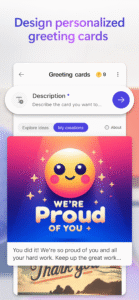
Greeting cards: Craft the perfect greeting for any occasion. From birthday cards to holiday cards and beyond, create a thoughtful greeting card with personalized messages and images even if you’re at a loss for words.
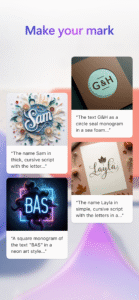
Monograms: Make your mark. Add some personal pop to your everyday life or for a special occasion like a wedding with custom crafted monograms that use letters and more to define your mark.
Invitations: Create invitations that wow. Customize your invitations for every occasion and any event like birthdays, weddings, and anything else big or small.
Social posts: Stand out online. Elevate and craft your next social post with Designer to create the perfect image and text to share online.
Icons: Express yourself visually. Create icons to easily communicate your vision and decorate your designs.
Emojis: Express yourself! Have the perfect reaction on hand with custom crafted emojis to fit any mood.
Coloring book pages: Color it in and get in your flow. Create custom coloring book pages to make coloring more exciting. Great for all ages.
Frame image: Turn your photos into a customized framed memory that you can share everywhere.
Collages: Bring your favorite photos, styles, and descriptions together create a custom collage from your favorite memories.
Banners: Create banners for newsletter headers, social profiles, and more to grab attention and stand out.
Microsoft Designer is available for free with a Microsoft account. Your Microsoft account provides 5 GB of free cloud storage that you can use to save your designs, files, and photos across your devices.
Additional information about terms of use can be found here:
designer.microsoft.com/consumerTermsOfUse/en-US/consumerTermsOfUse.pdf
Download Designer and create something new today!
Unleash your creativity—visually create, design, and edit just about anything you can imagine with AI. Use the power of generative AI to create eye-catching images with your words, craft next-level designs that pop like personalized birthday cards, holiday cards, and wallpapers for your phone, and even use AI to edit photos like an expert - erasing unwanted objects from photos. Create what you want, when and where you need it.
Key capabilities:
Images: Create any image you can imagine. Sci-fi art, surreal scenes, funny images? Dream it, describe it, and create it with AI. Your imagination is limitless!
Stickers: Create something that sticks. Make custom stickers that help you stick out on messaging apps, social, and more.
Edit with AI: make your photos and images picture perfect with AI.
Generative erase: Erase unwanted distractions to make objects you don’t want in your image disappear.
Remove background: Say bye-bye to bad backgrounds. Easily remove unwanted image backgrounds in one step.
Blur background: Bring what’s most important into focus. Blur the background of any image to make your subject pop.
Add filters, adjust brightness, resize: Customize to fit your creative vision, including resizing to turn your creations into a square or custom size that fits just right.
Wallpapers/Backgrounds: Put it all on display. Create custom wallpaper or background to fit your current mood, make a statement, or to keep a special occasion front and center on your phone screen.
Greeting cards: Craft the perfect greeting for any occasion. From birthday cards to holiday cards and beyond, create a thoughtful greeting card with personalized messages and images even if you’re at a loss for words.
Monograms: Make your mark. Add some personal pop to your everyday life or for a special occasion like a wedding with custom crafted monograms that use letters and more to define your mark.
Invitations: Create invitations that wow. Customize your invitations for every occasion and any event like birthdays, weddings, and anything else big or small.
Social posts: Stand out online. Elevate and craft your next social post with Designer to create the perfect image and text to share online.
Icons: Express yourself visually. Create icons to easily communicate your vision and decorate your designs.
Emojis: Express yourself! Have the perfect reaction on hand with custom crafted emojis to fit any mood.
Coloring book pages: Color it in and get in your flow. Create custom coloring book pages to make coloring more exciting. Great for all ages.
Frame image: Turn your photos into a customized framed memory that you can share everywhere.
Collages: Bring your favorite photos, styles, and descriptions together create a custom collage from your favorite memories.
Banners: Create banners for newsletter headers, social profiles, and more to grab attention and stand out.
Microsoft Designer is available for free with a Microsoft account. Your Microsoft account provides 5 GB of free cloud storage that you can use to save your designs, files, and photos across your devices.
Additional information about terms of use can be found here:
designer.microsoft.com/consumerTermsOfUse/en-US/consumerTermsOfUse.pdf
Download Designer and create something new today!
Download Microsoft Designer APK
Fast, free and safe download.
APK Permissions 24
- android.permission.ACCESS_NETWORK_STATE
- android.permission.CAMERA
- android.permission.FOREGROUND_SERVICE
- android.permission.INTERNET
- android.permission.MODIFY_AUDIO_SETTINGS
- android.permission.NFC
- android.permission.POST_NOTIFICATIONS
- android.permission.READ_EXTERNAL_STORAGE
- android.permission.READ_MEDIA_IMAGES
- android.permission.READ_MEDIA_VIDEO
- android.permission.READ_MEDIA_VISUAL_USER_SELECTED
- android.permission.READ_PHONE_STATE
- android.permission.RECEIVE_BOOT_COMPLETED
- android.permission.RECORD_AUDIO
- android.permission.REORDER_TASKS
- android.permission.SET_WALLPAPER
- android.permission.USE_FULL_SCREEN_INTENT
- android.permission.VIBRATE
- android.permission.WAKE_LOCK
- android.permission.WRITE_EXTERNAL_STORAGE
- com.android.vending.BILLING
- com.google.android.c2dm.permission.RECEIVE
- com.google.android.finsky.permission.BIND_GET_INSTALL_REFERRER_SERVICE
- com.microsoft.designer.DYNAMIC_RECEIVER_NOT_EXPORTED_PERMISSION
APK Verified
The cryptographic signature guarantees that the file is safe to install and was not tampered with in any way.
Similar in Art & Design


Frequently Asked Questions about Microsoft Designer APK
This is the universal variant — a single APK that contains native libraries for every CPU architecture. It installs on any Android device but is larger than per-architecture variants.
Yes — the APK's signature has been cryptographically verified against the publisher's signing key. The SHA-256 hash is shown in the File Information panel so you can independently confirm the file matches the original release.
Android 28 (API level 35) or newer. Older devices will refuse the install.
Install a free app like 'CPU-Z' or 'Droid Hardware Info' from the Play Store and look at the ABI / Instruction Set row. Most phones made after 2017 are arm64-v8a; if in doubt, download the universal variant.
All variants are functionally identical — same features, same version. They differ only in which CPU architectures the native code is compiled for, and (sometimes) which screen densities the included graphics target. Pick the one that matches your device for the smallest install size, or pick 'Universal' if you're unsure.