
This is the arm64-v8a build of Microsoft SharePoint 3.39.61 — the modern 64-bit ARM build that runs on virtually every Android phone released since 2017. It's smaller and faster than the universal variant because Android only loads the native code your CPU actually needs. If your phone is from the last 8 years, this is the right pick.
File size: 26.1 MB • Min Android: 27 • Target Android: 34 • Version code: 227233961 • Framework: React Native • Permissions: 14
Screenshots
File Information
| Package Name | com.microsoft.sharepoint |
|---|---|
| Version Name | 3.39.61 |
| Version Code | 227233961 |
| Architecture | arm64-v8a |
| Min Android Version | Android 27 (API 34) |
| Main Activity | com.microsoft.sharepoint.MainActivity |
| Framework | React Native |
| File Size | 26.14 MB |
| Signature (SHA1) | 812A2ACE16C28E4CAF23F97B902EC8746ECA6CF5 |
| File Hash (SHA256) | d24051501c4c93db44876fec9610fc1b4dbf35a770932c169a1d64568a06be95 |
What's New
• Stability improvements and bug fixes.
App Description
SharePoint infuses AI into the mobile app experience to keep you focused and productive while on the go. AI builds an understanding of what you work on, how you work, and how your colleagues' work relates to you. When you need expertise, content, or resources when you're on the go, SharePoint is a great place to start looking.
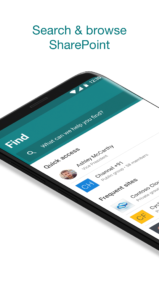
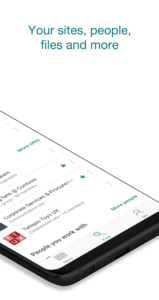
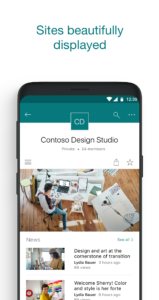
• Browse your sites, files, people and more to get back to what you were working on
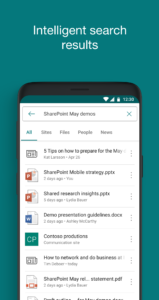
• Use search to find and discover important content
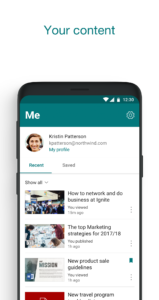
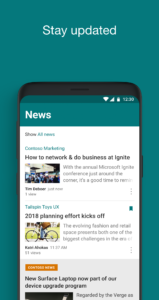
• Access your personalized view of team sites, communication sites, and news posts
• Tap on a user to get to their contact card and see who they work with and what they are working on
• Create news posts on the go and share your updates, reports, status, and experiences with your team
• Sign in to your SharePoint sites, whether they're in the cloud or on-premises. The app works with SharePoint Online and SharePoint Server versions 2013 and higher
• Add multiple accounts, and easily switch between them
Note: To sign in to SharePoint, your organization needs to have an Office 365 subscription that includes SharePoint Online or an on-premises SharePoint Server.
By installing the app, you agree to these terms and conditions:
aka.ms/spandeula/
This app is provided by Microsoft. Data provided through the use of this store and this app may be accessible to Microsoft and transferred to, stored, and processed in the United States or any other country/region where Microsoft or its affiliates maintain facilities.
• Browse your sites, files, people and more to get back to what you were working on
• Use search to find and discover important content
• Access your personalized view of team sites, communication sites, and news posts
• Tap on a user to get to their contact card and see who they work with and what they are working on
• Create news posts on the go and share your updates, reports, status, and experiences with your team
• Sign in to your SharePoint sites, whether they're in the cloud or on-premises. The app works with SharePoint Online and SharePoint Server versions 2013 and higher
• Add multiple accounts, and easily switch between them
Note: To sign in to SharePoint, your organization needs to have an Office 365 subscription that includes SharePoint Online or an on-premises SharePoint Server.
By installing the app, you agree to these terms and conditions:
aka.ms/spandeula/
This app is provided by Microsoft. Data provided through the use of this store and this app may be accessible to Microsoft and transferred to, stored, and processed in the United States or any other country/region where Microsoft or its affiliates maintain facilities.
Download Microsoft SharePoint APK
Fast, free and safe download.
APK Permissions 14
- android.permission.ACCESS_NETWORK_STATE
- android.permission.AUTHENTICATE_ACCOUNTS
- android.permission.FOREGROUND_SERVICE
- android.permission.GET_ACCOUNTS
- android.permission.INTERNET
- android.permission.MANAGE_ACCOUNTS
- android.permission.NFC
- android.permission.POST_NOTIFICATIONS
- android.permission.RECEIVE_BOOT_COMPLETED
- android.permission.USE_CREDENTIALS
- android.permission.VIBRATE
- android.permission.WAKE_LOCK
- com.google.android.c2dm.permission.RECEIVE
- com.google.android.finsky.permission.BIND_GET_INSTALL_REFERRER_SERVICE
APK Verified
The cryptographic signature guarantees that the file is safe to install and was not tampered with in any way.
Other Variants
This release has multiple variants (e.g. diff architectures).
arm64-v8a armeabi-v7a x86 x86_64Similar in Productivity


Frequently Asked Questions about Microsoft SharePoint APK
This variant is built for 64-bit ARM (most Android phones made since 2017). If your device's CPU matches, this is the smallest, fastest version to install.
Yes — the APK's signature has been cryptographically verified against the publisher's signing key. The SHA-256 hash is shown in the File Information panel so you can independently confirm the file matches the original release.
Android 27 (API level 34) or newer. Older devices will refuse the install.
Install a free app like 'CPU-Z' or 'Droid Hardware Info' from the Play Store and look at the ABI / Instruction Set row. Most phones made after 2017 are arm64-v8a; if in doubt, download the universal variant.
All variants are functionally identical — same features, same version. They differ only in which CPU architectures the native code is compiled for, and (sometimes) which screen densities the included graphics target. Pick the one that matches your device for the smallest install size, or pick 'Universal' if you're unsure.