
Download Microsoft 365 Admin APK 5.6.3.0 arm64-v8a, armeabi-v7a, x86, x86_64 · Android 21+
Download APK
Verified Safe
This is the arm64-v8a, armeabi-v7a, x86, x86_64 build of Microsoft 365 Admin 5.6.3.0. Pick this build if your device's primary ABI matches.
File size: 65.3 MB • Min Android: 21 • Target Android: 34 • Version code: 220 • Framework: Xamarin • Permissions: 23
Screenshots
File Information
| Package Name | com.ms.office365admin |
|---|---|
| Version Name | 5.6.3.0 |
| Version Code | 220 |
| Architecture | arm64-v8a, armeabi-v7a, x86, x86_64 |
| Min Android Version | Android 21 (API 34) |
| Main Activity | com.ms.office365admin.SplashScreen |
| Framework | Xamarin |
| File Size | 65.33 MB |
| Signature (SHA1) | 7DC83CD2ABE833560C2896626E307041C0DF3A7A |
| File Hash (SHA256) | 4f48ebab2d647491d69ed8d9f8e7c26fd7a56f1eeca9f28e1a59f70819353ff9 |
What's New
As part of this release we are introducing a feature through which admins can approve copilot license requests from end users in the M365 admin mobile app.
App Description
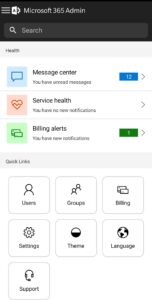
The Microsoft 365 Admin App enables you to be productive from anywhere. The app allows you to receive critical notifications, add users, reset passwords, manage devices, create support requests, and more-all while you’re on the go.
Who should use this app? People with an admin role to a Microsoft 365 or Office 365 enterprise or business subscription.
What can I do with this app?
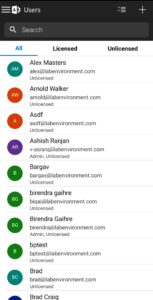
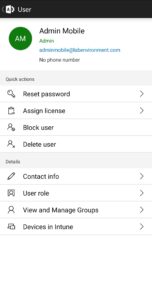
• Add, edit, block, or delete users, reset passwords, assign roles, or manage aliases & devices.
• Add groups, edit groups, and add or remove users from groups.
• View all available and assigned licenses, assign licenses to users, add or remove licenses, view and download invoices.
• Check the status of existing support requests, take actions on them, or create new ones.
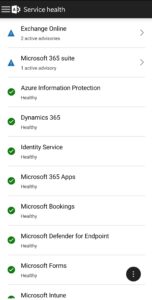
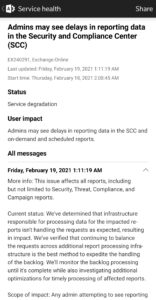
• Monitor the health of all services and view active incidents in Service Health.
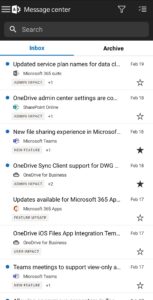
• Stay on top of all the upcoming changes and announcements via the Message Center feed.
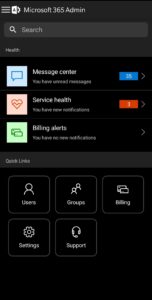
• Get push notifications about important information related to service health, message center, and billing.
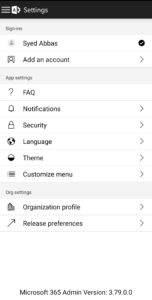
The app supports dark theme and is available in 39 languages. And if you're someone who is responsible for managing more than one tenant, you can sign-in to multiple tenants and quickly switch between them.
We're listening and constantly improving the app based on your feedback. Tell us what you like, what we can do better, and what features you'd like to see in the app. Send your feedback to
feedback365@microsoft.com
.
Who should use this app? People with an admin role to a Microsoft 365 or Office 365 enterprise or business subscription.
What can I do with this app?
• Add, edit, block, or delete users, reset passwords, assign roles, or manage aliases & devices.
• Add groups, edit groups, and add or remove users from groups.
• View all available and assigned licenses, assign licenses to users, add or remove licenses, view and download invoices.
• Check the status of existing support requests, take actions on them, or create new ones.
• Monitor the health of all services and view active incidents in Service Health.
• Stay on top of all the upcoming changes and announcements via the Message Center feed.
• Get push notifications about important information related to service health, message center, and billing.
The app supports dark theme and is available in 39 languages. And if you're someone who is responsible for managing more than one tenant, you can sign-in to multiple tenants and quickly switch between them.
We're listening and constantly improving the app based on your feedback. Tell us what you like, what we can do better, and what features you'd like to see in the app. Send your feedback to
feedback365@microsoft.com
.
Download Microsoft 365 Admin APK
Fast, free and safe download.
APK Permissions 23
- android.permission.ACCESS_MEDIA_LOCATION
- android.permission.ACCESS_NETWORK_STATE
- android.permission.ACCESS_WIFI_STATE
- android.permission.CALL_PHONE
- android.permission.CAMERA
- android.permission.FOREGROUND_SERVICE
- android.permission.GET_ACCOUNTS
- android.permission.INTERNET
- android.permission.MANAGE_ACCOUNTS
- android.permission.MANAGE_DOCUMENTS
- android.permission.POST_NOTIFICATIONS
- android.permission.READ_CONTACTS
- android.permission.READ_EXTERNAL_STORAGE
- android.permission.READ_MEDIA_IMAGES
- android.permission.READ_PHONE_STATE
- android.permission.RECEIVE_BOOT_COMPLETED
- android.permission.USE_BIOMETRIC
- android.permission.USE_CREDENTIALS
- android.permission.USE_FINGERPRINT
- android.permission.WAKE_LOCK
- android.permission.WRITE_EXTERNAL_STORAGE
- com.google.android.c2dm.permission.RECEIVE
- com.ms.office365admin.DYNAMIC_RECEIVER_NOT_EXPORTED_PERMISSION
APK Verified
The cryptographic signature guarantees that the file is safe to install and was not tampered with in any way.
Similar in Productivity


Frequently Asked Questions about Microsoft 365 Admin APK
This variant is built for devices that report `arm64-v8a, armeabi-v7a, x86, x86_64` as their primary ABI. If your device's CPU matches, this is the smallest, fastest version to install.
Yes — the APK's signature has been cryptographically verified against the publisher's signing key. The SHA-256 hash is shown in the File Information panel so you can independently confirm the file matches the original release.
Android 21 (API level 34) or newer. Older devices will refuse the install.
Install a free app like 'CPU-Z' or 'Droid Hardware Info' from the Play Store and look at the ABI / Instruction Set row. Most phones made after 2017 are arm64-v8a; if in doubt, download the universal variant.
All variants are functionally identical — same features, same version. They differ only in which CPU architectures the native code is compiled for, and (sometimes) which screen densities the included graphics target. Pick the one that matches your device for the smallest install size, or pick 'Universal' if you're unsure.