
Download Microsoft OneNote: Save Notes APK 16.0.19127.20192 arm64-v8a · Android 33+
Download APK
Verified Safe
This is the arm64-v8a build of Microsoft OneNote: Save Notes 16.0.19127.20192 — the modern 64-bit ARM build that runs on virtually every Android phone released since 2017. It's smaller and faster than the universal variant because Android only loads the native code your CPU actually needs. If your phone is from the last 8 years, this is the right pick.
File size: 86.4 MB • Min Android: 33 • Target Android: 34 • Version code: 1806744139 • Framework: Native (Java/Kotlin) • Permissions: 36
Screenshots
File Information
| Package Name | com.microsoft.office.onenote |
|---|---|
| Version Name | 16.0.19127.20192 |
| Version Code | 1806744139 |
| Architecture | arm64-v8a |
| Min Android Version | Android 33 (API 34) |
| Main Activity | com.microsoft.office.onenote.ui.ONMSplashActivity |
| Framework | Native (Java/Kotlin) |
| File Size | 86.37 MB |
| Signature (SHA1) | 464FE87D17060838E59300C1472D6BEF074593A8 |
| File Hash (SHA256) | 5630a6f093d537a3e16aa601120081599bd52e6cdabbd71aec5453f735139cd7 |
What's New
• Bug fixes and performance improvements.
App Description
Organize your thoughts, discoveries, and ideas and simplify planning important moments in your life with your digital notepad. Take notes on your phone and sync them across all your devices with Microsoft OneNote.
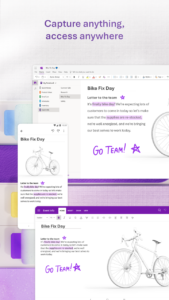
With OneNote, you can plan a big event, seize a moment of inspiration to create something new, and track your list of errands that are too important to forget. Take notes, write memos and make a digital sketchbook right on your phone. Capture pictures and add images to your notes.
Sync notes across your devices to access them anytime, anywhere. Save ideas and check your list at home, in the office, or on the go across your devices. Search your notes quickly and effortlessly.
Take notes, share ideas, organize and collaborate with Microsoft OneNote today.
Homepage & Quick Capture Bar
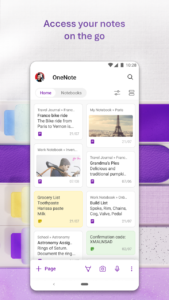
• Find all notes from your connected accounts in one place to easily create, find, & act on your notes
• Now with Samsung Notes integration
• Capture text, voice, ink or images to your notepad with Quick Capture
• Capture notes in ink. Click the pen button & write down your thoughts
Scan Pictures & Extract Text
• Notes Scanner: Scan documents, pictures, or files to extract notes
• Capture images to extract text from documents, files, & more
• Apply different filters to change colors, add ink, crop images & more
Audio Notes
• Take accurate voice notes with voice dictation
• Click the Mic button to begin recording, then click it again to end recording & save the file
• Dictate notes in 27 languages (note some languages are in preview) & use Auto-Punctutation to automatically format your notes
Capture Content & Get Organized
• Write notes, draw & clip things from the web to add to your notebook
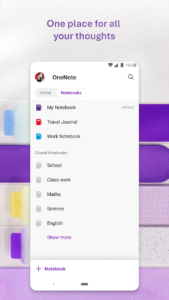
• Use OneNote’s flexible canvas to place content anywhere you want
Take Notes & Achieve More
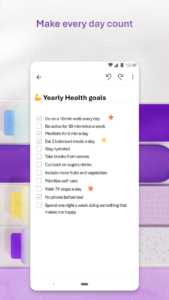
• Organize your notes using to-do lists, follow up items, marks for what’s important & custom labels
• Use OneNote as a notebook, journal or a notepad
Save Ideas At The Speed of Light
• OneNote syncs your notes across all devices & lets multiple people work on the content together, at the same time
• Notepad badge hovers on screen & lets you quickly write your thoughts down any time
• Sticky notes are helpful for quick memos
Collaborate & Share Notes
• Take meeting notes, brainstorm projects, & draw attention to important points
• Take notes & save ideas across your favorite devices, no matter what device your team likes to use
• Search your notes with a fast & powerful search function
Better Together With Microsoft Office
• OneNote is part of the Office family & works great with your favorite apps, such as Excel or Word, to help you do more
Write notes, save ideas & keep up with your to-do list with Microsoft OneNote.
You can find answers to frequently asked questions about OneNote for Android at
aka.ms/OnenoteAndroidFAQ
Requirements:
• Requires Android OS 9.0 or later.
• A free Microsoft account is required to use OneNote.
• OneNote opens existing notebooks created in Microsoft OneNote 2010 format or later.
• To sync your notes to OneDrive for Business, sign in with your organization’s Office 365 or SharePoint account.
This app is provided either by Microsoft or a third-party app publisher and is subject to a separate privacy statement and terms and conditions. Data provided through the use of this store and this app may be accessible to Microsoft or the third-party app publisher, as applicable, and transferred to, stored and processed in the United States or any other country where Microsoft or the app publisher and their affiliates or service providers maintain facilities.
Please refer to Microsoft’s End User License Agreement (EULA) for Terms of Service for OneNote on Android. By installing the app, you agree to these terms and conditions:
support.office.com/legal?llcc=en-us&aid=OneNoteForAndroidLicenseTerms.htm
. Microsoft’s privacy statement is available at
privacy.microsoft.com/en-us/privacystatement
With OneNote, you can plan a big event, seize a moment of inspiration to create something new, and track your list of errands that are too important to forget. Take notes, write memos and make a digital sketchbook right on your phone. Capture pictures and add images to your notes.
Sync notes across your devices to access them anytime, anywhere. Save ideas and check your list at home, in the office, or on the go across your devices. Search your notes quickly and effortlessly.
Take notes, share ideas, organize and collaborate with Microsoft OneNote today.
Homepage & Quick Capture Bar
• Find all notes from your connected accounts in one place to easily create, find, & act on your notes
• Now with Samsung Notes integration
• Capture text, voice, ink or images to your notepad with Quick Capture
• Capture notes in ink. Click the pen button & write down your thoughts
Scan Pictures & Extract Text
• Notes Scanner: Scan documents, pictures, or files to extract notes
• Capture images to extract text from documents, files, & more
• Apply different filters to change colors, add ink, crop images & more
Audio Notes
• Take accurate voice notes with voice dictation
• Click the Mic button to begin recording, then click it again to end recording & save the file
• Dictate notes in 27 languages (note some languages are in preview) & use Auto-Punctutation to automatically format your notes
Capture Content & Get Organized
• Write notes, draw & clip things from the web to add to your notebook
• Use OneNote’s flexible canvas to place content anywhere you want
Take Notes & Achieve More
• Organize your notes using to-do lists, follow up items, marks for what’s important & custom labels
• Use OneNote as a notebook, journal or a notepad
Save Ideas At The Speed of Light
• OneNote syncs your notes across all devices & lets multiple people work on the content together, at the same time
• Notepad badge hovers on screen & lets you quickly write your thoughts down any time
• Sticky notes are helpful for quick memos
Collaborate & Share Notes
• Take meeting notes, brainstorm projects, & draw attention to important points
• Take notes & save ideas across your favorite devices, no matter what device your team likes to use
• Search your notes with a fast & powerful search function
Better Together With Microsoft Office
• OneNote is part of the Office family & works great with your favorite apps, such as Excel or Word, to help you do more
Write notes, save ideas & keep up with your to-do list with Microsoft OneNote.
You can find answers to frequently asked questions about OneNote for Android at
aka.ms/OnenoteAndroidFAQ
Requirements:
• Requires Android OS 9.0 or later.
• A free Microsoft account is required to use OneNote.
• OneNote opens existing notebooks created in Microsoft OneNote 2010 format or later.
• To sync your notes to OneDrive for Business, sign in with your organization’s Office 365 or SharePoint account.
This app is provided either by Microsoft or a third-party app publisher and is subject to a separate privacy statement and terms and conditions. Data provided through the use of this store and this app may be accessible to Microsoft or the third-party app publisher, as applicable, and transferred to, stored and processed in the United States or any other country where Microsoft or the app publisher and their affiliates or service providers maintain facilities.
Please refer to Microsoft’s End User License Agreement (EULA) for Terms of Service for OneNote on Android. By installing the app, you agree to these terms and conditions:
support.office.com/legal?llcc=en-us&aid=OneNoteForAndroidLicenseTerms.htm
. Microsoft’s privacy statement is available at
privacy.microsoft.com/en-us/privacystatement
Download Microsoft OneNote: Save Notes APK
Fast, free and safe download.
APK Permissions 36
- android.permission.ACCESS_NETWORK_STATE
- android.permission.ACCESS_WIFI_STATE
- android.permission.BLUETOOTH
- android.permission.CAMERA
- android.permission.CHANGE_NETWORK_STATE
- android.permission.CHANGE_WIFI_STATE
- android.permission.FLASHLIGHT
- android.permission.FOREGROUND_SERVICE
- android.permission.FOREGROUND_SERVICE_DATA_SYNC
- android.permission.FOREGROUND_SERVICE_MEDIA_PLAYBACK
- android.permission.FOREGROUND_SERVICE_MEDIA_PROJECTION
- android.permission.FOREGROUND_SERVICE_SPECIAL_USE
- android.permission.GET_PACKAGE_SIZE
- android.permission.INTERNET
- android.permission.MODIFY_AUDIO_SETTINGS
- android.permission.NFC
- android.permission.POST_NOTIFICATIONS
- android.permission.READ_EXTERNAL_STORAGE
- android.permission.READ_PHONE_STATE
- android.permission.RECEIVE_BOOT_COMPLETED
- android.permission.RECORD_AUDIO
- android.permission.SCHEDULE_EXACT_ALARM
- android.permission.SYSTEM_ALERT_WINDOW
- android.permission.USE_BIOMETRIC
- android.permission.USE_EXACT_ALARM
- android.permission.USE_FINGERPRINT
- android.permission.VIBRATE
- android.permission.WAKE_LOCK
- android.permission.WRITE_EXTERNAL_STORAGE
- android.permission.WRITE_SYNC_SETTINGS
- com.android.alarm.permission.SET_ALARM
- com.android.launcher.permission.INSTALL_SHORTCUT
- com.android.launcher.permission.UNINSTALL_SHORTCUT
- com.google.android.finsky.permission.BIND_GET_INSTALL_REFERRER_SERVICE
- com.microsoft.office.onenote.DYNAMIC_RECEIVER_NOT_EXPORTED_PERMISSION
- com.microsoft.office.onenote.permission.CONTENT_READ
APK Verified
The cryptographic signature guarantees that the file is safe to install and was not tampered with in any way.
Other Variants
This release has multiple variants (e.g. diff architectures).
arm64-v8a arm64-v8a arm64-v8a armeabi-v7a armeabi-v7a x86 x86 x86_64 x86_64Similar in Productivity


Frequently Asked Questions about Microsoft OneNote: Save Notes APK
This variant is built for 64-bit ARM (most Android phones made since 2017). If your device's CPU matches, this is the smallest, fastest version to install.
Yes — the APK's signature has been cryptographically verified against the publisher's signing key. The SHA-256 hash is shown in the File Information panel so you can independently confirm the file matches the original release.
Android 33 (API level 34) or newer. Older devices will refuse the install.
Install a free app like 'CPU-Z' or 'Droid Hardware Info' from the Play Store and look at the ABI / Instruction Set row. Most phones made after 2017 are arm64-v8a; if in doubt, download the universal variant.
All variants are functionally identical — same features, same version. They differ only in which CPU architectures the native code is compiled for, and (sometimes) which screen densities the included graphics target. Pick the one that matches your device for the smallest install size, or pick 'Universal' if you're unsure.