
Screenshots
File Information
| Package Name | com.mixapplications.iso2usb |
|---|---|
| Version Name | 9.9.4 |
| Version Code | 90904 |
| Architecture | Universal |
| Min Android Version | Android 24 (API 36) |
| Main Activity | com.mixapplications.iso2usb.MainActivity |
| Framework | Native (Java/Kotlin) |
| File Size | 55.83 MB |
| Signature (SHA1) | DD9CD4CE1E09DC536A965CE8315E2FD248E81447 |
| File Hash (SHA256) | f6b203139c4e42baea171e71fa7ce526667105efc8fd4b241eaaad92773dddf0 |
What's New
*Improve App Performance*
*improve USB Connection*
*New*
Iso Burner Support : Automated Windows Setup Customization.
Iso Burner Support : Support split .wim file for fat32.
Iso Burner Support : FreeDOS, MS-DOS, Non Bootable Format.
Reduce Coins Cost For Format Fat32 to 1 Coin.
*Bug Fixes*
- UI Bug Fixed.
- All Reported Bugs Fixed.
*improve USB Connection*
*New*
Iso Burner Support : Automated Windows Setup Customization.
Iso Burner Support : Support split .wim file for fat32.
Iso Burner Support : FreeDOS, MS-DOS, Non Bootable Format.
Reduce Coins Cost For Format Fat32 to 1 Coin.
*Bug Fixes*
- UI Bug Fixed.
- All Reported Bugs Fixed.
App Description
ISO 2 USB — ISO Burner for Android
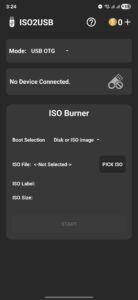
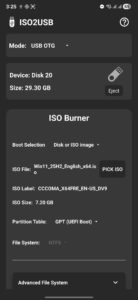
ISO2USB is a standalone ISO burning utility built for Android. It allows you to flash full operating system images directly to USB drives—without needing a PC. Whether you're preparing a bootable Windows installer or writing a Raspberry Pi image, ISO2USB gives you full control over partition schemes, file systems, and image handling. Designed for speed, precision, and manual configuration.
---
🧨 Core Features
Supported Image Types
• Burn ISO, DMG, and IMG files directly to USB
• Compatible with:
– Windows 7, 8, 8.1, 10, 11
– Non Bootable Format
– FreeDOS / MS-DOS
– All major Linux distributions (Ubuntu, Fedora, Debian, Arch, etc.)
– macOS DMG images (Intel-based only)
– Raspberry Pi OS and other ARM-based images
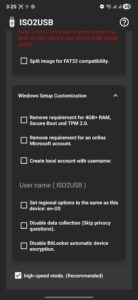
- Supports Bypassing Windows 11 minimum requirements
- Support: Automated Windows Setup Customization For Windows 10 , 11
- Support : Split .wim file for fat32.
Windows ISO Handling
• Manual selection of partition scheme and file system
– Partition schemes: GPT (UEFI), MBR (Legacy BIOS)
– File systems: NTFS, FAT32
• Supports bypassing Windows 11 minimum requirements during setup
– No need for modified ISOs ( if as bootable image )
– Compatible with official Microsoft images
Other Image Types
• Linux, macOS DMG, and Raspberry Pi images are written as raw blocks
– No customization or partition changes allowed
– Automatically uses the image’s original layout and boot structure
USB Compatibility
• Works with USB flash drives, SD card adapters, external SSDs, and HDDs
• OTG support required; root access only needed for internal SD slot
---
💰 Coin System
Certain advanced actions require coins to unlock processing power and maintain fair usage:
Coin-Based Actions
• Burn Windows ISO → cost 2 coins
• FreeDOS , MS-DOS → cost 1 coin
• Non Bootable Format → cost 1 coin for FAT32, 2 coins for other types
Ways to Get Coins
• Watch rewarded ads (available anytime)
• Purchase coins directly via in-app store
• Unlock unlimited access and remove coin limits by upgrading to Pro
---
📢 Ad-Supported Experience
ISO2USB is fully ad-supported to keep essential features free for all users.
• Includes persistent banner ads and optional rewarded video ads
• Ads are required to earn coins and unlock premium actions
Upgrade to Pro to:
• Remove all ads (no banners, no videos)
• Unlock unlimited access to all features
• Disable the coin system entirely
---
⚠️ Technical Notes
• Internet connection is required
• Ad blockers may interfere with coin rewards and app stability
---
ISO2USB gives you fast, reliable ISO burning with full control over bootable USB creation—right from your Android device.
Whether you're installing Windows, booting Linux, or prepping a Pi, ISO2USB puts the power in your hands.
Download now and burn smarter.
ISO2USB is a standalone ISO burning utility built for Android. It allows you to flash full operating system images directly to USB drives—without needing a PC. Whether you're preparing a bootable Windows installer or writing a Raspberry Pi image, ISO2USB gives you full control over partition schemes, file systems, and image handling. Designed for speed, precision, and manual configuration.
---
🧨 Core Features
Supported Image Types
• Burn ISO, DMG, and IMG files directly to USB
• Compatible with:
– Windows 7, 8, 8.1, 10, 11
– Non Bootable Format
– FreeDOS / MS-DOS
– All major Linux distributions (Ubuntu, Fedora, Debian, Arch, etc.)
– macOS DMG images (Intel-based only)
– Raspberry Pi OS and other ARM-based images
- Supports Bypassing Windows 11 minimum requirements
- Support: Automated Windows Setup Customization For Windows 10 , 11
- Support : Split .wim file for fat32.
Windows ISO Handling
• Manual selection of partition scheme and file system
– Partition schemes: GPT (UEFI), MBR (Legacy BIOS)
– File systems: NTFS, FAT32
• Supports bypassing Windows 11 minimum requirements during setup
– No need for modified ISOs ( if as bootable image )
– Compatible with official Microsoft images
Other Image Types
• Linux, macOS DMG, and Raspberry Pi images are written as raw blocks
– No customization or partition changes allowed
– Automatically uses the image’s original layout and boot structure
USB Compatibility
• Works with USB flash drives, SD card adapters, external SSDs, and HDDs
• OTG support required; root access only needed for internal SD slot
---
💰 Coin System
Certain advanced actions require coins to unlock processing power and maintain fair usage:
Coin-Based Actions
• Burn Windows ISO → cost 2 coins
• FreeDOS , MS-DOS → cost 1 coin
• Non Bootable Format → cost 1 coin for FAT32, 2 coins for other types
Ways to Get Coins
• Watch rewarded ads (available anytime)
• Purchase coins directly via in-app store
• Unlock unlimited access and remove coin limits by upgrading to Pro
---
📢 Ad-Supported Experience
ISO2USB is fully ad-supported to keep essential features free for all users.
• Includes persistent banner ads and optional rewarded video ads
• Ads are required to earn coins and unlock premium actions
Upgrade to Pro to:
• Remove all ads (no banners, no videos)
• Unlock unlimited access to all features
• Disable the coin system entirely
---
⚠️ Technical Notes
• Internet connection is required
• Ad blockers may interfere with coin rewards and app stability
---
ISO2USB gives you fast, reliable ISO burning with full control over bootable USB creation—right from your Android device.
Whether you're installing Windows, booting Linux, or prepping a Pi, ISO2USB puts the power in your hands.
Download now and burn smarter.
Download ISO 2 USB APK
Fast, free and safe download.
APK Permissions 17
- android.hardware.usb.action.USB_PERMISSION
- android.permission.ACCESS_ADSERVICES_AD_ID
- android.permission.ACCESS_ADSERVICES_ATTRIBUTION
- android.permission.ACCESS_ADSERVICES_TOPICS
- android.permission.ACCESS_NETWORK_STATE
- android.permission.ACCESS_WIFI_STATE
- android.permission.FOREGROUND_SERVICE
- android.permission.INTERNET
- android.permission.REORDER_TASKS
- android.permission.VIBRATE
- android.permission.WAKE_LOCK
- com.android.vending.BILLING
- com.applovin.array.apphub.permission.BIND_APPHUB_SERVICE
- com.google.android.c2dm.permission.RECEIVE
- com.google.android.finsky.permission.BIND_GET_INSTALL_REFERRER_SERVICE
- com.google.android.gms.permission.AD_ID
- com.mixapplications.iso2usb.DYNAMIC_RECEIVER_NOT_EXPORTED_PERMISSION
APK Verified
The cryptographic signature guarantees that the file is safe to install and was not tampered with in any way.


