
Download USB File Manager (NTFS, Exfat) APK 9.10.1 arm64-v8a, armeabi-v7a, x86, x86_64 · Android 24+
Download APK
Verified Safe
This is the arm64-v8a, armeabi-v7a, x86, x86_64 build of USB File Manager (NTFS, Exfat) 9.10.1. Pick this build if your device's primary ABI matches.
File size: 85.2 MB • Min Android: 24 • Target Android: 36 • Version code: 91001 • Framework: Native (Java/Kotlin) • Permissions: 17
Screenshots
File Information
| Package Name | com.mixapplications.usbfilemanager |
|---|---|
| Version Name | 9.10.1 |
| Version Code | 91001 |
| Architecture | arm64-v8a, armeabi-v7a, x86, x86_64 |
| Min Android Version | Android 24 (API 36) |
| Main Activity | com.mixapplications.usbfilemanager.MainActivity |
| Framework | Native (Java/Kotlin) |
| File Size | 85.18 MB |
| Signature (SHA1) | 6396B24A6F61E936B8CCCFD757D5C6F983E1F6B1 |
| File Hash (SHA256) | dff1d9a0d9cb0954ec616993965d8bdfe78359aaa4ff18535c7983c4b385c7e7 |
What's New
*Improve App Performance*
*improve USB Connection*
**New**
Support SD Card for #Rooted# Devices Only.
**All features are now available without requiring coins**
File Manager (All Features)
Partition Image Manager (All Features)
**Improvements**
- Enhanced full app performance.
*Bug Fixes*
- UI Bug Fixed.
- All Reported Bugs Fixed.
*improve USB Connection*
**New**
Support SD Card for #Rooted# Devices Only.
**All features are now available without requiring coins**
File Manager (All Features)
Partition Image Manager (All Features)
**Improvements**
- Enhanced full app performance.
*Bug Fixes*
- UI Bug Fixed.
- All Reported Bugs Fixed.
App Description
⚠️Caution: use it at your own risk. ⚠️
⚠️ Coins System Applied, you can either use our apps completely for free by watching Rewarded ads from paywall and earning free coins, or you can buy coins, or you can purchase the pro version to remove the coin system and ads. The choice is entirely yours. ⚠️
⚠️No app can damage a USB device, but unstable OTG connections can even destroy them. Ensuring OTG connection stability is the user's responsibility. Use high-quality connectors, trusted USB devices, ensure your phone's USB port is in good condition, and place your phone on a stable surface while processing. ⚠️
**Supported Devices:**
- ✅ USB flash drives (OTG - No Root Required)
- ✅ USB SD card adapters (OTG - No Root Required)
- ✅ USB hard drives / SSDs (OTG - No Root Required)
- ✅ USB hubs (OTG - No Root Required)
- ✅ Internal SD card slots (Root Access Required)
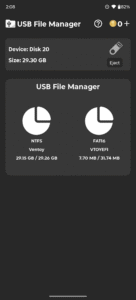
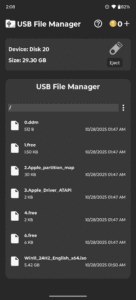
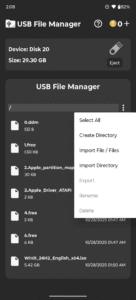
USB File Manager & File System Viewer is a small app to brawse , open, share ... etc. usb files.
No Root required…
supported partition filesystem:
FAT16
FAT32
EXFAT
NTFS
EXT 2,3,4
Use it on your risk.
⚠️ Coins System Applied, you can either use our apps completely for free by watching Rewarded ads from paywall and earning free coins, or you can buy coins, or you can purchase the pro version to remove the coin system and ads. The choice is entirely yours. ⚠️
⚠️No app can damage a USB device, but unstable OTG connections can even destroy them. Ensuring OTG connection stability is the user's responsibility. Use high-quality connectors, trusted USB devices, ensure your phone's USB port is in good condition, and place your phone on a stable surface while processing. ⚠️
**Supported Devices:**
- ✅ USB flash drives (OTG - No Root Required)
- ✅ USB SD card adapters (OTG - No Root Required)
- ✅ USB hard drives / SSDs (OTG - No Root Required)
- ✅ USB hubs (OTG - No Root Required)
- ✅ Internal SD card slots (Root Access Required)
USB File Manager & File System Viewer is a small app to brawse , open, share ... etc. usb files.
No Root required…
supported partition filesystem:
FAT16
FAT32
EXFAT
NTFS
EXT 2,3,4
Use it on your risk.
Download USB File Manager (NTFS, Exfat) APK
Fast, free and safe download.
APK Permissions 17
- android.permission.ACCESS_ADSERVICES_AD_ID
- android.permission.ACCESS_ADSERVICES_ATTRIBUTION
- android.permission.ACCESS_ADSERVICES_TOPICS
- android.permission.ACCESS_NETWORK_STATE
- android.permission.ACCESS_WIFI_STATE
- android.permission.FOREGROUND_SERVICE
- android.permission.INTERNET
- android.permission.RECEIVE_BOOT_COMPLETED
- android.permission.REORDER_TASKS
- android.permission.VIBRATE
- android.permission.WAKE_LOCK
- com.android.vending.BILLING
- com.applovin.array.apphub.permission.BIND_APPHUB_SERVICE
- com.google.android.c2dm.permission.RECEIVE
- com.google.android.finsky.permission.BIND_GET_INSTALL_REFERRER_SERVICE
- com.google.android.gms.permission.AD_ID
- com.mixapplications.usbfilemanager.DYNAMIC_RECEIVER_NOT_EXPORTED_PERMISSION
APK Verified
The cryptographic signature guarantees that the file is safe to install and was not tampered with in any way.
Similar in Tools


More by MixApplications


Frequently Asked Questions about USB File Manager (NTFS, Exfat) APK
This variant is built for devices that report `arm64-v8a, armeabi-v7a, x86, x86_64` as their primary ABI. If your device's CPU matches, this is the smallest, fastest version to install.
Yes — the APK's signature has been cryptographically verified against the publisher's signing key. The SHA-256 hash is shown in the File Information panel so you can independently confirm the file matches the original release.
Android 24 (API level 36) or newer. Older devices will refuse the install.
Install a free app like 'CPU-Z' or 'Droid Hardware Info' from the Play Store and look at the ABI / Instruction Set row. Most phones made after 2017 are arm64-v8a; if in doubt, download the universal variant.
All variants are functionally identical — same features, same version. They differ only in which CPU architectures the native code is compiled for, and (sometimes) which screen densities the included graphics target. Pick the one that matches your device for the smallest install size, or pick 'Universal' if you're unsure.