
Screenshots
File Information
| Package Name | com.mixapplications.ventoy_app |
|---|---|
| Version Name | 9.11.0 |
| Version Code | 91100 |
| Architecture | Universal |
| Min Android Version | Android 24 (API 36) |
| Main Activity | com.mixapplications.ventoy_app.MainActivity |
| Framework | Native (Java/Kotlin) |
| File Size | 73.08 MB |
| Signature (SHA1) | 6396B24A6F61E936B8CCCFD757D5C6F983E1F6B1 |
| File Hash (SHA256) | e7c908755c3e2d4116e5f8d26da54769bf813b8ba66510b1b47f37374099699f |
What's New
*Improve App Performance*
*improve USB Connection*
*Update*
Update Ventoy Version 1.1.07
*Bug Fixes*
- UI Bug Fixed.
- All Reported Bugs Fixed.
*improve USB Connection*
*Update*
Update Ventoy Version 1.1.07
*Bug Fixes*
- UI Bug Fixed.
- All Reported Bugs Fixed.
App Description
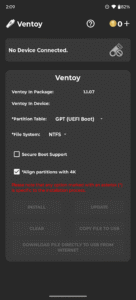
🧭 Ventoy — Multi-Boot USB Creator for Android Create multi-boot USB drives with dynamic ISO menus—no PC required. Ventoy is a standalone Android tool for building multi-boot USB drives. Just install once, then copy ISO files directly to your USB—no need to reformat or reburn. Boot any supported image from a dynamic menu with full control over partition schemes and file systems.
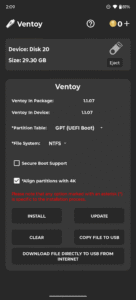
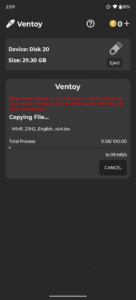
🛠️ Core Features • Create multi-boot USB drives with ISO boot menu • Supports Windows 7–11 and all major Linux distributions • Bypass Windows 11 minimum requirements • Manual selection of partition scheme: GPT (UEFI) or MBR (Legacy) • File system support: NTFS, FAT32, EXFAT (FAT32/EXFAT require Pro) • Add or remove ISOs anytime—no reburn needed • Copy ISO files or download them directly to USB
💰 Coin Usage Coins are used for core Ventoy operations. You can earn coins by watching rewarded ads or buy them directly. Coin-required actions: • Install Ventoy → 2 coins • Update Ventoy → 2 coins • Clear Ventoy → 2 coins Free actions: • Copy ISO files to USB • Download ISO files directly to USB
Want unlimited access? Upgrade to Pro to unlock all features, remove the coin system, and use the app offline—even with ad blockers.
📢 Ad-Supported Experience Ventoy includes banner ads and rewarded video ads to keep core features free. Upgrade to Pro to: • Remove all ads • Unlock unlimited access • Disable the coin system • Use offline and with ad blockers
⚠️ Notes • Internet required unless using Pro • Disable ad blockers unless using Pro • Keep the app in the foreground during USB operations • If USB isn’t recognized after setup: – The USB is likely working correctly – Test it on a PC to confirm – Use FAT32 for better compatibility
Download Ventoy now and boot smarter—right from your Android device.
🛠️ Core Features • Create multi-boot USB drives with ISO boot menu • Supports Windows 7–11 and all major Linux distributions • Bypass Windows 11 minimum requirements • Manual selection of partition scheme: GPT (UEFI) or MBR (Legacy) • File system support: NTFS, FAT32, EXFAT (FAT32/EXFAT require Pro) • Add or remove ISOs anytime—no reburn needed • Copy ISO files or download them directly to USB
💰 Coin Usage Coins are used for core Ventoy operations. You can earn coins by watching rewarded ads or buy them directly. Coin-required actions: • Install Ventoy → 2 coins • Update Ventoy → 2 coins • Clear Ventoy → 2 coins Free actions: • Copy ISO files to USB • Download ISO files directly to USB
Want unlimited access? Upgrade to Pro to unlock all features, remove the coin system, and use the app offline—even with ad blockers.
📢 Ad-Supported Experience Ventoy includes banner ads and rewarded video ads to keep core features free. Upgrade to Pro to: • Remove all ads • Unlock unlimited access • Disable the coin system • Use offline and with ad blockers
⚠️ Notes • Internet required unless using Pro • Disable ad blockers unless using Pro • Keep the app in the foreground during USB operations • If USB isn’t recognized after setup: – The USB is likely working correctly – Test it on a PC to confirm – Use FAT32 for better compatibility
Download Ventoy now and boot smarter—right from your Android device.
Download Ventoy (Unofficial) APK
Fast, free and safe download.
APK Permissions 18
- android.hardware.usb.action.USB_PERMISSION
- android.permission.ACCESS_ADSERVICES_AD_ID
- android.permission.ACCESS_ADSERVICES_ATTRIBUTION
- android.permission.ACCESS_ADSERVICES_TOPICS
- android.permission.ACCESS_NETWORK_STATE
- android.permission.ACCESS_WIFI_STATE
- android.permission.FOREGROUND_SERVICE
- android.permission.INTERNET
- android.permission.RECEIVE_BOOT_COMPLETED
- android.permission.REORDER_TASKS
- android.permission.VIBRATE
- android.permission.WAKE_LOCK
- com.android.vending.BILLING
- com.applovin.array.apphub.permission.BIND_APPHUB_SERVICE
- com.google.android.c2dm.permission.RECEIVE
- com.google.android.finsky.permission.BIND_GET_INSTALL_REFERRER_SERVICE
- com.google.android.gms.permission.AD_ID
- com.mixapplications.ventoy_app.DYNAMIC_RECEIVER_NOT_EXPORTED_PERMISSION
APK Verified
The cryptographic signature guarantees that the file is safe to install and was not tampered with in any way.


