
Screenshots
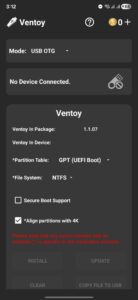
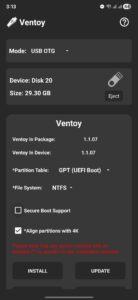
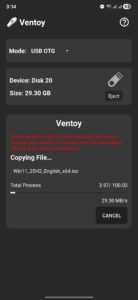
File Information
| Package Name | com.mixapplications.ventoy_app |
|---|---|
| Version Name | 9.9.3 (1.1.07) |
| Version Code | 90903 |
| Architecture | Universal |
| Min Android Version | Android 24 (API 36) |
| Main Activity | com.mixapplications.ventoy_app.MainActivity |
| Framework | Native (Java/Kotlin) |
| File Size | 69.79 MB |
| Signature (SHA1) | 6396B24A6F61E936B8CCCFD757D5C6F983E1F6B1 |
| File Hash (SHA256) | 78432fa393e1f7cefdefa4bce1b5540c142efe0ac424a1762e396844912aa8aa |
What's New
*Improve App Performance*
*improve USB Connection*
*Update*
Update Ventoy Version 1.1.07
*Bug Fixes*
- UI Bug Fixed.
- All Reported Bugs Fixed.
*improve USB Connection*
*Update*
Update Ventoy Version 1.1.07
*Bug Fixes*
- UI Bug Fixed.
- All Reported Bugs Fixed.
App Description
Ventoy — Multi-Boot USB Creator for Android
Ventoy is a standalone Android tool for creating multi-boot USB drives. Just install once, then copy ISO files directly to your USB—no need to reformat or reburn. Boot any supported image from a dynamic menu. No PC required.
---
🛠️ Core Features
• Create multi-boot USB drives with ISO boot menu
• Supports Windows 7, 8, 8.1, 10, 11 and all major Linux distributions
• Supports bypassing Windows 11 minimum requirements
• File systems: NTFS, FAT32, EXFAT (FAT32/EXFAT require Pro)
• Partition schemes: GPT (UEFI), MBR (Legacy) — manual selection
• Copy ISO files or download them directly to USB (free)
• No need to reburn—just add or remove ISOs anytime
---
💰 Coin System
Some actions require coins:
• Install Ventoy → 2 coins
• Update Ventoy → 2 coins
• Clear Ventoy → 2 coins
You can:
• Earn coins by watching rewarded ads
• Buy coins directly
• Unlock unlimited access and remove coin limits with Pro
---
📢 Ad-Supported Experience
Ventoy includes banner ads and rewarded video ads. Ads help keep core features free and support ongoing development.
Upgrade to Pro to:
• Remove all ads
• Unlock unlimited access
• Disable the coin system entirely
---
⚠️ Notes
• Internet is required for rewarded ads
• Disable ad blockers to ensure ads and rewards work
• Keep your device stable during USB operations
• If your phone cannot recognize the USB after setup, it may not support the selected file system
– The USB is working correctly
– To confirm, test it on a PC
– Use a more compatible file system like FAT32 if needed
---
Ventoy gives you fast, flexible control over bootable USB creation—right from your Android device.
Download now and boot smarter.
Ventoy is a standalone Android tool for creating multi-boot USB drives. Just install once, then copy ISO files directly to your USB—no need to reformat or reburn. Boot any supported image from a dynamic menu. No PC required.
---
🛠️ Core Features
• Create multi-boot USB drives with ISO boot menu
• Supports Windows 7, 8, 8.1, 10, 11 and all major Linux distributions
• Supports bypassing Windows 11 minimum requirements
• File systems: NTFS, FAT32, EXFAT (FAT32/EXFAT require Pro)
• Partition schemes: GPT (UEFI), MBR (Legacy) — manual selection
• Copy ISO files or download them directly to USB (free)
• No need to reburn—just add or remove ISOs anytime
---
💰 Coin System
Some actions require coins:
• Install Ventoy → 2 coins
• Update Ventoy → 2 coins
• Clear Ventoy → 2 coins
You can:
• Earn coins by watching rewarded ads
• Buy coins directly
• Unlock unlimited access and remove coin limits with Pro
---
📢 Ad-Supported Experience
Ventoy includes banner ads and rewarded video ads. Ads help keep core features free and support ongoing development.
Upgrade to Pro to:
• Remove all ads
• Unlock unlimited access
• Disable the coin system entirely
---
⚠️ Notes
• Internet is required for rewarded ads
• Disable ad blockers to ensure ads and rewards work
• Keep your device stable during USB operations
• If your phone cannot recognize the USB after setup, it may not support the selected file system
– The USB is working correctly
– To confirm, test it on a PC
– Use a more compatible file system like FAT32 if needed
---
Ventoy gives you fast, flexible control over bootable USB creation—right from your Android device.
Download now and boot smarter.
Download Ventoy (Unofficial) APK
Fast, free and safe download.
APK Permissions 17
- android.hardware.usb.action.USB_PERMISSION
- android.permission.ACCESS_ADSERVICES_AD_ID
- android.permission.ACCESS_ADSERVICES_ATTRIBUTION
- android.permission.ACCESS_ADSERVICES_TOPICS
- android.permission.ACCESS_NETWORK_STATE
- android.permission.ACCESS_WIFI_STATE
- android.permission.FOREGROUND_SERVICE
- android.permission.INTERNET
- android.permission.REORDER_TASKS
- android.permission.VIBRATE
- android.permission.WAKE_LOCK
- com.android.vending.BILLING
- com.applovin.array.apphub.permission.BIND_APPHUB_SERVICE
- com.google.android.c2dm.permission.RECEIVE
- com.google.android.finsky.permission.BIND_GET_INSTALL_REFERRER_SERVICE
- com.google.android.gms.permission.AD_ID
- com.mixapplications.ventoy_app.DYNAMIC_RECEIVER_NOT_EXPORTED_PERMISSION
APK Verified
The cryptographic signature guarantees that the file is safe to install and was not tampered with in any way.


