
This is the universal build of Video Cutter & Video Editor 1.2.04. It contains native libraries for every CPU architecture (arm64-v8a, armeabi-v7a, x86, x86_64), so it installs on any Android device. The trade-off is size — it's larger than per-architecture variants. Pick this one if you're unsure which CPU your phone has, or if you plan to share the APK with multiple devices.
File size: 52.6 MB • Min Android: 24 • Target Android: 35 • Version code: 108 • Framework: Native (Java/Kotlin) • Permissions: 21
Screenshots
File Information
| Package Name | com.betteridea.video.editor |
|---|---|
| Version Name | 1.2.04 |
| Version Code | 108 |
| Architecture | Universal |
| Min Android Version | Android 24 (API 35) |
| Main Activity | com.betteridea.video.main.MainActivity |
| Framework | Native (Java/Kotlin) |
| File Size | 52.64 MB |
| Signature (SHA1) | 11E2C0F45E48AD5AEC851B0BE8E6EBF26D7867FF |
| File Hash (SHA256) | ad1dd1c2031c8bef6364e446e914723474fff39dd7e81f54c5cbe54316802933 |
What's New
Bug fixes and performance improvements.
App Description
With Better Video Cutter, you can accurately cut out the favorite part of your video, you can compress videos with high quality, so it is easy to share big video files to social media or send to your friends.
FAST & FREE & No Watermark!
Features:
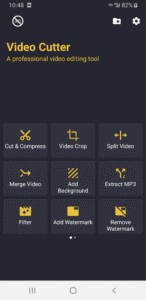
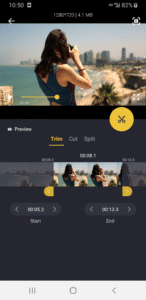
Cut & Compress Video
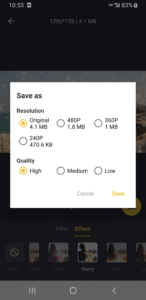
* Cut or trim video to the length you need, compress and reduce video size with high quality.
Crop Video
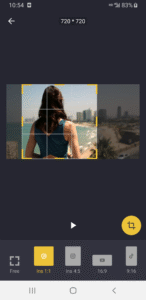
* Crop the video to any aspect ratio to meet the requirements of various video social platforms. such as 16:9, 9:16, 1:1, 4:5
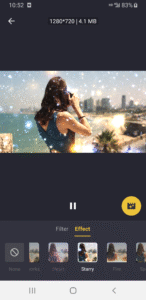
Video Effects & Filters
Provides a large number of video filters and effects, so you can easily create a variety of interesting videos.
- Retro VHS, Chrome, Shadow, RGB, Old TV, glitter, HeartBeat, Soul, Vibrate, Neon, Noise, Mirror, Wave, Moire, Aesthetic Effects...
Video Split
* Easily split videos for WhatsApp and Instagram stories to the required length. You can customize the number of splits.
Add Background
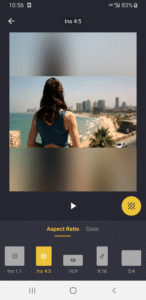
*Add a background to the video with a specified aspect ratio to meet the requirements of various video social platforms, such as 16:9, 9:16, 1:1, 4:5. Support blur background or colorful background.
Merge & Join Video
* Merge multi video clips and photos into one video.
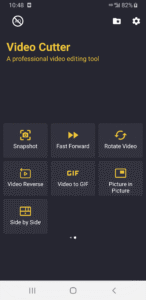
Video to GIF
* Easy to convert Video into GIF. Speed up or Slow down the GIF is also supported.
Extract MP3
* Extract audio from Video and save as MP3.
Add Music
* This app allows users to enhance videos by adding custom music tracks. Users can select a video from their library and choose a background music track to overlay. The app provides tools to adjust the timing and volume of the music, ensuring seamless integration with the video content.
Video Picture in Picture
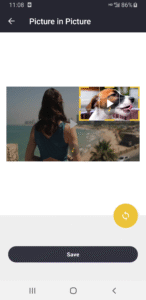
Combine two videos into one with Picture in Picture ( PIP ) mode
Rotate Video
* Rotate video by 90 degree.
* Flip video up to down.
* Flip video left to right.
Snapshot
Capture video frames at any moment(Accurate to milliseconds), so you can directly share the frame pictures.
Reverse Video
Reverse the video at various speeds, get amazing and interesting effects
Add Watermark by yourself
* You can add text or image watermark on the video
Remove Watermark
* Quickly remove all watermarks on the video, completely free
No Watermark by App
* We will never automatically add a watermark to your video.
Explanation of Permissions:
Read or Write External Storage - The permission is required to read the video files in the SD Card and the app can't work without it.
FAST & FREE & No Watermark!
Features:
Cut & Compress Video
* Cut or trim video to the length you need, compress and reduce video size with high quality.
Crop Video
* Crop the video to any aspect ratio to meet the requirements of various video social platforms. such as 16:9, 9:16, 1:1, 4:5
Video Effects & Filters
Provides a large number of video filters and effects, so you can easily create a variety of interesting videos.
- Retro VHS, Chrome, Shadow, RGB, Old TV, glitter, HeartBeat, Soul, Vibrate, Neon, Noise, Mirror, Wave, Moire, Aesthetic Effects...
Video Split
* Easily split videos for WhatsApp and Instagram stories to the required length. You can customize the number of splits.
Add Background
*Add a background to the video with a specified aspect ratio to meet the requirements of various video social platforms, such as 16:9, 9:16, 1:1, 4:5. Support blur background or colorful background.
Merge & Join Video
* Merge multi video clips and photos into one video.
Video to GIF
* Easy to convert Video into GIF. Speed up or Slow down the GIF is also supported.
Extract MP3
* Extract audio from Video and save as MP3.
Add Music
* This app allows users to enhance videos by adding custom music tracks. Users can select a video from their library and choose a background music track to overlay. The app provides tools to adjust the timing and volume of the music, ensuring seamless integration with the video content.
Video Picture in Picture
Combine two videos into one with Picture in Picture ( PIP ) mode
Rotate Video
* Rotate video by 90 degree.
* Flip video up to down.
* Flip video left to right.
Snapshot
Capture video frames at any moment(Accurate to milliseconds), so you can directly share the frame pictures.
Reverse Video
Reverse the video at various speeds, get amazing and interesting effects
Add Watermark by yourself
* You can add text or image watermark on the video
Remove Watermark
* Quickly remove all watermarks on the video, completely free
No Watermark by App
* We will never automatically add a watermark to your video.
Explanation of Permissions:
Read or Write External Storage - The permission is required to read the video files in the SD Card and the app can't work without it.
Download Video Cutter & Video Editor APK
Fast, free and safe download.
APK Permissions 21
- android.permission.ACCESS_ADSERVICES_AD_ID
- android.permission.ACCESS_ADSERVICES_ATTRIBUTION
- android.permission.ACCESS_ADSERVICES_TOPICS
- android.permission.ACCESS_NETWORK_STATE
- android.permission.ACCESS_WIFI_STATE
- android.permission.FOREGROUND_SERVICE
- android.permission.FOREGROUND_SERVICE_DATA_SYNC
- android.permission.INTERNET
- android.permission.POST_NOTIFICATIONS
- android.permission.READ_EXTERNAL_STORAGE
- android.permission.READ_MEDIA_AUDIO
- android.permission.VIBRATE
- android.permission.WAKE_LOCK
- android.permission.WRITE_EXTERNAL_STORAGE
- com.android.vending.BILLING
- com.android.vending.CHECK_LICENSE
- com.applovin.array.apphub.permission.BIND_APPHUB_SERVICE
- com.betteridea.video.editor.DYNAMIC_RECEIVER_NOT_EXPORTED_PERMISSION
- com.google.android.c2dm.permission.RECEIVE
- com.google.android.finsky.permission.BIND_GET_INSTALL_REFERRER_SERVICE
- com.google.android.gms.permission.AD_ID
APK Verified
The cryptographic signature guarantees that the file is safe to install and was not tampered with in any way.


Frequently Asked Questions about Video Cutter & Video Editor APK
This is the universal variant — a single APK that contains native libraries for every CPU architecture. It installs on any Android device but is larger than per-architecture variants.
Yes — the APK's signature has been cryptographically verified against the publisher's signing key. The SHA-256 hash is shown in the File Information panel so you can independently confirm the file matches the original release.
Android 24 (API level 35) or newer. Older devices will refuse the install.
Install a free app like 'CPU-Z' or 'Droid Hardware Info' from the Play Store and look at the ABI / Instruction Set row. Most phones made after 2017 are arm64-v8a; if in doubt, download the universal variant.
All variants are functionally identical — same features, same version. They differ only in which CPU architectures the native code is compiled for, and (sometimes) which screen densities the included graphics target. Pick the one that matches your device for the smallest install size, or pick 'Universal' if you're unsure.