
Download Mobi PDF・Editor・Scanner・Reader APK 11.9.267330 Universal · Android 24+
Download APK
Verified Safe
This is the universal build of Mobi PDF・Editor・Scanner・Reader 11.9.267330. It contains native libraries for every CPU architecture (arm64-v8a, armeabi-v7a, x86, x86_64), so it installs on any Android device. The trade-off is size — it's larger than per-architecture variants. Pick this one if you're unsure which CPU your phone has, or if you plan to share the APK with multiple devices.
File size: 126.8 MB • Min Android: 24 • Target Android: 35 • Version code: 267330 • Framework: Native (Java/Kotlin) • Permissions: 36
Screenshots
File Information
| Package Name | com.mobisystems.mobiscanner |
|---|---|
| Version Name | 11.9.267330 |
| Version Code | 267330 |
| Architecture | Universal |
| Min Android Version | Android 24 (API 35) |
| Main Activity | com.mobisystems.office.splashScreen.SplashScreenActivity |
| Framework | Native (Java/Kotlin) |
| File Size | 126.78 MB |
| Signature (SHA1) | 3924E1059F20B31D872E5A54595BC8C611A3E2B8 |
| File Hash (SHA256) | c726b038f74de9284a1f60d5437a3b7d59026e10216c91a5ee835116a5730307 |
What's New
Thank you for using MobiPDF!
• New Scan Filter: Apply the new Mono filter for crisp black-and-white scans - ideal for text documents.
• Digital Signature Validation: Ensure every signature is validated against Android root and EU/Adobe certificates.
• Sign with Evrotrust: Sign documents securely and conveniently using Evrotrust - legally binding and accepted worldwide.
Enjoying MobiPDF? Leave us a review - it helps us improve!
• New Scan Filter: Apply the new Mono filter for crisp black-and-white scans - ideal for text documents.
• Digital Signature Validation: Ensure every signature is validated against Android root and EU/Adobe certificates.
• Sign with Evrotrust: Sign documents securely and conveniently using Evrotrust - legally binding and accepted worldwide.
Enjoying MobiPDF? Leave us a review - it helps us improve!
App Description
MobiPDF Editor and Scanner gives you a powerful collection of expert tools to quickly and easily view, review, edit, create, and secure PDFs on your phone, wherever you are.
MobiPDF is a proud member of the PDF Association.
📃 AI-Powered Scan to PDF
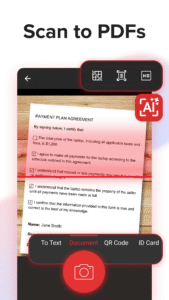
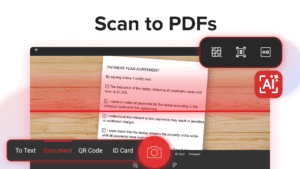
Experience AI-powered scanning with enhanced edge detection and capture clear scans of your paper documents to convert them into editable PDF files. From receipts and contracts to invoices, notes, certificates, reports, IDs, and passports, MobiPDF delivers fast and reliable scanning.
👁️ Recognize text (OCR)
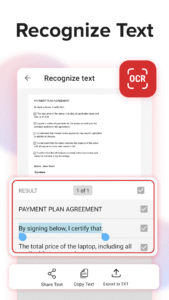
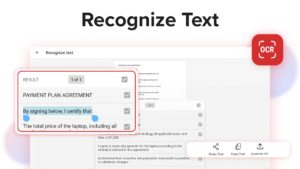
Utilize OCR technology to recognize text from scans and images and easily share the recognized text by email, messaging apps, or upload it to the cloud.
✏️ Edit PDF files
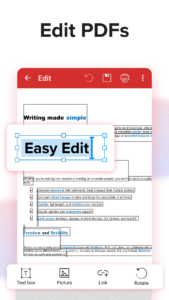
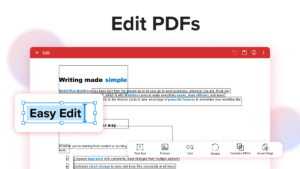
Access one of the most advanced mobile PDF editors on the market and edit PDFs, create blank PDFs, and insert, remove, or modify various document aspects including text, pictures, signatures, comments, drawings, certificates, and more.
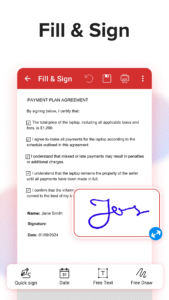
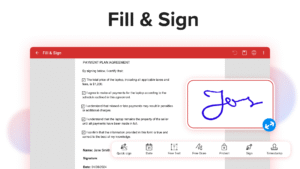
✒️ Fill and Sign
Fill out and share forms and sign documents on the go with advanced support for fillable PDFs, enabling you to draw your signature directly on documents or reuse saved electronic signatures while making all the changes you need.
🖨️ Print PDFs
Print PDF documents wirelessly straight from your phone.
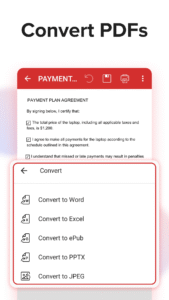
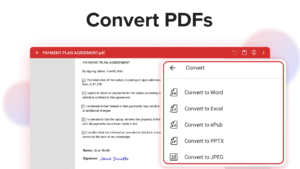
➕ Convert PDFs
Convert PDFs to Word, Excel, PowerPoint, or ePub formats while preserving the original layout and formatting, and save Word, Excel, PowerPoint, and ePub files as PDFs for easy sharing. Enjoy reliable conversion of PNG and JPEG images into editable PDF files or use the free PNG and JPEG converter within MobiPDF to easily turn PDF documents into images.
🔐 Protect PDFs
Protect your sensitive documents with passwords to lock, encrypt, and restrict user access and utilize digital certificates for authenticity validation.
☁️ Back-up your scans and PDFs
Log into your account to access 5GB of free cloud storage on MobiDrive. Upgrade to MobiPDF Premium for an additional 50GB of storage.
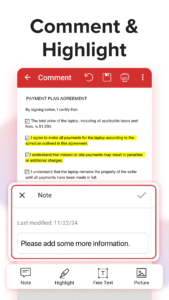
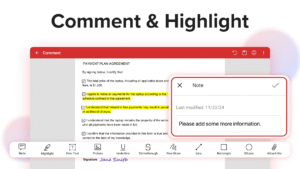
🗨️ View and Comment
Enhance your reading experience with MobiPDF's advanced PDF viewer and easily switch different page modes or enable Read More for distraction-free reading. Easily add comments, use drawing tools, highlight and markup text, insert stamps, or attach files to your PDF.
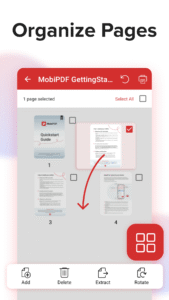
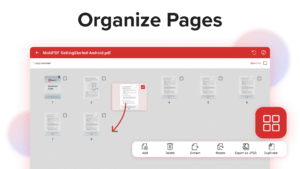
📚 Organize pages in PDFs
Enjoy full control over your PDF documents: view, rearrange, insert, delete, extract, duplicate, and rotate pages or merge PDFs into one to create your perfectly organized PDF layout.
Use In-App Purchases to unlock the best mobile scanner and editor experience. Please note:
• All payments are charged by Google Play Store after you confirm the purchase.
• Unless you cancel at least 24 hours before the end of the current period, your account will be automatically charged for renewal.
• You can manage your subscriptions by going to your Google Play Account Settings.
Need more? Check out our free MobiPDF version for Windows desktop -
mobisystems.com/en-us/mobipdf
Help Center:
support.mobisystems.com/hc/en-us/sections/20794400214045-Android
Privacy Policy:
mobisystems.com/en-us/privacy-policy
Terms of Use:
mobisystems.com/en-us/terms-of-use
MobiPDF is a proud member of the PDF Association.
📃 AI-Powered Scan to PDF
Experience AI-powered scanning with enhanced edge detection and capture clear scans of your paper documents to convert them into editable PDF files. From receipts and contracts to invoices, notes, certificates, reports, IDs, and passports, MobiPDF delivers fast and reliable scanning.
👁️ Recognize text (OCR)
Utilize OCR technology to recognize text from scans and images and easily share the recognized text by email, messaging apps, or upload it to the cloud.
✏️ Edit PDF files
Access one of the most advanced mobile PDF editors on the market and edit PDFs, create blank PDFs, and insert, remove, or modify various document aspects including text, pictures, signatures, comments, drawings, certificates, and more.
✒️ Fill and Sign
Fill out and share forms and sign documents on the go with advanced support for fillable PDFs, enabling you to draw your signature directly on documents or reuse saved electronic signatures while making all the changes you need.
🖨️ Print PDFs
Print PDF documents wirelessly straight from your phone.
➕ Convert PDFs
Convert PDFs to Word, Excel, PowerPoint, or ePub formats while preserving the original layout and formatting, and save Word, Excel, PowerPoint, and ePub files as PDFs for easy sharing. Enjoy reliable conversion of PNG and JPEG images into editable PDF files or use the free PNG and JPEG converter within MobiPDF to easily turn PDF documents into images.
🔐 Protect PDFs
Protect your sensitive documents with passwords to lock, encrypt, and restrict user access and utilize digital certificates for authenticity validation.
☁️ Back-up your scans and PDFs
Log into your account to access 5GB of free cloud storage on MobiDrive. Upgrade to MobiPDF Premium for an additional 50GB of storage.
🗨️ View and Comment
Enhance your reading experience with MobiPDF's advanced PDF viewer and easily switch different page modes or enable Read More for distraction-free reading. Easily add comments, use drawing tools, highlight and markup text, insert stamps, or attach files to your PDF.
📚 Organize pages in PDFs
Enjoy full control over your PDF documents: view, rearrange, insert, delete, extract, duplicate, and rotate pages or merge PDFs into one to create your perfectly organized PDF layout.
Use In-App Purchases to unlock the best mobile scanner and editor experience. Please note:
• All payments are charged by Google Play Store after you confirm the purchase.
• Unless you cancel at least 24 hours before the end of the current period, your account will be automatically charged for renewal.
• You can manage your subscriptions by going to your Google Play Account Settings.
Need more? Check out our free MobiPDF version for Windows desktop -
mobisystems.com/en-us/mobipdf
Help Center:
support.mobisystems.com/hc/en-us/sections/20794400214045-Android
Privacy Policy:
mobisystems.com/en-us/privacy-policy
Terms of Use:
mobisystems.com/en-us/terms-of-use
Download Mobi PDF・Editor・Scanner・Reader APK
Fast, free and safe download.
APK Permissions 36
- android.permission.ACCESS_ADSERVICES_AD_ID
- android.permission.ACCESS_ADSERVICES_ATTRIBUTION
- android.permission.ACCESS_ADSERVICES_CUSTOM_AUDIENCE
- android.permission.ACCESS_ADSERVICES_TOPICS
- android.permission.ACCESS_NETWORK_STATE
- android.permission.ACCESS_WIFI_STATE
- android.permission.AUTHENTICATE_ACCOUNTS
- android.permission.CAMERA
- android.permission.CHANGE_NETWORK_STATE
- android.permission.FOREGROUND_SERVICE
- android.permission.FOREGROUND_SERVICE_DATA_SYNC
- android.permission.GET_ACCOUNTS
- android.permission.INTERNET
- android.permission.MANAGE_ACCOUNTS
- android.permission.POST_NOTIFICATIONS
- android.permission.RECEIVE_BOOT_COMPLETED
- android.permission.REORDER_TASKS
- android.permission.USE_CREDENTIALS
- android.permission.VIBRATE
- android.permission.WAKE_LOCK
- android.permission.WRITE_EXTERNAL_STORAGE
- android.permission.WRITE_USER_DICTIONARY
- com.android.email.permission.ACCESS_PROVIDER
- com.android.vending.BILLING
- com.google.android.c2dm.permission.RECEIVE
- com.google.android.finsky.permission.BIND_GET_INSTALL_REFERRER_SERVICE
- com.google.android.gms.permission.AD_ID
- com.google.android.providers.gmail.permission.READ_GMAIL
- com.google.android.providers.gsf.permission.READ_GSERVICES
- com.huawei.appmarket.service.commondata.permission.GET_COMMON_DATA
- com.mobisystems.CustomReadWritePermission
- com.mobisystems.mobiscanner.DYNAMIC_RECEIVER_NOT_EXPORTED_PERMISSION
- com.mobisystems.office.licenses
- com.samsung.android.mapsagent.permission.READ_APP_INFO
- com.sec.android.iap.permission.BILLING
- com.sonymobile.permission.CAMERA_ADDON
APK Verified
The cryptographic signature guarantees that the file is safe to install and was not tampered with in any way.
Similar in Business


Frequently Asked Questions about Mobi PDF・Editor・Scanner・Reader APK
This is the universal variant — a single APK that contains native libraries for every CPU architecture. It installs on any Android device but is larger than per-architecture variants.
Yes — the APK's signature has been cryptographically verified against the publisher's signing key. The SHA-256 hash is shown in the File Information panel so you can independently confirm the file matches the original release.
Android 24 (API level 35) or newer. Older devices will refuse the install.
Install a free app like 'CPU-Z' or 'Droid Hardware Info' from the Play Store and look at the ABI / Instruction Set row. Most phones made after 2017 are arm64-v8a; if in doubt, download the universal variant.
All variants are functionally identical — same features, same version. They differ only in which CPU architectures the native code is compiled for, and (sometimes) which screen densities the included graphics target. Pick the one that matches your device for the smallest install size, or pick 'Universal' if you're unsure.