
Download Mopria Print Service APK
org.mopria.printplugin · by Mopria Alliance
Screenshots
About Mopria Print Service
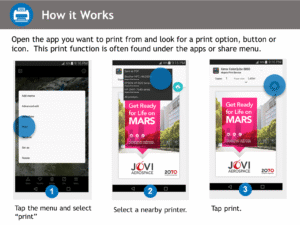
Mopria Print Service enables printing over Wi-Fi or Wi-Fi Direct from your Android smartphone or tablet to Mopria® certified printers and multi-function printers (MFPs). If you want to check to see if your printer is Mopria® certified before installing the Mopria Print Service, check here: mopria.org/certified-products . Easily print photos, web pages and documents when your mobile device is connected to a Mopria® certified printer through a wireless network or using Wi-Fi Direct®. Control print settings such as color, number of copies, duplex, paper size, page range, media type and orientation. In the workplace, take advantage of the advanced punching, folding, stapling, PIN printing, user authentication, and accounting features. The Mopria Print Service also allows users to print using the Share feature from many of their favorite apps including Facebook, Flipboard, LinkedIn, Twitter and Pinterest, giving users the power to print easily. When using the Share feature, users will see a Mopria Print Service option is included as an option after email and messaging. The Share icon is conspicuously placed and users simply select the Mopria Print Service option, select their printer, adjust settings and print. Mopria Print Service is pre-installed on some Android and Amazon devices. The device manufacturer determines which devices have the Mopria Print Service pre-installed and if the Mopria Print Service can be uninstalled from such devices. For more detailed information, visit the following website: mopria.org/en/faq .