
This is the universal build of FM Radio 02.05.0037. It contains native libraries for every CPU architecture (arm64-v8a, armeabi-v7a, x86, x86_64), so it installs on any Android device. The trade-off is size — it's larger than per-architecture variants. Pick this one if you're unsure which CPU your phone has, or if you plan to share the APK with multiple devices.
File size: 7.5 MB • Min Android: 26 • Target Android: 33 • Version code: 20500370 • Framework: Native (Java/Kotlin) • Permissions: 16
Screenshots
File Information
| Package Name | com.motorola.fmplayer |
|---|---|
| Version Name | 02.05.0037 |
| Version Code | 20500370 |
| Architecture | Universal |
| Min Android Version | Android 26 (API 33) |
| Main Activity | com.motorola.fmplayer.ChangeThemeActivity |
| Framework | Native (Java/Kotlin) |
| File Size | 7.49 MB |
| Signature (SHA1) | D670D099A3A6E657BA839DCE0746FE1A31F4547E |
| File Hash (SHA256) | eb694cc84ab39d13646ed8dedeb9ba86c34170d771417d8abb301b6a33e9bdf8 |
What's New
• Added “Recordings” and “Favorites” shortcuts from the app icon. Press and hold the app icon to access the shortcuts. You can also add them to your Home screen by pressing and holding the shortcut and then dragging it to your preferred spot.
• Bug fixes and stability improvements
• Bug fixes and stability improvements
App Description
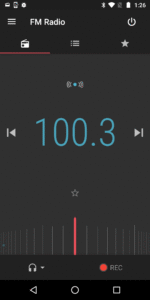
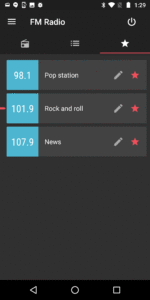
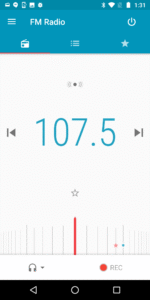
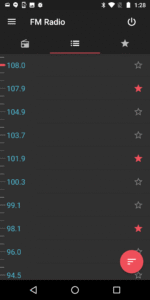
Motorola FM Radio makes it easy to scan for stations, build your favorites list, set your sleep timer, record the best songs, and see live information about what’s playing -- all with a cool Material Design look.
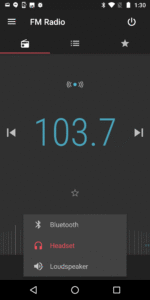
This application has been designed to work on Motorola phones with an enabled FM chipset and running Android 6.0 (Marshmallow) and above. You may play through a wired headset, Bluetooth headset, or loudspeaker. For the best performance, you should connect a wired headset or Digital TV dongle to act as the FM antenna.
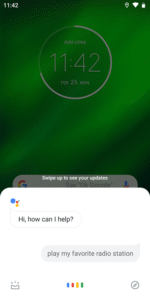
Voice commands*: You can also use the Google Assistant to manage your FM Radio hands-free. You can find a list of supported commands in the Options menu.
*Languages supported: U.S. English, Brazilian Portuguese, Latin American Spanish, UK English, French (EU), Italian, German, and Spanish (EU)
Note: Features, functions, screens and supported languages may vary by phone model.
This application has been designed to work on Motorola phones with an enabled FM chipset and running Android 6.0 (Marshmallow) and above. You may play through a wired headset, Bluetooth headset, or loudspeaker. For the best performance, you should connect a wired headset or Digital TV dongle to act as the FM antenna.
Voice commands*: You can also use the Google Assistant to manage your FM Radio hands-free. You can find a list of supported commands in the Options menu.
*Languages supported: U.S. English, Brazilian Portuguese, Latin American Spanish, UK English, French (EU), Italian, German, and Spanish (EU)
Note: Features, functions, screens and supported languages may vary by phone model.
Download FM Radio APK
Fast, free and safe download.
APK Permissions 16
- android.permission.ACCESS_NETWORK_STATE
- android.permission.CAPTURE_AUDIO_OUTPUT
- android.permission.FOREGROUND_SERVICE
- android.permission.INTERNET
- android.permission.MODIFY_AUDIO_SETTINGS
- android.permission.POST_NOTIFICATIONS
- android.permission.READ_EXTERNAL_STORAGE
- android.permission.READ_MEDIA_AUDIO
- android.permission.READ_PHONE_STATE
- android.permission.RECEIVE_BOOT_COMPLETED
- android.permission.RECORD_AUDIO
- android.permission.WAKE_LOCK
- android.permission.WRITE_EXTERNAL_STORAGE
- com.motorola.android.permission.USEFMRADIO
- com.motorola.mod.permission.MOD_ACCESS_INFO
- com.motorola.permission.ACCESS_CHECKIN
APK Verified
The cryptographic signature guarantees that the file is safe to install and was not tampered with in any way.
Similar in Music & Audio


More by Motorola Mobility LLC.


Frequently Asked Questions about FM Radio APK
This is the universal variant — a single APK that contains native libraries for every CPU architecture. It installs on any Android device but is larger than per-architecture variants.
Yes — the APK's signature has been cryptographically verified against the publisher's signing key. The SHA-256 hash is shown in the File Information panel so you can independently confirm the file matches the original release.
Android 26 (API level 33) or newer. Older devices will refuse the install.
Install a free app like 'CPU-Z' or 'Droid Hardware Info' from the Play Store and look at the ABI / Instruction Set row. Most phones made after 2017 are arm64-v8a; if in doubt, download the universal variant.
All variants are functionally identical — same features, same version. They differ only in which CPU architectures the native code is compiled for, and (sometimes) which screen densities the included graphics target. Pick the one that matches your device for the smallest install size, or pick 'Universal' if you're unsure.