
Screenshots
File Information
| Package Name | com.motorola.motcameradesktop |
|---|---|
| Version Name | 5.02.016.00 |
| Version Code | 50201600 |
| Architecture | arm64-v8a |
| Min Android Version | Android 30 (API 34) |
| Framework | Native (Java/Kotlin) |
| File Size | 17.39 MB |
| Signature (SHA1) | D670D099A3A6E657BA839DCE0746FE1A31F4547E |
| File Hash (SHA256) | 4ea7a273d71d7a42b9459efb5e823d9719fae5b6ba815ca76c0aed86f335e885 |
What's New
• Adjustments to Content Creator Mode Due to Third-Party App Limitations
• Updated Creator Toolkit sidebar and features
• Bug fixes and improvements
• Updated Creator Toolkit sidebar and features
• Bug fixes and improvements
App Description
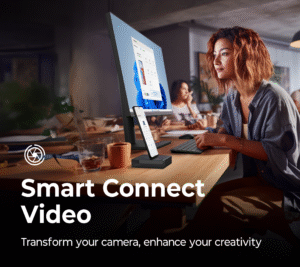
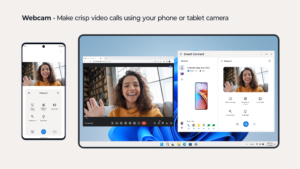
Smart Connect Video powers multiple camera experiences on your Motorola smartphone. Use your phone as a versatile webcam, perfect for high quality video calls. Or dive into the Creator Toolkit for customizable camera effects to enhance social media creativity.
Webcam features:
•Use your phone as a high-quality webcam, either via Smart Connect or using a USB cable connection
•Subject tracking ensures your face is always centered in frame, with customizable sensitivity settings
•Video masking features such as Smart loop and Freeze frame enable you to maintain privacy during video calls
•Leverage your phone’s multiple cameras, like telephoto and ultra-wide lenses
Creator Toolkit features:
•Produce your best content by using camera effects directly within social media apps
•Easily apply special effects with Creator Toolkit while using your camera in social media apps
•Make your content pop by switching or blurring backgrounds, video looping, and more
For Motorola camera features to work as they should, avoid disabling or uninstalling this app. Some features are only supported on compatible Motorola devices.
Webcam features:
•Use your phone as a high-quality webcam, either via Smart Connect or using a USB cable connection
•Subject tracking ensures your face is always centered in frame, with customizable sensitivity settings
•Video masking features such as Smart loop and Freeze frame enable you to maintain privacy during video calls
•Leverage your phone’s multiple cameras, like telephoto and ultra-wide lenses
Creator Toolkit features:
•Produce your best content by using camera effects directly within social media apps
•Easily apply special effects with Creator Toolkit while using your camera in social media apps
•Make your content pop by switching or blurring backgrounds, video looping, and more
For Motorola camera features to work as they should, avoid disabling or uninstalling this app. Some features are only supported on compatible Motorola devices.
Download Smart Connect Video APK
Fast, free and safe download.
APK Permissions 16
- android.permission.ACCESS_NETWORK_STATE
- android.permission.CAMERA
- android.permission.FOREGROUND_SERVICE
- android.permission.FOREGROUND_SERVICE_SPECIAL_USE
- android.permission.INTERACT_ACROSS_USERS
- android.permission.MODIFY_AUDIO_SETTINGS
- android.permission.QUERY_ALL_PACKAGES
- android.permission.RECEIVE_BOOT_COMPLETED
- android.permission.START_FOREGROUND_SERVICES_FROM_BACKGROUND
- android.permission.VIBRATE
- android.permission.WAKE_LOCK
- com.motorola.motcameradesktop.DYNAMIC_RECEIVER_NOT_EXPORTED_PERMISSION
- com.motorola.permission.ACCESS_CHECKIN
- com.motorola.permission.ACCESS_DESKTOP
- com.motorola.permission.DESKTOP_STATUS_BAR
- com.motorola.permission.INTERNAL_SYSTEM_WINDOW
APK Verified
The cryptographic signature guarantees that the file is safe to install and was not tampered with in any way.


