
This is the universal build of Smart Connect 08.0.1.018.0. It contains native libraries for every CPU architecture (arm64-v8a, armeabi-v7a, x86, x86_64), so it installs on any Android device. The trade-off is size — it's larger than per-architecture variants. Pick this one if you're unsure which CPU your phone has, or if you plan to share the APK with multiple devices.
File size: 119.8 MB • Min Android: 31 • Target Android: 35 • Version code: 8010180 • Framework: Native (Java/Kotlin) • Permissions: 63
Screenshots
File Information
| Package Name | com.motorola.mobiledesktop |
|---|---|
| Version Name | 08.0.1.018.0 |
| Version Code | 8010180 |
| Architecture | Universal |
| Min Android Version | Android 31 (API 35) |
| Main Activity | com.motorola.mobiledesktop.desktop.MainActivity |
| Framework | Native (Java/Kotlin) |
| File Size | 119.83 MB |
| Signature (SHA1) | 39A2CA57E3915EAD0E335481A30E2C2E52409BA8 |
| File Hash (SHA256) | 2637b6036095910d11798d4cb512fe5cf60e0015b62690d847de5c9b3f8ff2de |
What's New
• Support for forced and optional app updates on Android
• Cross-device Smart Actions supported on PRC devices
• Local file sharing with compatible Superfile PRC devices
• Updates and bug fixes for improved stability and performance
• Cross-device Smart Actions supported on PRC devices
• Local file sharing with compatible Superfile PRC devices
• Updates and bug fixes for improved stability and performance
App Description
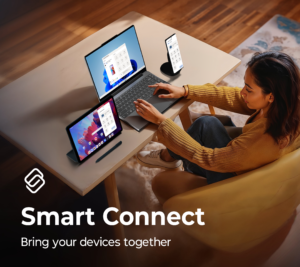
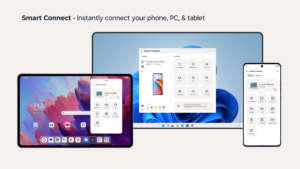
Smart Connect brings your phone, PC, and tablet together like never before. Seamlessly pair your devices and take control of your digital life. Whether you're sharing files, extending your screen, or streaming content, Smart Connect simplifies the way you interact with your devices.
Key features:
•Pair your smartphone, PC, and tablet, or connect to a display
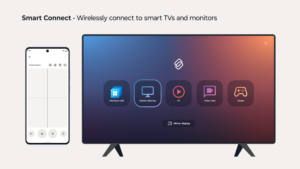
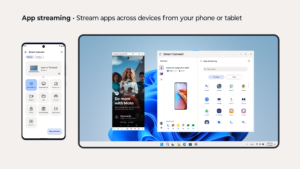
•Stream media, apps, and more from your smartphone or tablet
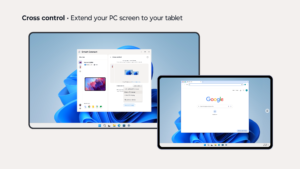
•Cross control extends your PC screen to your tablet, or easily control your devices with a keyboard and mouse
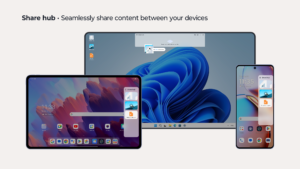
•Share hub syncs files and media across paired devices via the Share hub tray
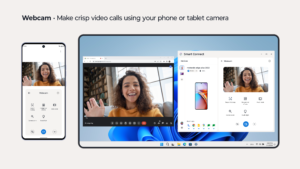
•Use your phone or tablet’s high-resolution camera as a webcam for clear video calls
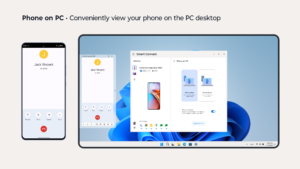
•Mobile desktop transforms your smartphone into a PC-like desktop for on-the-go productivity
A Windows 10 or 11 PC with Bluetooth and a compatible phone or tablet is required.
Smart Connect requires elevated permissions to install and use this app.
Feature compatibility may vary by device. Click the link to see if your phone or tablet is compatible:
help.motorola.com/hc/apps/smartconnect/index.php?v=&t=help_pc_compatible
Key features:
•Pair your smartphone, PC, and tablet, or connect to a display
•Stream media, apps, and more from your smartphone or tablet
•Cross control extends your PC screen to your tablet, or easily control your devices with a keyboard and mouse
•Share hub syncs files and media across paired devices via the Share hub tray
•Use your phone or tablet’s high-resolution camera as a webcam for clear video calls
•Mobile desktop transforms your smartphone into a PC-like desktop for on-the-go productivity
A Windows 10 or 11 PC with Bluetooth and a compatible phone or tablet is required.
Smart Connect requires elevated permissions to install and use this app.
Feature compatibility may vary by device. Click the link to see if your phone or tablet is compatible:
help.motorola.com/hc/apps/smartconnect/index.php?v=&t=help_pc_compatible
Download Smart Connect APK
Fast, free and safe download.
APK Permissions 63
- android.permission.ACCESS_FINE_LOCATION
- android.permission.ACCESS_NETWORK_STATE
- android.permission.ACCESS_NOTIFICATION_POLICY
- android.permission.ACCESS_WIFI_STATE
- android.permission.BLUETOOTH
- android.permission.BLUETOOTH_ADMIN
- android.permission.BLUETOOTH_ADVERTISE
- android.permission.BLUETOOTH_CONNECT
- android.permission.BLUETOOTH_SCAN
- android.permission.BROADCAST_STICKY
- android.permission.CALL_PHONE
- android.permission.CAMERA
- android.permission.CHANGE_WIFI_STATE
- android.permission.EXPAND_STATUS_BAR
- android.permission.FOREGROUND_SERVICE
- android.permission.FOREGROUND_SERVICE_CONNECTED_DEVICE
- android.permission.HIGH_SAMPLING_RATE_SENSORS
- android.permission.INTERNET
- android.permission.MANAGE_EXTERNAL_STORAGE
- android.permission.NEARBY_WIFI_DEVICES
- android.permission.POST_NOTIFICATIONS
- android.permission.QUERY_ALL_PACKAGES
- android.permission.READ_CONTACTS
- android.permission.READ_EXTERNAL_STORAGE
- android.permission.READ_MEDIA_IMAGES
- android.permission.READ_PHONE_STATE
- android.permission.RECEIVE_BOOT_COMPLETED
- android.permission.RECORD_AUDIO
- android.permission.REQUEST_IGNORE_BATTERY_OPTIMIZATIONS
- android.permission.SET_WALLPAPER
- android.permission.SYSTEM_ALERT_WINDOW
- android.permission.USE_BIOMETRIC
- android.permission.USE_FULL_SCREEN_INTENT
- android.permission.VIBRATE
- android.permission.WAKE_LOCK
- android.permission.WRITE_EXTERNAL_STORAGE
- com.google.android.c2dm.permission.RECEIVE
- com.moto.smartconnect.permission.CONNECT_PLUGIN
- com.motorola.actions.provider.permission.READ_MODES
- com.motorola.actions.provider.permission.WRITE_MODES
- com.motorola.aicore.BIND_SERVICE
- com.motorola.aiservices.BIND_SERVICE
- com.motorola.launcher3.permission.RECEIVE_OVERVIEW_STATE_CHANGE_BROADCASTS
- com.motorola.launcher3.secondarydisplay.permission.SETTINGS
- com.motorola.mobiledesktop.DYNAMIC_RECEIVER_NOT_EXPORTED_PERMISSION
- com.motorola.mobiledesktop.MEDIA_OUTPUT_ROUTE_CONTROL
- com.motorola.mobiledesktop.permission.INTERNAL
- com.motorola.motcameradesktop.ACCESS_DESKTOP_CAMERA
- com.motorola.motocare.ACCESS_MOTOCARE
- com.motorola.multimodal.BIND_SERVICE
- com.motorola.permission.ACCESS_CHECKIN
- com.motorola.permission.ACCESS_DESKTOP
- com.motorola.permission.ACCESS_MOTO_INSTALLER
- com.motorola.permission.BIND_EXPERIENCE
- com.motorola.permission.DESKTOP_STATUS_BAR
- com.motorola.permission.MANAGE_NOTIFICATIONS
- com.motorola.permission.MANAGE_TYPE_MOTO_TRUSTED_APPS_OVERLAY
- com.motorola.permission.REGISTER_SMART_NOTIFICATIONS
- com.motorola.permission.SET_ACTIVITY_WATCHER
- com.motorola.permission.TAKE_SCREENSHOT
- com.oculus.permission.GET_BARCODE
- com.zui.launcher.permission.overview
- com.zui.performance.permission.refreshrate
APK Verified
The cryptographic signature guarantees that the file is safe to install and was not tampered with in any way.
Similar in Productivity


More by Motorola Mobility LLC.


Frequently Asked Questions about Smart Connect APK
This is the universal variant — a single APK that contains native libraries for every CPU architecture. It installs on any Android device but is larger than per-architecture variants.
Yes — the APK's signature has been cryptographically verified against the publisher's signing key. The SHA-256 hash is shown in the File Information panel so you can independently confirm the file matches the original release.
Android 31 (API level 35) or newer. Older devices will refuse the install.
Install a free app like 'CPU-Z' or 'Droid Hardware Info' from the Play Store and look at the ABI / Instruction Set row. Most phones made after 2017 are arm64-v8a; if in doubt, download the universal variant.
All variants are functionally identical — same features, same version. They differ only in which CPU architectures the native code is compiled for, and (sometimes) which screen densities the included graphics target. Pick the one that matches your device for the smallest install size, or pick 'Universal' if you're unsure.