
This is the universal build of Smart Connect 09.0.0.011.0. It contains native libraries for every CPU architecture (arm64-v8a, armeabi-v7a, x86, x86_64), so it installs on any Android device. The trade-off is size — it's larger than per-architecture variants. Pick this one if you're unsure which CPU your phone has, or if you plan to share the APK with multiple devices.
File size: 117.8 MB • Min Android: 31 • Target Android: 35 • Version code: 9000110 • Framework: Native (Java/Kotlin) • Permissions: 67
Screenshots
File Information
| Package Name | com.motorola.mobiledesktop |
|---|---|
| Version Name | 09.0.0.011.0 |
| Version Code | 9000110 |
| Architecture | Universal |
| Min Android Version | Android 31 (API 35) |
| Main Activity | com.motorola.mobiledesktop.desktop.MainActivity |
| Framework | Native (Java/Kotlin) |
| File Size | 117.81 MB |
| Signature (SHA1) | 39A2CA57E3915EAD0E335481A30E2C2E52409BA8 |
| File Hash (SHA256) | 103f8861ec1553ef2bd654aa460e050cbcacf5ec8bc5f9f36e46d26ed1585c35 |
What's New
• Connect your iPhone with your PC or Android device for Messages, Gallery, and sending files.
• Refreshed PC dashboard with a new Gallery for photo and video browsing.
• Use Tap to Launch on Lenovo Aura Edition PCs for quicker access to your files.
• Send images instantly from your Motorola phone to your PC with Turn to Share.
• Mirror your tablet screen on your PC with Screen Share.
• Bug fixes and performance improvements.
• Refreshed PC dashboard with a new Gallery for photo and video browsing.
• Use Tap to Launch on Lenovo Aura Edition PCs for quicker access to your files.
• Send images instantly from your Motorola phone to your PC with Turn to Share.
• Mirror your tablet screen on your PC with Screen Share.
• Bug fixes and performance improvements.
App Description
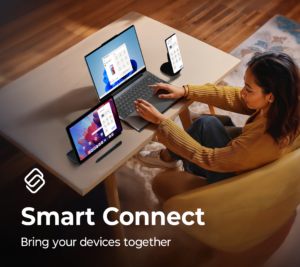
Smart Connect brings your personal ecosystem together like never before. Designed for seamless multitasking and device control. Whether you're streaming apps, searching for files, or managing accessories, Smart Connect simplifies the way you interact with your devices.
Key features:
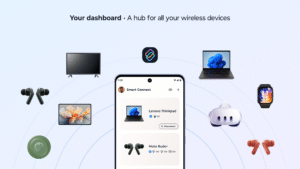
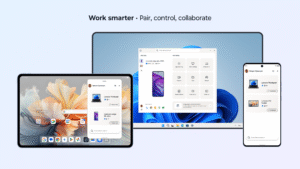
• Pair your phone, tablet, and PC to unlock cross-device control
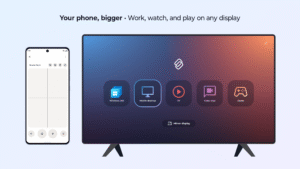
• Connect to smart TVs and displays for a lean-back experience
• Manage Motorola accessories like Buds and Tag from a single dashboard
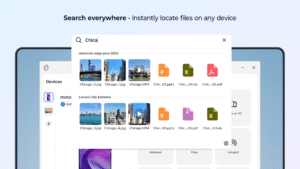
• Find files and apps instantly with cross-device search
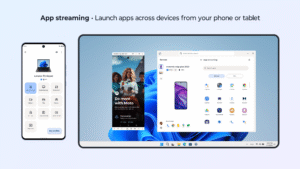
• Stream Android apps to your PC, tablet, or display
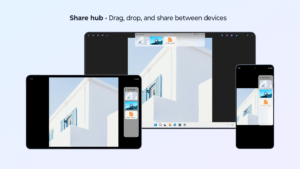
• Use Share hub to transfer files and media between devices
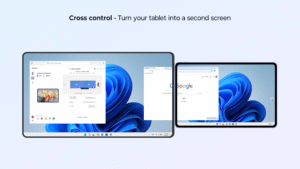
• Start Cross control to use your tablet as a second screen
• Includes advanced features like Webcam and Mobile desktop
• Now available on Meta Quest and third-party Android devices
A Windows 10 or 11 PC with Bluetooth and a compatible phone or tablet is required.
Smart Connect requires elevated permissions to install and use this app.
Feature compatibility may vary by device. Check if your phone or tablet is compatible:
help.motorola.com/hc/apps/smartconnect/index.php?v=&t=help_pc_compatible
Key features:
• Pair your phone, tablet, and PC to unlock cross-device control
• Connect to smart TVs and displays for a lean-back experience
• Manage Motorola accessories like Buds and Tag from a single dashboard
• Find files and apps instantly with cross-device search
• Stream Android apps to your PC, tablet, or display
• Use Share hub to transfer files and media between devices
• Start Cross control to use your tablet as a second screen
• Includes advanced features like Webcam and Mobile desktop
• Now available on Meta Quest and third-party Android devices
A Windows 10 or 11 PC with Bluetooth and a compatible phone or tablet is required.
Smart Connect requires elevated permissions to install and use this app.
Feature compatibility may vary by device. Check if your phone or tablet is compatible:
help.motorola.com/hc/apps/smartconnect/index.php?v=&t=help_pc_compatible
Download Smart Connect APK
Fast, free and safe download.
APK Permissions 67
- android.permission.ACCESS_FINE_LOCATION
- android.permission.ACCESS_NETWORK_STATE
- android.permission.ACCESS_NOTIFICATION_POLICY
- android.permission.ACCESS_WIFI_STATE
- android.permission.BLUETOOTH
- android.permission.BLUETOOTH_ADMIN
- android.permission.BLUETOOTH_ADVERTISE
- android.permission.BLUETOOTH_CONNECT
- android.permission.BLUETOOTH_SCAN
- android.permission.BROADCAST_STICKY
- android.permission.CALL_PHONE
- android.permission.CAMERA
- android.permission.CHANGE_WIFI_STATE
- android.permission.EXPAND_STATUS_BAR
- android.permission.FOREGROUND_SERVICE
- android.permission.FOREGROUND_SERVICE_CONNECTED_DEVICE
- android.permission.HIGH_SAMPLING_RATE_SENSORS
- android.permission.INTERNET
- android.permission.MANAGE_EXTERNAL_STORAGE
- android.permission.NEARBY_WIFI_DEVICES
- android.permission.POST_NOTIFICATIONS
- android.permission.QUERY_ALL_PACKAGES
- android.permission.READ_CONTACTS
- android.permission.READ_EXTERNAL_STORAGE
- android.permission.READ_MEDIA_IMAGES
- android.permission.READ_NEARBY_STREAMING_POLICY
- android.permission.READ_PHONE_STATE
- android.permission.READ_SMS
- android.permission.RECEIVE_BOOT_COMPLETED
- android.permission.RECORD_AUDIO
- android.permission.REQUEST_IGNORE_BATTERY_OPTIMIZATIONS
- android.permission.SEND_SMS
- android.permission.SET_WALLPAPER
- android.permission.SYSTEM_ALERT_WINDOW
- android.permission.USE_BIOMETRIC
- android.permission.USE_FULL_SCREEN_INTENT
- android.permission.VIBRATE
- android.permission.WAKE_LOCK
- android.permission.WRITE_EXTERNAL_STORAGE
- com.google.android.c2dm.permission.RECEIVE
- com.moto.smartconnect.permission.CONNECT_PLUGIN
- com.motorola.actions.provider.permission.READ_MODES
- com.motorola.actions.provider.permission.WRITE_MODES
- com.motorola.launcher3.permission.RECEIVE_OVERVIEW_STATE_CHANGE_BROADCASTS
- com.motorola.launcher3.secondarydisplay.permission.SETTINGS
- com.motorola.mobiledesktop.DYNAMIC_RECEIVER_NOT_EXPORTED_PERMISSION
- com.motorola.mobiledesktop.MEDIA_OUTPUT_ROUTE_CONTROL
- com.motorola.mobiledesktop.permission.INTERNAL
- com.motorola.motcameradesktop.ACCESS_DESKTOP_CAMERA
- com.motorola.motocare.ACCESS_MOTOCARE
- com.motorola.multimodal.BIND_SERVICE
- com.motorola.permission.ACCESS_ACTION_CORE
- com.motorola.permission.ACCESS_CHECKIN
- com.motorola.permission.ACCESS_DESKTOP
- com.motorola.permission.ACCESS_MOTO_INSTALLER
- com.motorola.permission.BIND_EXPERIENCE
- com.motorola.permission.DESKTOP_STATUS_BAR
- com.motorola.permission.MANAGE_NOTIFICATIONS
- com.motorola.permission.MANAGE_TYPE_MOTO_TRUSTED_APPS_OVERLAY
- com.motorola.permission.MONITOR_INPUT
- com.motorola.permission.REGISTER_SMART_NOTIFICATIONS
- com.motorola.permission.SCREEN_HELPER_SIGNATURE
- com.motorola.permission.SET_ACTIVITY_WATCHER
- com.motorola.permission.TAKE_SCREENSHOT
- com.oculus.permission.GET_BARCODE
- com.zui.launcher.permission.overview
- com.zui.performance.permission.refreshrate
APK Verified
The cryptographic signature guarantees that the file is safe to install and was not tampered with in any way.
Similar in Productivity


More by Motorola Mobility LLC.


Frequently Asked Questions about Smart Connect APK
This is the universal variant — a single APK that contains native libraries for every CPU architecture. It installs on any Android device but is larger than per-architecture variants.
Yes — the APK's signature has been cryptographically verified against the publisher's signing key. The SHA-256 hash is shown in the File Information panel so you can independently confirm the file matches the original release.
Android 31 (API level 35) or newer. Older devices will refuse the install.
Install a free app like 'CPU-Z' or 'Droid Hardware Info' from the Play Store and look at the ABI / Instruction Set row. Most phones made after 2017 are arm64-v8a; if in doubt, download the universal variant.
All variants are functionally identical — same features, same version. They differ only in which CPU architectures the native code is compiled for, and (sometimes) which screen densities the included graphics target. Pick the one that matches your device for the smallest install size, or pick 'Universal' if you're unsure.