
Download Add Text: Text on Photo Editor APK 12.5.1 Universal · Android 21+
Download APK
Verified Safe
This is the universal build of Add Text: Text on Photo Editor 12.5.1. It contains native libraries for every CPU architecture (arm64-v8a, armeabi-v7a, x86, x86_64), so it installs on any Android device. The trade-off is size — it's larger than per-architecture variants. Pick this one if you're unsure which CPU your phone has, or if you plan to share the APK with multiple devices.
File size: 8.6 MB • Min Android: 21 • Target Android: 34 • Version code: 185 • Framework: Native (Java/Kotlin) • Permissions: 14
Screenshots
File Information
| Package Name | com.nand.addtext |
|---|---|
| Version Name | 12.5.1 |
| Version Code | 185 |
| Architecture | Universal |
| Min Android Version | Android 21 (API 34) |
| Main Activity | com.nand.addtext.ui.home.HomeActivity |
| Framework | Native (Java/Kotlin) |
| File Size | 8.59 MB |
| Signature (SHA1) | AB232BE225A9E6CB04320EE183A73D19847C7B3F |
| File Hash (SHA256) | 78b05220d27c45135a34c41af90635cfc8438b055a5cff267c0fd510341ad0a0 |
What's New
1. To uppercase and lowercase added in 3-dot more menu in add text screen. You can change only the selected part of the text.
2. When adding text on light background, text color becomes black for better visibility
3. Bug fixed in onboarding
2. When adding text on light background, text color becomes black for better visibility
3. Bug fixed in onboarding
App Description
Hello & Welcome!
Add Text app is the all-in-one tool for text creation. Texts can be added to a photo, gradient, solid color or a transparent background.
HIGHLIGHTS
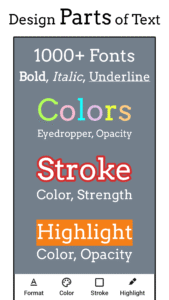
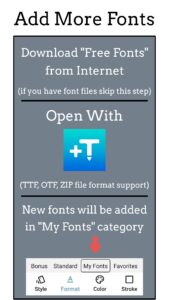
• 1000+ fonts, + ability to add unlimited number of your custom fonts (including emoji fonts)
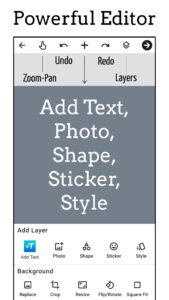
• Add layers: texts, photos, shapes, stickers and saved text styles
• Design parts of the text separately: supported in Font, Format, Color, Stroke, Highlight tools
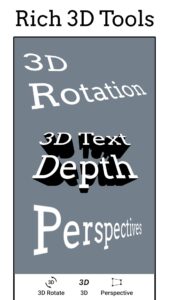
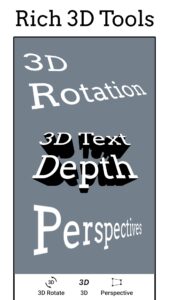
• 3D text tools: 3D Rotate, 3D Depth, Perspective
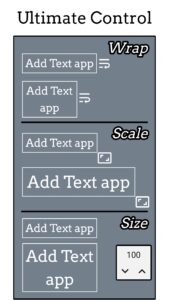
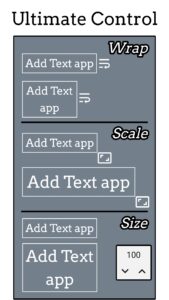
• Change text size, wrapping and scale to get any type of text layout
• Layers view: reorder layers (overlays), change visibility, lock/unlock for each layer
• Tools for background: Effects, Crop, Resize, Flip/Rotate, Square Fit
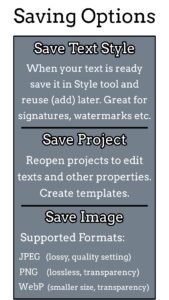
• Save your text creation in Style tool to reuse later for watermarks, signatures, branding etc
• Save project to edit & reuse later, create templates
• Save image as JPEG, PNG or WebP file
• Dark mode to reduce eye strain and save battery life
• Professional support for all users:
hi@addtextapp.com
• Constantly maintained according to our users' feedback
FEATURES
• Add multiple texts (and overlays) on photo, edit each one without losing final preview
• Move, scale, rotate, edit, copy, delete (for overlays) and wrap the text by text-box handles
• Font and Format tools: change font, alignment, text size, with bold, italic, underlined & strikethrough options
• Change text color & opacity: can be applied on each word/letter separately
• Add Stroke (Outline) to text with colors and stroke width
• Highlight the whole text or separate parts with different colors & opacity
• Letter & Line spacing
• Positioning grid with snapping option, flip overlay horizontally and/or vertically
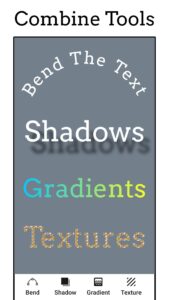
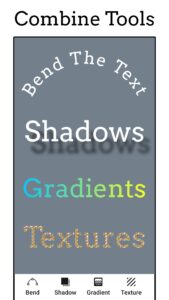
• Bend the text: text along a curve
• Shadow with colors, opacity, blur and positioning
• Predefined Gradients: edit start/end colors and gradient angle
• Texture by adding any photo and make any type of transformation with it
• Opacity and Blend with background
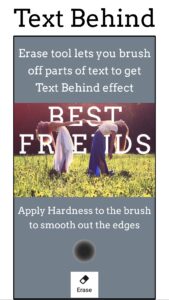
• Erase tool: Clear parts of text with brush to achieve Text Behind effect (see screenshot)
• Color tools have eyedropper, color picker and predefined colors
• Add Stickers/Emojis, hundreds of them arranged in 8 categories
• Add any photo from your phone as an overlay
• Add 100+ shapes: with both filled and outlined versions
• Tools for other overlays: Opacity, Position, Perspective, Crop, Shape color, stroke & width
• Change the background without starting your work from scratch
• Pan mode: move canvas with one finger & pinch to zoom without worrying to accidentally touch overlays
• Pin mode: pins the background so that you won't accidentally change its position
• Fit: bring canvas to its original position (fit to screen)
• Undo & Redo history
• Fast sharing: showing recent apps you shared your work to
• All these and more in a small sized APK
If you come across any problem or have a suggestion please contact at
hi@addtextapp.com
Spread the word to make this free tool available for everyone. Inspire us for the next releases. And rate us in Play Store.
So go ahead and create a meme, quote, Instagram story, Youtube thumbnail, banner, cover photo with captions, word art, poster, flyer, invitation, logo etc.
Stay Young at Heart!
Nareck
Add Text app is the all-in-one tool for text creation. Texts can be added to a photo, gradient, solid color or a transparent background.
HIGHLIGHTS
• 1000+ fonts, + ability to add unlimited number of your custom fonts (including emoji fonts)
• Add layers: texts, photos, shapes, stickers and saved text styles
• Design parts of the text separately: supported in Font, Format, Color, Stroke, Highlight tools
• 3D text tools: 3D Rotate, 3D Depth, Perspective
• Change text size, wrapping and scale to get any type of text layout
• Layers view: reorder layers (overlays), change visibility, lock/unlock for each layer
• Tools for background: Effects, Crop, Resize, Flip/Rotate, Square Fit
• Save your text creation in Style tool to reuse later for watermarks, signatures, branding etc
• Save project to edit & reuse later, create templates
• Save image as JPEG, PNG or WebP file
• Dark mode to reduce eye strain and save battery life
• Professional support for all users:
hi@addtextapp.com
• Constantly maintained according to our users' feedback
FEATURES
• Add multiple texts (and overlays) on photo, edit each one without losing final preview
• Move, scale, rotate, edit, copy, delete (for overlays) and wrap the text by text-box handles
• Font and Format tools: change font, alignment, text size, with bold, italic, underlined & strikethrough options
• Change text color & opacity: can be applied on each word/letter separately
• Add Stroke (Outline) to text with colors and stroke width
• Highlight the whole text or separate parts with different colors & opacity
• Letter & Line spacing
• Positioning grid with snapping option, flip overlay horizontally and/or vertically
• Bend the text: text along a curve
• Shadow with colors, opacity, blur and positioning
• Predefined Gradients: edit start/end colors and gradient angle
• Texture by adding any photo and make any type of transformation with it
• Opacity and Blend with background
• Erase tool: Clear parts of text with brush to achieve Text Behind effect (see screenshot)
• Color tools have eyedropper, color picker and predefined colors
• Add Stickers/Emojis, hundreds of them arranged in 8 categories
• Add any photo from your phone as an overlay
• Add 100+ shapes: with both filled and outlined versions
• Tools for other overlays: Opacity, Position, Perspective, Crop, Shape color, stroke & width
• Change the background without starting your work from scratch
• Pan mode: move canvas with one finger & pinch to zoom without worrying to accidentally touch overlays
• Pin mode: pins the background so that you won't accidentally change its position
• Fit: bring canvas to its original position (fit to screen)
• Undo & Redo history
• Fast sharing: showing recent apps you shared your work to
• All these and more in a small sized APK
If you come across any problem or have a suggestion please contact at
hi@addtextapp.com
Spread the word to make this free tool available for everyone. Inspire us for the next releases. And rate us in Play Store.
So go ahead and create a meme, quote, Instagram story, Youtube thumbnail, banner, cover photo with captions, word art, poster, flyer, invitation, logo etc.
Stay Young at Heart!
Nareck
Download Add Text: Text on Photo Editor APK
Fast, free and safe download.
APK Permissions 14
- android.permission.ACCESS_ADSERVICES_AD_ID
- android.permission.ACCESS_ADSERVICES_ATTRIBUTION
- android.permission.ACCESS_ADSERVICES_TOPICS
- android.permission.ACCESS_NETWORK_STATE
- android.permission.FOREGROUND_SERVICE
- android.permission.INTERNET
- android.permission.READ_EXTERNAL_STORAGE
- android.permission.READ_MEDIA_IMAGES
- android.permission.WAKE_LOCK
- android.permission.WRITE_EXTERNAL_STORAGE
- com.android.vending.BILLING
- com.google.android.finsky.permission.BIND_GET_INSTALL_REFERRER_SERVICE
- com.google.android.gms.permission.AD_ID
- com.nand.addtext.DYNAMIC_RECEIVER_NOT_EXPORTED_PERMISSION
APK Verified
The cryptographic signature guarantees that the file is safe to install and was not tampered with in any way.


Frequently Asked Questions about Add Text: Text on Photo Editor APK
This is the universal variant — a single APK that contains native libraries for every CPU architecture. It installs on any Android device but is larger than per-architecture variants.
Yes — the APK's signature has been cryptographically verified against the publisher's signing key. The SHA-256 hash is shown in the File Information panel so you can independently confirm the file matches the original release.
Android 21 (API level 34) or newer. Older devices will refuse the install.
Install a free app like 'CPU-Z' or 'Droid Hardware Info' from the Play Store and look at the ABI / Instruction Set row. Most phones made after 2017 are arm64-v8a; if in doubt, download the universal variant.
All variants are functionally identical — same features, same version. They differ only in which CPU architectures the native code is compiled for, and (sometimes) which screen densities the included graphics target. Pick the one that matches your device for the smallest install size, or pick 'Universal' if you're unsure.