
This is the universal build of NAVER Maps, Navigation 5.35.1.1. It contains native libraries for every CPU architecture (arm64-v8a, armeabi-v7a, x86, x86_64), so it installs on any Android device. The trade-off is size — it's larger than per-architecture variants. Pick this one if you're unsure which CPU your phone has, or if you plan to share the APK with multiple devices.
File size: 176.8 MB • Min Android: 24 • Target Android: 34 • Version code: 53501000 • Framework: Native (Java/Kotlin) • Permissions: 52
Screenshots



File Information
| Package Name | com.nhn.android.nmap |
|---|---|
| Version Name | 5.35.1.1 |
| Version Code | 53501000 |
| Architecture | Universal |
| Min Android Version | Android 24 (API 34) |
| Main Activity | com.naver.map.LaunchActivity |
| Framework | Native (Java/Kotlin) |
| File Size | 176.76 MB |
| Signature (SHA1) | 08688AE148F57B5CDC3FD6FA52BC649F06390100 |
| File Hash (SHA256) | 1557ca005b15783ca2a875de588204d051ca46ad0c08ff0274edb7b445788b8b |
What's New
● Navigation
- Provides arrival estimates based on your driving style
- Supports automatic app launch when your car is connected via via Bluetooth
● MY
- Shows a new review feed from the reviewers you follow
- Provides arrival estimates based on your driving style
- Supports automatic app launch when your car is connected via via Bluetooth
● MY
- Shows a new review feed from the reviewers you follow
App Description
South Korea's GPS navigation Get started right away
* Experience the completely new NAVER Map.
※ Are you traveling Korea?
Don't miss the smart tips to use NAVER Map:
naver.me/GfCSj5Ut
[Key features]
- Menu tab for Map home
Quickly access and use Nearby, Bookmark, Transit, Navigation and the MY tab from the home screen.
- Simplified search
Search locations, buses, subway, and more in a comprehensive search bar.
- Nearby (SmartAround)
Check restaurants and places to visit in your surroundings provided by NAVER's user data.
- Navigation
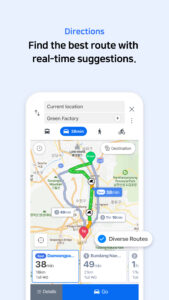
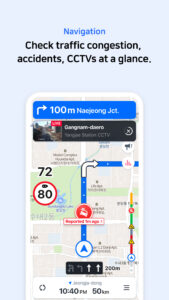
Fast and accurate navigation with real-time traffic info and optimized usability for any driving condition.
- Vector map
360 degrees rotation-enabled vector map with 3D view of key landmarks via tilting.
- Transit
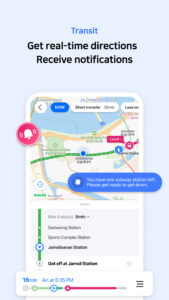
You can easily reach your destination by using transit directions for various modes of transportation, real-time departure and arrival times, and notifications for when to get on/off.
- Street view
Seamless street and aerial views provided for location search and route planning.
- Bookmark
Easily save your best restaurants and must-visit tourist spots on NAVER Map and share them with others.
- MY
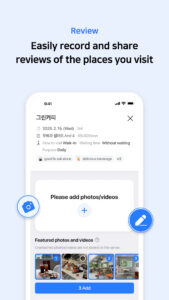
View all your maps, reviews, and bookings in one place and write reviews with ease.
- Instant search
View useful info about your query, such as opening/closing times for supermarkets while you search.
- Language
Korean/English/Japanese/Chinese maps and English navigation provided.
*Requires Android OS 7.0 or later
*Find out more tips on how to use NAVER Map
- NAVER Map customer service:
naver.me/GYywEiT4
- NAVER Map blog:
blog.naver.com/naver_map
----
*User confirmation for NAVER Map
Enabling the below privacy settings is recommended:
(Some features to make calls and send messages while navigating is supported only in Korea)
- Microphone: Used to provide voice search or voice comman.(KR only)
- Location: Used to find users' location when users find direction or use navigation.
- Phone: Used to make calls while navigating.(KR only)
- Call history: Used to access receipts of phone calls/messages while navigating.(KR only)
- SMS: Used to send messages while navigating.(KR only)
- File and Media (Photos and Videos): Allows users to attach or edit media files (photos and videos) stored in their devices when writing reviews.
- Contacts: Used to make calls and send messages while navigating.(KR only)
- Camera: Used in Feedback and NAVER’s MY - Receipt Confirmation to take photos of receipts.
- Notifications: Used to receive important notices, events, and promotional notifications (supported on devices running Android 13.0 or later).
----
*Contact: 1588-3820
*Address: 95, Jeongjail-ro, Bundang-gu, Seongnam-si, Gyeonggi-do, Republic of Korea
* Experience the completely new NAVER Map.
※ Are you traveling Korea?
Don't miss the smart tips to use NAVER Map:
naver.me/GfCSj5Ut
[Key features]
- Menu tab for Map home
Quickly access and use Nearby, Bookmark, Transit, Navigation and the MY tab from the home screen.
- Simplified search
Search locations, buses, subway, and more in a comprehensive search bar.
- Nearby (SmartAround)
Check restaurants and places to visit in your surroundings provided by NAVER's user data.
- Navigation
Fast and accurate navigation with real-time traffic info and optimized usability for any driving condition.
- Vector map
360 degrees rotation-enabled vector map with 3D view of key landmarks via tilting.
- Transit
You can easily reach your destination by using transit directions for various modes of transportation, real-time departure and arrival times, and notifications for when to get on/off.
- Street view
Seamless street and aerial views provided for location search and route planning.
- Bookmark
Easily save your best restaurants and must-visit tourist spots on NAVER Map and share them with others.
- MY
View all your maps, reviews, and bookings in one place and write reviews with ease.
- Instant search
View useful info about your query, such as opening/closing times for supermarkets while you search.
- Language
Korean/English/Japanese/Chinese maps and English navigation provided.
*Requires Android OS 7.0 or later
*Find out more tips on how to use NAVER Map
- NAVER Map customer service:
naver.me/GYywEiT4
- NAVER Map blog:
blog.naver.com/naver_map
----
*User confirmation for NAVER Map
Enabling the below privacy settings is recommended:
(Some features to make calls and send messages while navigating is supported only in Korea)
- Microphone: Used to provide voice search or voice comman.(KR only)
- Location: Used to find users' location when users find direction or use navigation.
- Phone: Used to make calls while navigating.(KR only)
- Call history: Used to access receipts of phone calls/messages while navigating.(KR only)
- SMS: Used to send messages while navigating.(KR only)
- File and Media (Photos and Videos): Allows users to attach or edit media files (photos and videos) stored in their devices when writing reviews.
- Contacts: Used to make calls and send messages while navigating.(KR only)
- Camera: Used in Feedback and NAVER’s MY - Receipt Confirmation to take photos of receipts.
- Notifications: Used to receive important notices, events, and promotional notifications (supported on devices running Android 13.0 or later).
----
*Contact: 1588-3820
*Address: 95, Jeongjail-ro, Bundang-gu, Seongnam-si, Gyeonggi-do, Republic of Korea
Download NAVER Maps, Navigation APK
Fast, free and safe download.
APK Permissions 52
- android.permission.ACCESS_ADSERVICES_AD_ID
- android.permission.ACCESS_ADSERVICES_ATTRIBUTION
- android.permission.ACCESS_ADSERVICES_TOPICS
- android.permission.ACCESS_BACKGROUND_LOCATION
- android.permission.ACCESS_COARSE_LOCATION
- android.permission.ACCESS_FINE_LOCATION
- android.permission.ACCESS_MEDIA_LOCATION
- android.permission.ACCESS_NETWORK_STATE
- android.permission.ACCESS_WIFI_STATE
- android.permission.AUTHENTICATE_ACCOUNTS
- android.permission.BLUETOOTH
- android.permission.BLUETOOTH_CONNECT
- android.permission.CALL_PHONE
- android.permission.CAMERA
- android.permission.CHANGE_NETWORK_STATE
- android.permission.CHANGE_WIFI_STATE
- android.permission.FLASHLIGHT
- android.permission.FOREGROUND_SERVICE
- android.permission.FOREGROUND_SERVICE_DATA_SYNC
- android.permission.FOREGROUND_SERVICE_LOCATION
- android.permission.FOREGROUND_SERVICE_MEDIA_PLAYBACK
- android.permission.GET_ACCOUNTS
- android.permission.INTERNET
- android.permission.MANAGE_ACCOUNTS
- android.permission.POST_NOTIFICATIONS
- android.permission.READ_CALL_LOG
- android.permission.READ_CONTACTS
- android.permission.READ_EXTERNAL_STORAGE
- android.permission.READ_MEDIA_IMAGES
- android.permission.READ_MEDIA_VIDEO
- android.permission.READ_PHONE_STATE
- android.permission.RECEIVE_BOOT_COMPLETED
- android.permission.RECORD_AUDIO
- android.permission.REQUEST_COMPANION_RUN_IN_BACKGROUND
- android.permission.SEND_SMS
- android.permission.SYSTEM_ALERT_WINDOW
- android.permission.USE_BIOMETRIC
- android.permission.USE_CREDENTIALS
- android.permission.USE_FINGERPRINT
- android.permission.VIBRATE
- android.permission.WAKE_LOCK
- android.permission.WRITE_EXTERNAL_STORAGE
- androidx.car.app.ACCESS_SURFACE
- androidx.car.app.NAVIGATION_TEMPLATES
- com.android.launcher.permission.INSTALL_SHORTCUT
- com.google.android.c2dm.permission.RECEIVE
- com.google.android.finsky.permission.BIND_GET_INSTALL_REFERRER_SERVICE
- com.google.android.gms.permission.AD_ID
- com.google.android.gms.permission.CAR_FUEL
- com.google.android.gms.permission.CAR_MILEAGE
- com.google.android.gms.permission.CAR_SPEED
- com.nhn.android.nmap.DYNAMIC_RECEIVER_NOT_EXPORTED_PERMISSION
APK Verified
The cryptographic signature guarantees that the file is safe to install and was not tampered with in any way.
Similar in Maps & Navigation


More by NAVER Corp.


Frequently Asked Questions about NAVER Maps, Navigation APK
This is the universal variant — a single APK that contains native libraries for every CPU architecture. It installs on any Android device but is larger than per-architecture variants.
Yes — the APK's signature has been cryptographically verified against the publisher's signing key. The SHA-256 hash is shown in the File Information panel so you can independently confirm the file matches the original release.
Android 24 (API level 34) or newer. Older devices will refuse the install.
Install a free app like 'CPU-Z' or 'Droid Hardware Info' from the Play Store and look at the ABI / Instruction Set row. Most phones made after 2017 are arm64-v8a; if in doubt, download the universal variant.
All variants are functionally identical — same features, same version. They differ only in which CPU architectures the native code is compiled for, and (sometimes) which screen densities the included graphics target. Pick the one that matches your device for the smallest install size, or pick 'Universal' if you're unsure.