
This is the universal build of Syncthing-Fork 2.0.9.1. It contains native libraries for every CPU architecture (arm64-v8a, armeabi-v7a, x86, x86_64), so it installs on any Android device. The trade-off is size — it's larger than per-architecture variants. Pick this one if you're unsure which CPU your phone has, or if you plan to share the APK with multiple devices.
File size: 60.2 MB • Min Android: 21 • Target Android: 36 • Version code: 2000901 • Framework: Native (Java/Kotlin) • Permissions: 20
Screenshots
File Information
| Package Name | com.github.catfriend1.syncthingandroid |
|---|---|
| Version Name | 2.0.9.1 |
| Version Code | 2000901 |
| Architecture | Universal |
| Min Android Version | Android 21 (API 36) |
| Main Activity | com.nutomic.syncthingandroid.activities.FirstStartActivity |
| Framework | Native (Java/Kotlin) |
| File Size | 60.23 MB |
| Signature (SHA1) | 7500271D7BE587CD32260AD0502A3A2C0838DBDE |
| File Hash (SHA256) | ea753717fd3cb6ccf62af41271fd248b5293b729db97e5c3c30648c80f088aff |
What's New
Syncthing-Fork v1.30.0.3
App Description
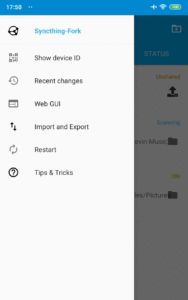
This is a fork of the Syncthing-Android wrapper for Syncthing that brings major enhancements like:
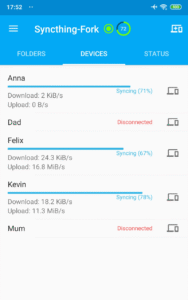
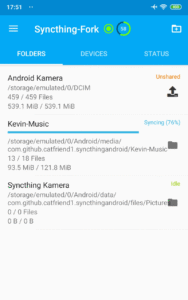
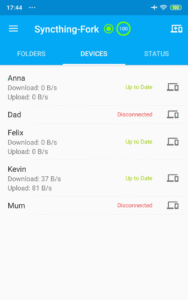
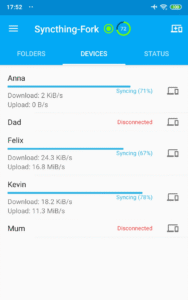
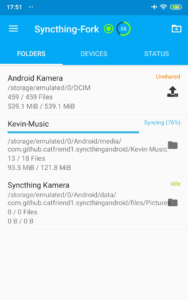
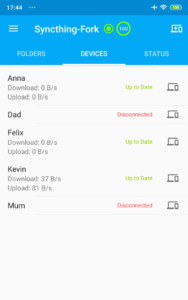
* Folder, device and overall sync progress can easily be read off the UI.
* "Syncthing Camera" - an optional feature (with optional permission to use the camera) where you can take pictures with your friend, partner, ... on two phones into one shared and private Syncthing folder. No cloud involved. - FEATURE CURRENTLY IN BETA STAGE -
* "Sync every hour" to save even more battery
* Individual sync conditions can be applied per device and per folder
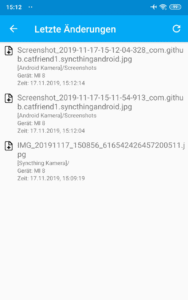
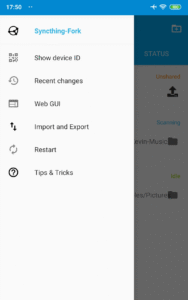
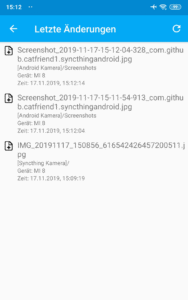
* Recent changes UI, click to open files.
* Changes to folder and device config can be made regardless if Syncthing is running or not
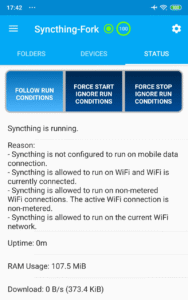
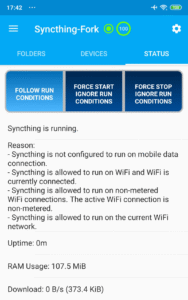
* UI explains why syncthing is running or not.
* "Battery eater" problem is fixed.
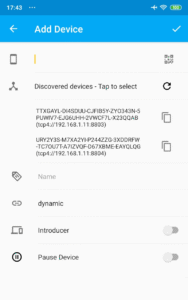
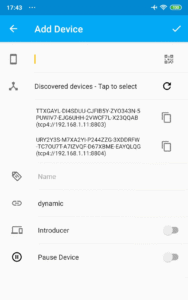
* Discover other Syncthing devices on the same network and easily add them.
* Supports two-way synchronization on external SD card since Android 11.
Syncthing-Fork for Android is a wrapper for Syncthing that provides an Android UI instead of Syncthing's built-in Web UI. Syncthing replaces proprietary sync and cloud services with something open, trustworthy and decentralized. Your data is your data alone and you deserve to choose where it is stored, if it is shared with some third party and how it's transmitted over the Internet.
Goals of the fork:
* Develop and try out enhancements together with the community.
* Release the wrapper more frequently to identify and fix bugs caused by changes in the syncthing submodule
* Make enhancements configurable in the UI, users should be able to turn them on and off
Comparison between upstream and fork at the time of writing this:
* Both contain the syncthing binary built from the official source at GitHub
* Syncing functionality and reliability depends on the syncthing binary submodule version.
* Fork gets along with upstream and sometimes they pick up my improvements.
* Strategy and release frequency is different
* Only the wrapper containing the Android UI is addressed by the fork.
Website:
github.com/nel0x/syncthing-android-gplay
Source code:
github.com/nel0x/syncthing-android-gplay
How Syncthing writes to external SD card:
github.com/nel0x/syncthing-android/blob/master/wiki/SD-card-write-access.md
Wiki, FAQ and helpful articles:
github.com/Catfriend1/syncthing-android/wiki
Issues:
github.com/nel0x/syncthing-android-gplay/issues
Please help with the
Translation:
hosted.weblate.org/projects/syncthing/android/catfriend1
* Folder, device and overall sync progress can easily be read off the UI.
* "Syncthing Camera" - an optional feature (with optional permission to use the camera) where you can take pictures with your friend, partner, ... on two phones into one shared and private Syncthing folder. No cloud involved. - FEATURE CURRENTLY IN BETA STAGE -
* "Sync every hour" to save even more battery
* Individual sync conditions can be applied per device and per folder
* Recent changes UI, click to open files.
* Changes to folder and device config can be made regardless if Syncthing is running or not
* UI explains why syncthing is running or not.
* "Battery eater" problem is fixed.
* Discover other Syncthing devices on the same network and easily add them.
* Supports two-way synchronization on external SD card since Android 11.
Syncthing-Fork for Android is a wrapper for Syncthing that provides an Android UI instead of Syncthing's built-in Web UI. Syncthing replaces proprietary sync and cloud services with something open, trustworthy and decentralized. Your data is your data alone and you deserve to choose where it is stored, if it is shared with some third party and how it's transmitted over the Internet.
Goals of the fork:
* Develop and try out enhancements together with the community.
* Release the wrapper more frequently to identify and fix bugs caused by changes in the syncthing submodule
* Make enhancements configurable in the UI, users should be able to turn them on and off
Comparison between upstream and fork at the time of writing this:
* Both contain the syncthing binary built from the official source at GitHub
* Syncing functionality and reliability depends on the syncthing binary submodule version.
* Fork gets along with upstream and sometimes they pick up my improvements.
* Strategy and release frequency is different
* Only the wrapper containing the Android UI is addressed by the fork.
Website:
github.com/nel0x/syncthing-android-gplay
Source code:
github.com/nel0x/syncthing-android-gplay
How Syncthing writes to external SD card:
github.com/nel0x/syncthing-android/blob/master/wiki/SD-card-write-access.md
Wiki, FAQ and helpful articles:
github.com/Catfriend1/syncthing-android/wiki
Issues:
github.com/nel0x/syncthing-android-gplay/issues
Please help with the
Translation:
hosted.weblate.org/projects/syncthing/android/catfriend1
Download Syncthing-Fork APK
Fast, free and safe download.
APK Permissions 20
- android.permission.ACCESS_BACKGROUND_LOCATION
- android.permission.ACCESS_COARSE_LOCATION
- android.permission.ACCESS_FINE_LOCATION
- android.permission.ACCESS_NETWORK_STATE
- android.permission.ACCESS_WIFI_STATE
- android.permission.CAMERA
- android.permission.CHANGE_WIFI_MULTICAST_STATE
- android.permission.FOREGROUND_SERVICE
- android.permission.FOREGROUND_SERVICE_SPECIAL_USE
- android.permission.INTERNET
- android.permission.MANAGE_EXTERNAL_STORAGE
- android.permission.POST_NOTIFICATIONS
- android.permission.READ_SYNC_SETTINGS
- android.permission.RECEIVE_BOOT_COMPLETED
- android.permission.REQUEST_IGNORE_BATTERY_OPTIMIZATIONS
- android.permission.WAKE_LOCK
- android.permission.WRITE_EXTERNAL_STORAGE
- android.permission.WRITE_SECURE_SETTINGS
- android.permission.WRITE_SETTINGS
- com.github.catfriend1.syncthingandroid.DYNAMIC_RECEIVER_NOT_EXPORTED_PERMISSION
APK Verified
The cryptographic signature guarantees that the file is safe to install and was not tampered with in any way.


Frequently Asked Questions about Syncthing-Fork APK
This is the universal variant — a single APK that contains native libraries for every CPU architecture. It installs on any Android device but is larger than per-architecture variants.
Yes — the APK's signature has been cryptographically verified against the publisher's signing key. The SHA-256 hash is shown in the File Information panel so you can independently confirm the file matches the original release.
Android 21 (API level 36) or newer. Older devices will refuse the install.
Install a free app like 'CPU-Z' or 'Droid Hardware Info' from the Play Store and look at the ABI / Instruction Set row. Most phones made after 2017 are arm64-v8a; if in doubt, download the universal variant.
All variants are functionally identical — same features, same version. They differ only in which CPU architectures the native code is compiled for, and (sometimes) which screen densities the included graphics target. Pick the one that matches your device for the smallest install size, or pick 'Universal' if you're unsure.