
This is the universal build of Settings: All Quick Access 1.6.11. It contains native libraries for every CPU architecture (arm64-v8a, armeabi-v7a, x86, x86_64), so it installs on any Android device. The trade-off is size — it's larger than per-architecture variants. Pick this one if you're unsure which CPU your phone has, or if you plan to share the APK with multiple devices.
File size: 11.6 MB • Min Android: 23 • Target Android: 35 • Version code: 34 • Framework: Native (Java/Kotlin) • Permissions: 13
Screenshots
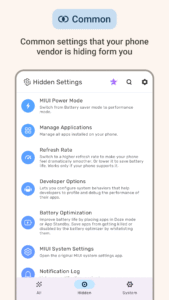
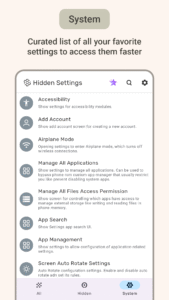
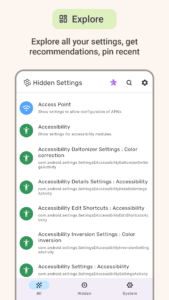
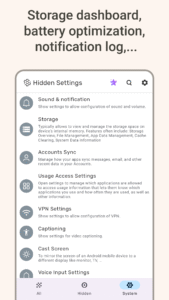
File Information
| Package Name | com.netvor.hiddensettings |
|---|---|
| Version Name | 1.6.11 |
| Version Code | 34 |
| Architecture | Universal |
| Min Android Version | Android 23 (API 35) |
| Main Activity | com.netvor.hiddensettings.LaunchActivity |
| Framework | Native (Java/Kotlin) |
| File Size | 11.55 MB |
| Signature (SHA1) | 7FB58CD32C3EA06950E571870F80A9DFE18AEDDC |
| File Hash (SHA256) | f56a5d5db1e15c57d299817356620993ec63e76b58848040fbc955ed7af255c5 |
What's New
This update brings more improvements:
★
New Favorites UI
: Enjoy a polished new interface for pinning shortcuts and managing your favorite settings.
🛠
Fixes & Stability/b>: We've squashed many bugs and crashes for a smoother, more reliable experience.
-
We appreciate your feedback!
★
New Favorites UI
: Enjoy a polished new interface for pinning shortcuts and managing your favorite settings.
🛠
Fixes & Stability/b>: We've squashed many bugs and crashes for a smoother, more reliable experience.
-
We appreciate your feedback!
App Description
Quick Settings Activity Launcher and Shortcut Maker: Force Launch Hidden Settings and Find all settings quickly
Advertisement
Remove ads, dark theme, and more with
Premium
Stop digging through confusing settings app menus. Hidden Settings is the quick, powerful, all-in-one settings app and Activity Launcher for settings app that puts you back in control of your phone's settings. We offer quick access to every phone setting, app setting, and system setting, making device settings easy to find and manage.
This app is a better alternative to the system settings app, or Activity Launcher but for settings, or MIUI downloader news and apps, or miuies – roms & apps hidden settings feature.
This is your new control center for Android settings. Get quick access to standard mobile settings and unlock advanced hidden settings. This is the ultimate tool for quick settings management and finding any device setting.
Some manufacturers hide settings like Samsung, Xiaomi (MIUI, HyperOS), Poco, Redmi, Vivo, Oppo, OnePlus, Realme, LG, Infinix.
Why You'll Love Our Quick Settings & Activity Launcher App:
► Quick Settings Shortcuts:
Create quick shortcuts for any settings you use often. Instantly access Wi-Fi settings, Battery settings, Developer settings, or any other phone setting. It's the ultimate tool for quick settings access.
► Hidden & System Settings Hub:
We organize every phone setting for quick management:
•
All Settings:
A complete directory of every launchable settings activity on your phone, similar to Activity Launcher.
•
Hidden Settings:
Discover powerful hidden settings and secret device settings, similar to "MIUI downloader news and apps" or "miuies – roms & apps" hidden settings feature.
•
System Settings:
All your standard Android settings for quick settings access.
► Quick Settings Search:
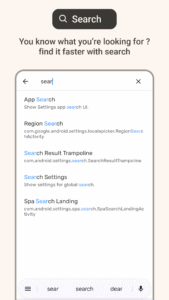
The fastest way to find any setting. Our quick settings search finds any settings menu instantly. Managing your mobile settings and hidden settings has never been easier.
Unlock Key Hidden & Advanced Settings:
Our app provides quick shortcuts to hundreds of powerful phone settings:
🔋 Battery Optimization Quick Settings:
Extend battery life by managing background app settings. Useful for MIUI and HyperOS devices like Redmi and Poco.
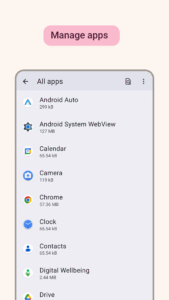
📱 Manage Apps Quick Settings:
Access hidden app settings to disable bloatware and unwanted system apps.
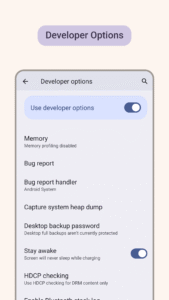
👨💻 Developer Options Quick Settings:
One-tap shortcut to advanced developer settings for power users.
🔒 Private DNS Quick Settings:
Quick access to network settings that block ads and enhance security.
⚡ Screen Refresh Rate Settings:
A hidden setting to change your screen display settings for smoother experience.
📡 Advanced Network Settings:
Access APN settings and other deep network settings to fix connectivity.
🛠️ Engineering Mode:
Engineer mode options, and MTK engineering mode features for power users. Many devices use MTK processors like Redmi, Realme, Poco, Samsung.
⚙️ And much more:
Developer Options hidden settings, MTK/engineering mode hidden settings, network (APN, LTE, band, roaming, VPN, DNS, Wi-Fi, hotspot), battery (saver, optimization), security & privacy (biometric, fingerprint, lockscreen, notifications, usage access), display (screen, refresh rate, brightness, rotation, screensaver, DPI), sound (ringtone, vibration), apps (default, permissions, dual apps, second space, bloatware removal), google settings and ads settings, system (accounts, language, input, storage, date/time, accessibility, engineer mode, location, system UI tuner, quick settings, Google/autofill sync) hidden settings.
App supports Samsung, Xiaomi (MIUI, HyperOS, Poco, Redmi), Vivo, Oppo, OnePlus, Realme, LG, Infinix.
Download now All Settings app for quick fix, quick access to all mobile settings & hidden settings!
⚠️ Disclaimer:
Please use this settings app with caution.
Show more
Show less
Advertisement
Remove ads, dark theme, and more with
Premium
Stop digging through confusing settings app menus. Hidden Settings is the quick, powerful, all-in-one settings app and Activity Launcher for settings app that puts you back in control of your phone's settings. We offer quick access to every phone setting, app setting, and system setting, making device settings easy to find and manage.
This app is a better alternative to the system settings app, or Activity Launcher but for settings, or MIUI downloader news and apps, or miuies – roms & apps hidden settings feature.
This is your new control center for Android settings. Get quick access to standard mobile settings and unlock advanced hidden settings. This is the ultimate tool for quick settings management and finding any device setting.
Some manufacturers hide settings like Samsung, Xiaomi (MIUI, HyperOS), Poco, Redmi, Vivo, Oppo, OnePlus, Realme, LG, Infinix.
Why You'll Love Our Quick Settings & Activity Launcher App:
► Quick Settings Shortcuts:
Create quick shortcuts for any settings you use often. Instantly access Wi-Fi settings, Battery settings, Developer settings, or any other phone setting. It's the ultimate tool for quick settings access.
► Hidden & System Settings Hub:
We organize every phone setting for quick management:
•
All Settings:
A complete directory of every launchable settings activity on your phone, similar to Activity Launcher.
•
Hidden Settings:
Discover powerful hidden settings and secret device settings, similar to "MIUI downloader news and apps" or "miuies – roms & apps" hidden settings feature.
•
System Settings:
All your standard Android settings for quick settings access.
► Quick Settings Search:
The fastest way to find any setting. Our quick settings search finds any settings menu instantly. Managing your mobile settings and hidden settings has never been easier.
Unlock Key Hidden & Advanced Settings:
Our app provides quick shortcuts to hundreds of powerful phone settings:
🔋 Battery Optimization Quick Settings:
Extend battery life by managing background app settings. Useful for MIUI and HyperOS devices like Redmi and Poco.
📱 Manage Apps Quick Settings:
Access hidden app settings to disable bloatware and unwanted system apps.
👨💻 Developer Options Quick Settings:
One-tap shortcut to advanced developer settings for power users.
🔒 Private DNS Quick Settings:
Quick access to network settings that block ads and enhance security.
⚡ Screen Refresh Rate Settings:
A hidden setting to change your screen display settings for smoother experience.
📡 Advanced Network Settings:
Access APN settings and other deep network settings to fix connectivity.
🛠️ Engineering Mode:
Engineer mode options, and MTK engineering mode features for power users. Many devices use MTK processors like Redmi, Realme, Poco, Samsung.
⚙️ And much more:
Developer Options hidden settings, MTK/engineering mode hidden settings, network (APN, LTE, band, roaming, VPN, DNS, Wi-Fi, hotspot), battery (saver, optimization), security & privacy (biometric, fingerprint, lockscreen, notifications, usage access), display (screen, refresh rate, brightness, rotation, screensaver, DPI), sound (ringtone, vibration), apps (default, permissions, dual apps, second space, bloatware removal), google settings and ads settings, system (accounts, language, input, storage, date/time, accessibility, engineer mode, location, system UI tuner, quick settings, Google/autofill sync) hidden settings.
App supports Samsung, Xiaomi (MIUI, HyperOS, Poco, Redmi), Vivo, Oppo, OnePlus, Realme, LG, Infinix.
Download now All Settings app for quick fix, quick access to all mobile settings & hidden settings!
⚠️ Disclaimer:
Please use this settings app with caution.
Show more
Show less
Download Settings: All Quick Access APK
Fast, free and safe download.
APK Permissions 13
- android.permission.ACCESS_ADSERVICES_AD_ID
- android.permission.ACCESS_ADSERVICES_ATTRIBUTION
- android.permission.ACCESS_ADSERVICES_TOPICS
- android.permission.ACCESS_NETWORK_STATE
- android.permission.ACCESS_WIFI_STATE
- android.permission.FOREGROUND_SERVICE
- android.permission.GET_ACCOUNTS
- android.permission.INTERNET
- android.permission.WAKE_LOCK
- com.android.vending.BILLING
- com.google.android.finsky.permission.BIND_GET_INSTALL_REFERRER_SERVICE
- com.google.android.gms.permission.AD_ID
- com.netvor.hiddensettings.DYNAMIC_RECEIVER_NOT_EXPORTED_PERMISSION
APK Verified
The cryptographic signature guarantees that the file is safe to install and was not tampered with in any way.


Frequently Asked Questions about Settings: All Quick Access APK
This is the universal variant — a single APK that contains native libraries for every CPU architecture. It installs on any Android device but is larger than per-architecture variants.
Yes — the APK's signature has been cryptographically verified against the publisher's signing key. The SHA-256 hash is shown in the File Information panel so you can independently confirm the file matches the original release.
Android 23 (API level 35) or newer. Older devices will refuse the install.
Install a free app like 'CPU-Z' or 'Droid Hardware Info' from the Play Store and look at the ABI / Instruction Set row. Most phones made after 2017 are arm64-v8a; if in doubt, download the universal variant.
All variants are functionally identical — same features, same version. They differ only in which CPU architectures the native code is compiled for, and (sometimes) which screen densities the included graphics target. Pick the one that matches your device for the smallest install size, or pick 'Universal' if you're unsure.