
Download Nintendo Store APK 3.0.1 arm64-v8a, armeabi-v7a, x86, x86_64 · Android 29+
Download APK
Verified Safe
This is the arm64-v8a, armeabi-v7a, x86, x86_64 build of Nintendo Store 3.0.1. Pick this build if your device's primary ABI matches.
File size: 46.4 MB • Min Android: 29 • Target Android: 35 • Version code: 34 • Framework: Native (Java/Kotlin) • Permissions: 14
Screenshots
File Information
| Package Name | com.nintendo.znej |
|---|---|
| Version Name | 3.0.1 |
| Version Code | 34 |
| Architecture | arm64-v8a, armeabi-v7a, x86, x86_64 |
| Min Android Version | Android 29 (API 35) |
| Main Activity | jp.co.nintendo.entry.ui.bootsequence.BootActivity |
| Framework | Native (Java/Kotlin) |
| File Size | 46.43 MB |
| Signature (SHA1) | 5B640801A43A597F0C5DDD3F5795EC63B8967EDA |
| File Hash (SHA256) | 0869a722a6428864ff2eb9253a911cb16fe4298bdc1f165b70318cec6b4eb475 |
What's New
The Nintendo Store app has been released!
App Description
Nintendo Store is a free app for browsing Nintendo systems, accessories, games, and merchandise. You can use this app to access all the features below!
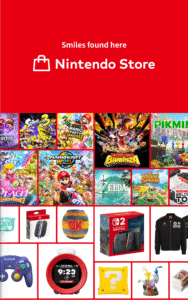
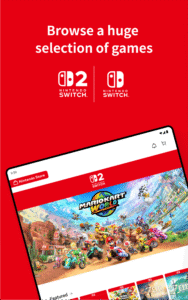
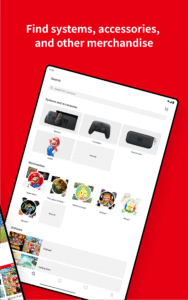
■ Shop on My Nintendo Store
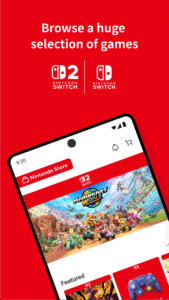
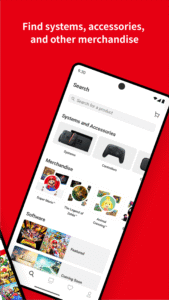
You can use this app to browse Nintendo Switch™ 2 / Nintendo Switch systems and accessories, physical and digital games, and other Nintendo products and merchandise—and then jump directly to My Nintendo™ Store to make purchases.
Note: Physical products are not available in all countries/regions.
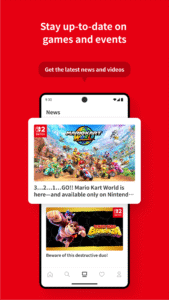
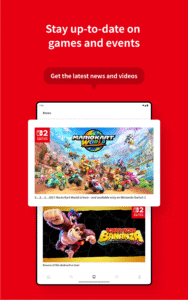
■ Get the latest info on games
You can stay up-to-date with the latest news on Nintendo games, events, and more!
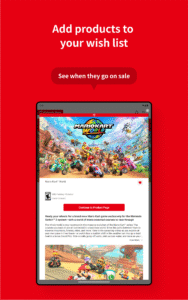
■ Receive notifications about sales
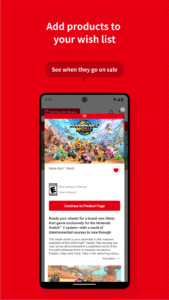
You can turn on push notifications for when items on your Wish List go on sale.
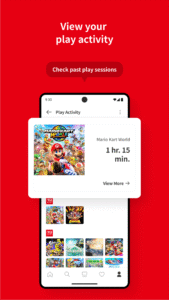
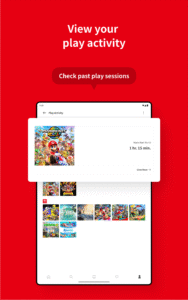
■ Review your play activity
You can sign in with your Nintendo Account to see your Nintendo Switch 2 / Nintendo Switch play activity. If you had a Nintendo 3DS™ or Wii U™ system, you can see your play activity logged prior to February 2020.
Note: To view your Nintendo 3DS and Wii U play activity, you'll need to link your Nintendo Network ID (NNID) to your Nintendo Account.
■ Check in at events
You can use the app to check in at official Nintendo stores and events and earn related rewards! Your check-in activity will also be accessible within the app.
Attention:
● You must be at least 17 years old to access some content in this app.
● You must sign in to a Nintendo Account to use some app features.
● Persistent internet and a compatible smart device are required. Data charges may apply.
● Android 10.0 or later is required.
● May include advertising.
● With your consent, we permit our third-party partners to collect data from this app for analytical and marketing purposes. For more information about our ads, please see the "How we use your information" section of the Nintendo Privacy Policy.
User Agreement:
support.nintendo.com/jp/legal-notes/znej-eula-selector/index.html
■ Shop on My Nintendo Store
You can use this app to browse Nintendo Switch™ 2 / Nintendo Switch systems and accessories, physical and digital games, and other Nintendo products and merchandise—and then jump directly to My Nintendo™ Store to make purchases.
Note: Physical products are not available in all countries/regions.
■ Get the latest info on games
You can stay up-to-date with the latest news on Nintendo games, events, and more!
■ Receive notifications about sales
You can turn on push notifications for when items on your Wish List go on sale.
■ Review your play activity
You can sign in with your Nintendo Account to see your Nintendo Switch 2 / Nintendo Switch play activity. If you had a Nintendo 3DS™ or Wii U™ system, you can see your play activity logged prior to February 2020.
Note: To view your Nintendo 3DS and Wii U play activity, you'll need to link your Nintendo Network ID (NNID) to your Nintendo Account.
■ Check in at events
You can use the app to check in at official Nintendo stores and events and earn related rewards! Your check-in activity will also be accessible within the app.
Attention:
● You must be at least 17 years old to access some content in this app.
● You must sign in to a Nintendo Account to use some app features.
● Persistent internet and a compatible smart device are required. Data charges may apply.
● Android 10.0 or later is required.
● May include advertising.
● With your consent, we permit our third-party partners to collect data from this app for analytical and marketing purposes. For more information about our ads, please see the "How we use your information" section of the Nintendo Privacy Policy.
User Agreement:
support.nintendo.com/jp/legal-notes/znej-eula-selector/index.html
Download Nintendo Store APK
Fast, free and safe download.
APK Permissions 14
- android.permission.ACCESS_ADSERVICES_AD_ID
- android.permission.ACCESS_ADSERVICES_ATTRIBUTION
- android.permission.ACCESS_COARSE_LOCATION
- android.permission.ACCESS_FINE_LOCATION
- android.permission.ACCESS_NETWORK_STATE
- android.permission.EXPAND_STATUS_BAR
- android.permission.INTERNET
- android.permission.POST_NOTIFICATIONS
- android.permission.VIBRATE
- android.permission.WAKE_LOCK
- com.google.android.c2dm.permission.RECEIVE
- com.google.android.finsky.permission.BIND_GET_INSTALL_REFERRER_SERVICE
- com.google.android.gms.permission.AD_ID
- com.nintendo.znej.DYNAMIC_RECEIVER_NOT_EXPORTED_PERMISSION
APK Verified
The cryptographic signature guarantees that the file is safe to install and was not tampered with in any way.
Similar in Lifestyle


More by Nintendo Co., Ltd.


Frequently Asked Questions about Nintendo Store APK
This variant is built for devices that report `arm64-v8a, armeabi-v7a, x86, x86_64` as their primary ABI. If your device's CPU matches, this is the smallest, fastest version to install.
Yes — the APK's signature has been cryptographically verified against the publisher's signing key. The SHA-256 hash is shown in the File Information panel so you can independently confirm the file matches the original release.
Android 29 (API level 35) or newer. Older devices will refuse the install.
Install a free app like 'CPU-Z' or 'Droid Hardware Info' from the Play Store and look at the ABI / Instruction Set row. Most phones made after 2017 are arm64-v8a; if in doubt, download the universal variant.
All variants are functionally identical — same features, same version. They differ only in which CPU architectures the native code is compiled for, and (sometimes) which screen densities the included graphics target. Pick the one that matches your device for the smallest install size, or pick 'Universal' if you're unsure.