
Download Nintendo Switch Parental Controls APK 2.2.0 arm64-v8a, armeabi-v7a, x86, x86_64 · Android 26+
Download APK
Verified Safe
This is the arm64-v8a, armeabi-v7a, x86, x86_64 build of Nintendo Switch Parental Controls 2.2.0. Pick this build if your device's primary ABI matches.
File size: 88.5 MB • Min Android: 26 • Target Android: 35 • Version code: 560 • Framework: Native (Java/Kotlin) • Permissions: 12
Screenshots
File Information
| Package Name | com.nintendo.znma |
|---|---|
| Version Name | 2.2.0 |
| Version Code | 560 |
| Architecture | arm64-v8a, armeabi-v7a, x86, x86_64 |
| Min Android Version | Android 26 (API 35) |
| Main Activity | com.nintendo.znma.ui.splash.SplashActivity |
| Framework | Native (Java/Kotlin) |
| File Size | 88.49 MB |
| Signature (SHA1) | 0C3D789F5ED23F2B34C79660A37190D1C873A3F2 |
| File Hash (SHA256) | 908c2e0d0de7f5109591abf4d010fe48230ea05d9eb529fd4a80ddf0af84fa73 |
What's New
・ Improved the Play Activity display.
・ Added tips to the bottom of notifications.
・ Fixed behavior that allowed the menu to slide when setting the time.
・ Other improvements have also been made.
・ Added tips to the bottom of notifications.
・ Fixed behavior that allowed the menu to slide when setting the time.
・ Other improvements have also been made.
App Description
Nintendo Switch Parental Controls™ is a free app that allows you to easily monitor your child's use of the Nintendo Switch 2 or Nintendo Switch system.
◆ A Nintendo Switch 2 or Nintendo Switch system is required to use this app.
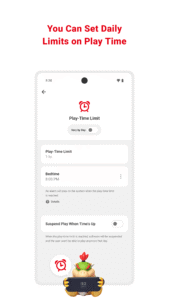
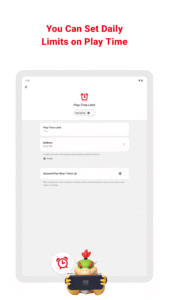
■ Set a daily play-time limit
You can set a timer for how long your child can play for each day. You can select different settings for each day of the week, and even set it so that the game is suspended on the system as soon as the play-time limit is reached.
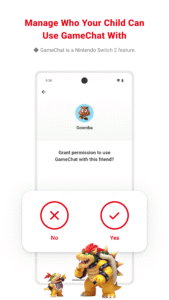
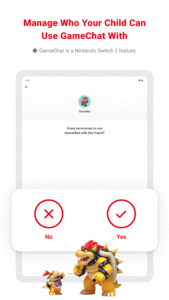
■ Manage your child's GameChat settings
If you allow your child to use GameChat, you can manage which friends they're approved to chat with and decide when they can use video chat.
◆ The GameChat feature can only be used on Nintendo Switch 2 systems.
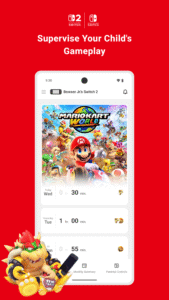
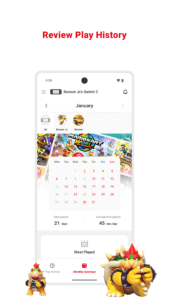
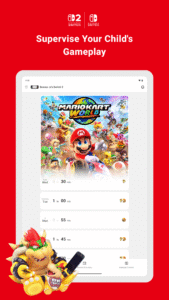
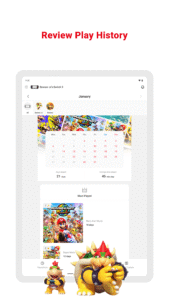
■ View your child's play activity
You can easily check which games your child plays and for how long. You'll also get a monthly overview of their gameplay activity.
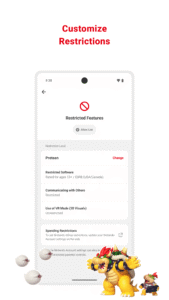
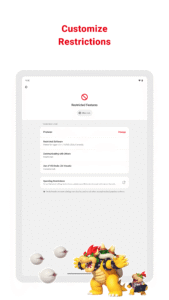
■ Set restrictions based on your child's age
You can set up age-based restrictions on the games your child can play and the features they can use.
Attention:
● To use the Nintendo Switch Parental Controls app, a parent or guardian (aged 18 or above) will need to have a Nintendo Account.
● Purchasing restrictions, including restrictions on purchasing products and services in Nintendo eShop, can be set up in the Nintendo Account settings.
● To make use of all of the features and settings available in the Nintendo Switch Parental Controls app, all linked Nintendo Switch 2 and Nintendo Switch systems need to be using the latest system version.
● For details about the GameChat feature, please visit support.nintendo.com.
◆ A Nintendo Switch 2 or Nintendo Switch system is required to use this app.
■ Set a daily play-time limit
You can set a timer for how long your child can play for each day. You can select different settings for each day of the week, and even set it so that the game is suspended on the system as soon as the play-time limit is reached.
■ Manage your child's GameChat settings
If you allow your child to use GameChat, you can manage which friends they're approved to chat with and decide when they can use video chat.
◆ The GameChat feature can only be used on Nintendo Switch 2 systems.
■ View your child's play activity
You can easily check which games your child plays and for how long. You'll also get a monthly overview of their gameplay activity.
■ Set restrictions based on your child's age
You can set up age-based restrictions on the games your child can play and the features they can use.
Attention:
● To use the Nintendo Switch Parental Controls app, a parent or guardian (aged 18 or above) will need to have a Nintendo Account.
● Purchasing restrictions, including restrictions on purchasing products and services in Nintendo eShop, can be set up in the Nintendo Account settings.
● To make use of all of the features and settings available in the Nintendo Switch Parental Controls app, all linked Nintendo Switch 2 and Nintendo Switch systems need to be using the latest system version.
● For details about the GameChat feature, please visit support.nintendo.com.
Download Nintendo Switch Parental Controls APK
Fast, free and safe download.
APK Permissions 12
- android.permission.ACCESS_ADSERVICES_AD_ID
- android.permission.ACCESS_ADSERVICES_ATTRIBUTION
- android.permission.ACCESS_NETWORK_STATE
- android.permission.INTERNET
- android.permission.POST_NOTIFICATIONS
- android.permission.USE_BIOMETRIC
- android.permission.USE_FINGERPRINT
- android.permission.VIBRATE
- android.permission.WAKE_LOCK
- com.google.android.c2dm.permission.RECEIVE
- com.google.android.finsky.permission.BIND_GET_INSTALL_REFERRER_SERVICE
- com.nintendo.znma.DYNAMIC_RECEIVER_NOT_EXPORTED_PERMISSION
APK Verified
The cryptographic signature guarantees that the file is safe to install and was not tampered with in any way.
Similar in Lifestyle


More by Nintendo Co., Ltd.


Frequently Asked Questions about Nintendo Switch Parental Controls APK
This variant is built for devices that report `arm64-v8a, armeabi-v7a, x86, x86_64` as their primary ABI. If your device's CPU matches, this is the smallest, fastest version to install.
Yes — the APK's signature has been cryptographically verified against the publisher's signing key. The SHA-256 hash is shown in the File Information panel so you can independently confirm the file matches the original release.
Android 26 (API level 35) or newer. Older devices will refuse the install.
Install a free app like 'CPU-Z' or 'Droid Hardware Info' from the Play Store and look at the ABI / Instruction Set row. Most phones made after 2017 are arm64-v8a; if in doubt, download the universal variant.
All variants are functionally identical — same features, same version. They differ only in which CPU architectures the native code is compiled for, and (sometimes) which screen densities the included graphics target. Pick the one that matches your device for the smallest install size, or pick 'Universal' if you're unsure.