
Download Notepad – Notes and To Do List APK 2.0.701 arm64-v8a, armeabi-v7a, x86, x86_64 · Android 16+
Download APK
Verified Safe
This is the arm64-v8a, armeabi-v7a, x86, x86_64 build of Notepad – Notes and To Do List 2.0.701. Pick this build if your device's primary ABI matches.
File size: 19.6 MB • Min Android: 16 • Target Android: 28 • Version code: 16614 • Framework: Native (Java/Kotlin) • Permissions: 19
Screenshots
File Information
| Package Name | com.ztnstudio.notepad |
|---|---|
| Version Name | 2.0.701 |
| Version Code | 16614 |
| Architecture | arm64-v8a, armeabi-v7a, x86, x86_64 |
| Min Android Version | Android 16 (API 28) |
| Main Activity | com.ztnstudio.notepad.NoteListActivity |
| Framework | Native (Java/Kotlin) |
| File Size | 19.59 MB |
| Signature (SHA1) | 83F62B034B1AEC0D2024952F4AE604181BFECCBA |
| File Hash (SHA256) | 1c34fdd6e44bf3b9db4f8ffb4565181e8c14401ae6c529102a7e5b623981ca54 |
What's New
Thank you for using our app. The latest update optimizes performance and integrates improvements based on your suggestions.
App Description
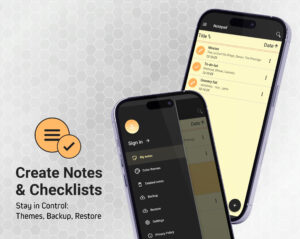
Notepad
is an easy-to-use
free notes app
for Android, optimized for after-call note taking. This clear and simple notepad app allows you to make
quick notes and checklists
to help organize your life with great ease.
SIMPLE AND CLEAR
✔
This quick notepad allows you to
sort notes
by date or title to help you keep them in order and a useful
search function
will help you find specific notes if you have many saved in your list of notes.
SHARE AND CONNECT
☝
All notes can easily be
shared with others
via your email account or various social media platforms, and a smart link to phone calls allows you to write notes or memos immediately following every phone call made or received. Connect all aspects of your communication with this smart Notepad app!
ORGANIZE YOUR TASKS
✍
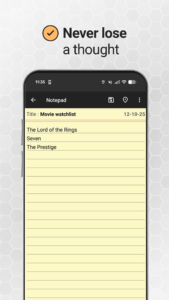
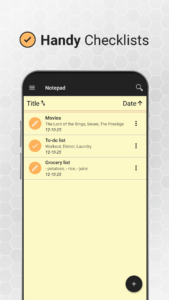
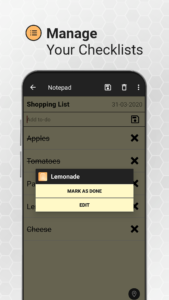
The useful checklist function allows you to create clear checklists such as
to do lists, shopping lists or task lists
, and also allows you to cross out items on the list when they are completed without having to delete them, in case you need to refer to the original list later.
SMART CONNECTION TO PHONE CALLS
✆
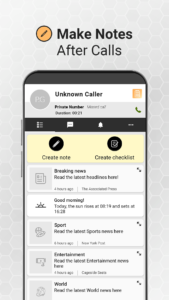
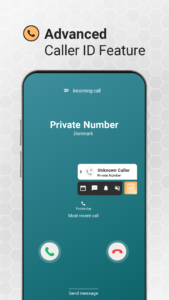
Following every phone call Notepad is activated on your phone, allowing you to quickly make notes so that you don’t forget anything important from the call. An advanced
Caller ID feature
also displays detailed information about the call. Details such as caller name, number, time and much more are displayed and serve as a useful reminder when making notes.
NOTEPAD KEY FEATURES
✎
✒
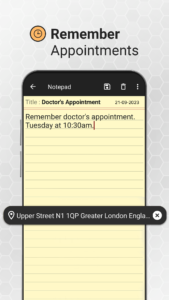
Clearly presented notes
which can be sorted by date or title. Quickly and easily edit, save and delete notes at any time.
✒
Easy checklist function
where completed items can be marked as ‘done’.
✒
Useful search function
for those difficult-to-find notes to save time.
✒
Sort your notes
by date or title.
✒
Backup & restore notes
so that you don’t lose any important information. You can backup directly to your phone or to Google Drive.
✒
Quickly share notes
with others via email, SMS or various social media platforms including Facebook, Twitter, Instagram, WhatsApp, Messenger, Skype and LinkedIn.
✒
Create notes quickly
following phone calls with a handy quick link to Notepad after every call made or received.
✒
Identify unknown callers
with the advanced caller ID feature and see detailed call information - useful when making notes after phone calls!
For your privacy and data protection
we do not have access
to any of your notes or store any of the information contained within them. Therefore,
we recommend that you regularly use the useful backup feature
on this app to avoid the accidental loss of any important information.
Install Notepad today and
organize your life
with this easy-to-use notepad application and enjoy a hassle-free time. Never be stuck without a pen and paper again!
is an easy-to-use
free notes app
for Android, optimized for after-call note taking. This clear and simple notepad app allows you to make
quick notes and checklists
to help organize your life with great ease.
SIMPLE AND CLEAR
✔
This quick notepad allows you to
sort notes
by date or title to help you keep them in order and a useful
search function
will help you find specific notes if you have many saved in your list of notes.
SHARE AND CONNECT
☝
All notes can easily be
shared with others
via your email account or various social media platforms, and a smart link to phone calls allows you to write notes or memos immediately following every phone call made or received. Connect all aspects of your communication with this smart Notepad app!
ORGANIZE YOUR TASKS
✍
The useful checklist function allows you to create clear checklists such as
to do lists, shopping lists or task lists
, and also allows you to cross out items on the list when they are completed without having to delete them, in case you need to refer to the original list later.
SMART CONNECTION TO PHONE CALLS
✆
Following every phone call Notepad is activated on your phone, allowing you to quickly make notes so that you don’t forget anything important from the call. An advanced
Caller ID feature
also displays detailed information about the call. Details such as caller name, number, time and much more are displayed and serve as a useful reminder when making notes.
NOTEPAD KEY FEATURES
✎
✒
Clearly presented notes
which can be sorted by date or title. Quickly and easily edit, save and delete notes at any time.
✒
Easy checklist function
where completed items can be marked as ‘done’.
✒
Useful search function
for those difficult-to-find notes to save time.
✒
Sort your notes
by date or title.
✒
Backup & restore notes
so that you don’t lose any important information. You can backup directly to your phone or to Google Drive.
✒
Quickly share notes
with others via email, SMS or various social media platforms including Facebook, Twitter, Instagram, WhatsApp, Messenger, Skype and LinkedIn.
✒
Create notes quickly
following phone calls with a handy quick link to Notepad after every call made or received.
✒
Identify unknown callers
with the advanced caller ID feature and see detailed call information - useful when making notes after phone calls!
For your privacy and data protection
we do not have access
to any of your notes or store any of the information contained within them. Therefore,
we recommend that you regularly use the useful backup feature
on this app to avoid the accidental loss of any important information.
Install Notepad today and
organize your life
with this easy-to-use notepad application and enjoy a hassle-free time. Never be stuck without a pen and paper again!
Download Notepad – Notes and To Do List APK
Fast, free and safe download.
APK Permissions 19
- android.permission.ACCESS_COARSE_LOCATION
- android.permission.ACCESS_FINE_LOCATION
- android.permission.ACCESS_NETWORK_STATE
- android.permission.ACCESS_NOTIFICATION_POLICY
- android.permission.ANSWER_PHONE_CALLS
- android.permission.BATTERY_STATS
- android.permission.CALL_PHONE
- android.permission.FOREGROUND_SERVICE
- android.permission.INTERNET
- android.permission.READ_CONTACTS
- android.permission.READ_EXTERNAL_STORAGE
- android.permission.READ_PHONE_STATE
- android.permission.RECEIVE_BOOT_COMPLETED
- android.permission.SYSTEM_ALERT_WINDOW
- android.permission.WAKE_LOCK
- android.permission.WRITE_CONTACTS
- android.permission.WRITE_EXTERNAL_STORAGE
- com.google.android.c2dm.permission.RECEIVE
- com.google.android.finsky.permission.BIND_GET_INSTALL_REFERRER_SERVICE
APK Verified
The cryptographic signature guarantees that the file is safe to install and was not tampered with in any way.


Frequently Asked Questions about Notepad – Notes and To Do List APK
This variant is built for devices that report `arm64-v8a, armeabi-v7a, x86, x86_64` as their primary ABI. If your device's CPU matches, this is the smallest, fastest version to install.
Yes — the APK's signature has been cryptographically verified against the publisher's signing key. The SHA-256 hash is shown in the File Information panel so you can independently confirm the file matches the original release.
Android 16 (API level 28) or newer. Older devices will refuse the install.
Install a free app like 'CPU-Z' or 'Droid Hardware Info' from the Play Store and look at the ABI / Instruction Set row. Most phones made after 2017 are arm64-v8a; if in doubt, download the universal variant.
All variants are functionally identical — same features, same version. They differ only in which CPU architectures the native code is compiled for, and (sometimes) which screen densities the included graphics target. Pick the one that matches your device for the smallest install size, or pick 'Universal' if you're unsure.