
Download Mobile Account Manager – My O2 APK 14.5.20 Universal · Android 23+
Download APK
Verified Safe
This is the universal build of Mobile Account Manager – My O2 14.5.20. It contains native libraries for every CPU architecture (arm64-v8a, armeabi-v7a, x86, x86_64), so it installs on any Android device. The trade-off is size — it's larger than per-architecture variants. Pick this one if you're unsure which CPU your phone has, or if you plan to share the APK with multiple devices.
File size: 12.2 MB • Min Android: 23 • Target Android: 33 • Version code: 432140520 • Framework: Native (Java/Kotlin) • Permissions: 26
Screenshots


File Information
| Package Name | uk.co.o2.android.myo2 |
|---|---|
| Version Name | 14.5.20 |
| Version Code | 432140520 |
| Architecture | Universal |
| Min Android Version | Android 23 (API 33) |
| Main Activity | com.tuenti.messenger.ui.activity.MainActivity |
| Framework | Native (Java/Kotlin) |
| File Size | 12.18 MB |
| Signature (SHA1) | EA90FD5C51D23B701099061860AEE5EAC059D463 |
| File Hash (SHA256) | 790b8b0602178edbf5bdd33765b60f6c868c15b6649e4ad50380d3da0308e449 |
What's New
We’ve fixed some bugs.
App Description
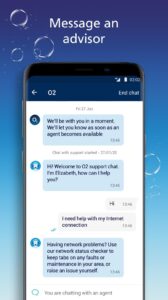
The O2 app that allows you to manage your mobile accounts, access exclusive offers and shop for new accessories and mobile devices!
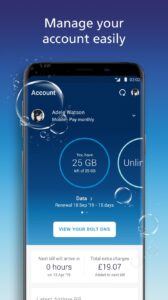
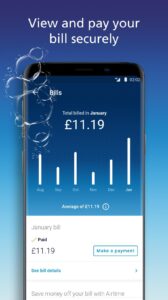
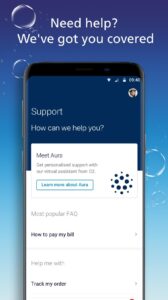
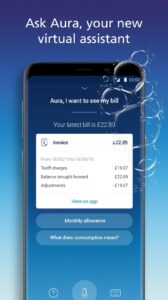
With the My O2 app you’ll be able to add data Bolt Ons, see your recent mobile charges, check your allowances, shop for new device upgrades and gadgets in our online store and get access to exclusive offers for O2 customers including free Wi-Fi. Sign in safe and securely with your fingerprint to access personal details and bills support. Sign up to Airtime Rewards, shop well-known brands and receive discounts on your O2 mobile bill!
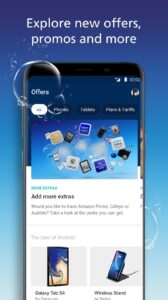
The explore tab of our app gives you the option to buy our best-selling products with exclusive offers on the latest android devices and accessories including Samsung Galaxy S20, wireless headphones, Fit Bits and many more.
Bear in mind that the My O2 app isn’t available for O2 Business customers. And if you use the My O2 app outside of our Europe Zone, data roaming charges may apply.
With the My O2 app you’ll be able to add data Bolt Ons, see your recent mobile charges, check your allowances, shop for new device upgrades and gadgets in our online store and get access to exclusive offers for O2 customers including free Wi-Fi. Sign in safe and securely with your fingerprint to access personal details and bills support. Sign up to Airtime Rewards, shop well-known brands and receive discounts on your O2 mobile bill!
The explore tab of our app gives you the option to buy our best-selling products with exclusive offers on the latest android devices and accessories including Samsung Galaxy S20, wireless headphones, Fit Bits and many more.
Bear in mind that the My O2 app isn’t available for O2 Business customers. And if you use the My O2 app outside of our Europe Zone, data roaming charges may apply.
Download Mobile Account Manager – My O2 APK
Fast, free and safe download.
APK Permissions 26
- android.permission.ACCESS_BACKGROUND_LOCATION
- android.permission.ACCESS_COARSE_LOCATION
- android.permission.ACCESS_FINE_LOCATION
- android.permission.ACCESS_NETWORK_STATE
- android.permission.ACCESS_WIFI_STATE
- android.permission.CAMERA
- android.permission.CHANGE_WIFI_STATE
- android.permission.FOREGROUND_SERVICE
- android.permission.INTERNET
- android.permission.POST_NOTIFICATIONS
- android.permission.READ_CONTACTS
- android.permission.READ_PHONE_STATE
- android.permission.READ_PRIVILEGED_PHONE_STATE
- android.permission.RECEIVE_BOOT_COMPLETED
- android.permission.RECORD_AUDIO
- android.permission.SYSTEM_ALERT_WINDOW
- android.permission.USE_BIOMETRIC
- android.permission.USE_FINGERPRINT
- android.permission.VIBRATE
- android.permission.WAKE_LOCK
- android.permission.WRITE_EXTERNAL_STORAGE
- com.google.android.c2dm.permission.RECEIVE
- com.google.android.finsky.permission.BIND_GET_INSTALL_REFERRER_SERVICE
- com.google.android.gms.permission.AD_ID
- uk.co.o2.android.myo2.DYNAMIC_RECEIVER_NOT_EXPORTED_PERMISSION
- uk.co.o2.android.myo2.permission.BROADCAST
APK Verified
The cryptographic signature guarantees that the file is safe to install and was not tampered with in any way.


Frequently Asked Questions about Mobile Account Manager – My O2 APK
This is the universal variant — a single APK that contains native libraries for every CPU architecture. It installs on any Android device but is larger than per-architecture variants.
Yes — the APK's signature has been cryptographically verified against the publisher's signing key. The SHA-256 hash is shown in the File Information panel so you can independently confirm the file matches the original release.
Android 23 (API level 33) or newer. Older devices will refuse the install.
Install a free app like 'CPU-Z' or 'Droid Hardware Info' from the Play Store and look at the ABI / Instruction Set row. Most phones made after 2017 are arm64-v8a; if in doubt, download the universal variant.
All variants are functionally identical — same features, same version. They differ only in which CPU architectures the native code is compiled for, and (sometimes) which screen densities the included graphics target. Pick the one that matches your device for the smallest install size, or pick 'Universal' if you're unsure.