
Download Meteor Speed Test - Ad Free APK 2.61.0-2 arm64-v8a, armeabi-v7a, x86, x86_64 · Android 24+
Download APK
Verified Safe
This is the arm64-v8a, armeabi-v7a, x86, x86_64 build of Meteor Speed Test - Ad Free 2.61.0-2. Pick this build if your device's primary ABI matches.
File size: 13.1 MB • Min Android: 24 • Target Android: 35 • Version code: 2061000 • Framework: Native (Java/Kotlin) • Permissions: 16
Screenshots


File Information
| Package Name | meteor.test.and.grade.internet.connection.speed |
|---|---|
| Version Name | 2.61.0-2 |
| Version Code | 2061000 |
| Architecture | arm64-v8a, armeabi-v7a, x86, x86_64 |
| Min Android Version | Android 24 (API 35) |
| Main Activity | meteor.test.and.grade.internet.connection.speed.activities.WelcomeActivity |
| Framework | Native (Java/Kotlin) |
| File Size | 13.06 MB |
| Signature (SHA1) | 83AC1B2A8FC6E5C5ED344CF0C6B5699506E4F7B0 |
| File Hash (SHA256) | ea9c1e308bdd7f4fd9f9aa1c5de44d8de952281d7e477965d0957ddfa326941e |
What's New
Bug fixes and stability improvements.
App Description
- Testing speed for mobile and WiFi internet connections
Meteor is an ad-free internet speed test tool that can be used to check the speed of your mobile and wireless connection (on 3G, 4G LTE or 5G), as well as for WiFi speed testing.
- Test connection speed and app performance
Meteor’s unique test allows you to see how your internet connection and download speed will affect the performance of your favorite mobile apps. You can test app performance for up to six mobile apps at a time, from 27 of the most popular apps and games around the world.
- Test connection speed and app performance
Meteor’s unique test allows you to see how your internet connection will affect the performance of your favorite mobile apps and games. You can test up to six mobile apps at a time, from 27 of the most popular ones around the world.
- Easy to use speed test
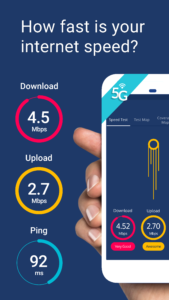
One simple test gives you easy-to-understand results for download speed, upload speed and ping time. Then, simply choose the apps you use most to see how they are impacted by your current network connection - no more trying to work out whether your network service provider is delivering the 5G connection you need.
- Historic internet speed test performance
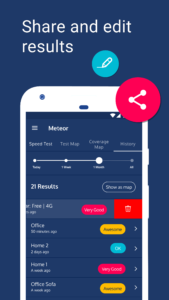
View all your internet speed tests by location on a map and sort them by best and worst performance. See a timeline of your tests in the history tab and review the stats for each speed test to monitor how your network experience has changed over time.
- Connectivity coverage map
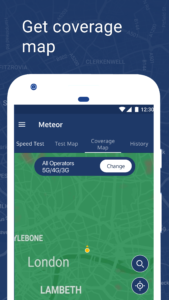
Always know where to find the best coverage with Meteor’s network coverage map. The map shows signal strength down to street level using signal data from local users. With network stats on local network operators, you can check coverage ahead of a trip, check the internet and signal strength in remote areas, compare your network to other providers in the area, arrange the best local SIM.
- Improving network connection
Meteor is completely free to use and contains no advertising.
We provide an independent source of truth in mobile network experience: A data source that shows how users experience mobile network speeds, gaming, video, and voice services worldwide. To do this, we collect anonymised data on the signal strength, network, location, and other device sensors. You can stop this at any time in the settings section. We share this data with network operators globally and others in the industry to drive better connectivity for all.
Do Not Sell My Info:
www.opensignal.com/ccpa
Meteor is an ad-free internet speed test tool that can be used to check the speed of your mobile and wireless connection (on 3G, 4G LTE or 5G), as well as for WiFi speed testing.
- Test connection speed and app performance
Meteor’s unique test allows you to see how your internet connection and download speed will affect the performance of your favorite mobile apps. You can test app performance for up to six mobile apps at a time, from 27 of the most popular apps and games around the world.
- Test connection speed and app performance
Meteor’s unique test allows you to see how your internet connection will affect the performance of your favorite mobile apps and games. You can test up to six mobile apps at a time, from 27 of the most popular ones around the world.
- Easy to use speed test
One simple test gives you easy-to-understand results for download speed, upload speed and ping time. Then, simply choose the apps you use most to see how they are impacted by your current network connection - no more trying to work out whether your network service provider is delivering the 5G connection you need.
- Historic internet speed test performance
View all your internet speed tests by location on a map and sort them by best and worst performance. See a timeline of your tests in the history tab and review the stats for each speed test to monitor how your network experience has changed over time.
- Connectivity coverage map
Always know where to find the best coverage with Meteor’s network coverage map. The map shows signal strength down to street level using signal data from local users. With network stats on local network operators, you can check coverage ahead of a trip, check the internet and signal strength in remote areas, compare your network to other providers in the area, arrange the best local SIM.
- Improving network connection
Meteor is completely free to use and contains no advertising.
We provide an independent source of truth in mobile network experience: A data source that shows how users experience mobile network speeds, gaming, video, and voice services worldwide. To do this, we collect anonymised data on the signal strength, network, location, and other device sensors. You can stop this at any time in the settings section. We share this data with network operators globally and others in the industry to drive better connectivity for all.
Do Not Sell My Info:
www.opensignal.com/ccpa
Download Meteor Speed Test - Ad Free APK
Fast, free and safe download.
APK Permissions 16
- android.permission.ACCESS_ADSERVICES_AD_ID
- android.permission.ACCESS_ADSERVICES_ATTRIBUTION
- android.permission.ACCESS_BACKGROUND_LOCATION
- android.permission.ACCESS_COARSE_LOCATION
- android.permission.ACCESS_FINE_LOCATION
- android.permission.ACCESS_NETWORK_STATE
- android.permission.ACCESS_WIFI_STATE
- android.permission.CHANGE_WIFI_STATE
- android.permission.INTERNET
- android.permission.READ_BASIC_PHONE_STATE
- android.permission.RECEIVE_BOOT_COMPLETED
- android.permission.VIBRATE
- android.permission.WAKE_LOCK
- com.google.android.finsky.permission.BIND_GET_INSTALL_REFERRER_SERVICE
- meteor.test.and.grade.internet.connection.speed.assistant.RECEIVE_BROADCAST_PERMISSION
- meteor.test.and.grade.internet.connection.speed.DYNAMIC_RECEIVER_NOT_EXPORTED_PERMISSION
APK Verified
The cryptographic signature guarantees that the file is safe to install and was not tampered with in any way.
Similar in Tools


More by OpenSignal.com

Frequently Asked Questions about Meteor Speed Test - Ad Free APK
This variant is built for devices that report `arm64-v8a, armeabi-v7a, x86, x86_64` as their primary ABI. If your device's CPU matches, this is the smallest, fastest version to install.
Yes — the APK's signature has been cryptographically verified against the publisher's signing key. The SHA-256 hash is shown in the File Information panel so you can independently confirm the file matches the original release.
Android 24 (API level 35) or newer. Older devices will refuse the install.
Install a free app like 'CPU-Z' or 'Droid Hardware Info' from the Play Store and look at the ABI / Instruction Set row. Most phones made after 2017 are arm64-v8a; if in doubt, download the universal variant.
All variants are functionally identical — same features, same version. They differ only in which CPU architectures the native code is compiled for, and (sometimes) which screen densities the included graphics target. Pick the one that matches your device for the smallest install size, or pick 'Universal' if you're unsure.