
Download Opera: Private Web Browser APK 91.1.4817.85143 x86_64 · Android 31+
Download APK
Verified Safe
This is the x86_64 build of Opera: Private Web Browser 91.1.4817.85143. Intel-architecture builds are useful for Android emulators (BlueStacks, NoxPlayer, Android Studio AVD), Chromebooks running ARC, and the small number of Intel-CPU Android phones. Most physical Android phones should download the ARM variant instead.
File size: 85.4 MB • Min Android: 31 • Target Android: 36 • Version code: 1909115508 • Framework: Native (Java/Kotlin) • Permissions: 36
Screenshots
File Information
| Package Name | com.opera.browser |
|---|---|
| Version Name | 91.1.4817.85143 |
| Version Code | 1909115508 |
| Architecture | x86_64 |
| Min Android Version | Android 31 (API 36) |
| Main Activity | com.opera.Opera |
| Framework | Native (Java/Kotlin) |
| File Size | 85.40 MB |
| Signature (SHA1) | EBE9F902C7E1FB068D7EA40DC4F2D83A6FFCA41E |
| File Hash (SHA256) | 30547d0e6510cf49513246b324e497232adf61e9fd6a41c532c79468b568bf0a |
What's New
Thanks for choosing Opera! This version introduces a cleaner bookmarks UI, with the option to switch back to a more detailed view.
More changes/additions:
- Chromium 139
- Media background play setting
- Android 16 support added
- Android 8 and 9 deprecated by Chromium
- 2-QWAC support
- Aria widget and shortcut
- Latest Chromium security updates (2025-08-28)
More changes/additions:
- Chromium 139
- Media background play setting
- Android 16 support added
- Android 8 and 9 deprecated by Chromium
- 2-QWAC support
- Aria widget and shortcut
- Latest Chromium security updates (2025-08-28)
App Description
Your ultimate, no-BS browser – faster, safer, and packed with tools the others
wish
they had. Free VPN, ad-blocking, tracker-blocking, and total customization, all in one package. Say goodbye to basic and hello to a browser that actually does more than load pages.
THE FULL FEATURE LINEUP:
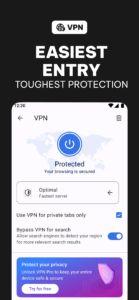
🛡️ Free VPN – Because your privacy shouldn’t come with a price tag.
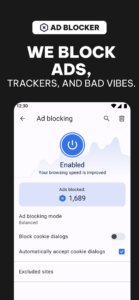
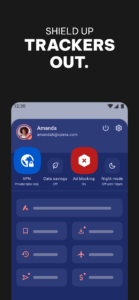
⛔ Enhanced Ad Blocker – Ads? Nope. uBlock Origin-powered, so it actually works.
👀 Tracker Blocker – Stops others from selling your browsing habits.
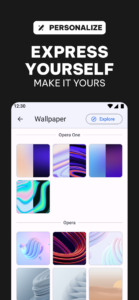
🎨 Total Customization – Dark Mode, wallpapers, themes—make it your browser.
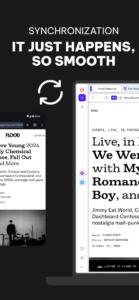
🌍 Sync Across Devices – Keep your tabs, bookmarks, and settings wherever you go.
🚫 BLOCK ADS. TAKE BACK CONTROL.
Tired of the internet looking like Times Square? Our ad blocker does more than slap a bandaid on the problem—it deletes ads, trackers, and all the other garbage slowing you down.
🛡️ BROWSE PRIVATELY, ANYWHERE.
Free VPN = total privacy with just one tap. No sign-ups, no weird data collection, no "7-day free trials" that suddenly charge you $9.99. It just works.
🔒 LOCK DOWN EVERY DEVICE.
Need protection beyond Opera? VPN Pro covers everything—your apps, your entire phone, even your grandma’s tablet (if you’re feeling generous). One subscription, six devices.
📉 DATA SAVINGS THAT ACTUALLY SAVE DATA.
Why load a 10MB webpage when we can slim it down for you? Opera compresses pages, so you get the speed without the data drain.
🎨 YOUR BROWSER, YOUR RULES.
Customize everything—wallpapers, icons, layouts. Dark Mode? Of course. Opera is your browser, not just another cookie-cutter app.
Got questions? Check out our Help and FAQ: opera.com/help
Terms of Service: legal.opera.com/terms
Privacy Policy: legal.opera.com/privacy
Ditch the average. Opera is what the internet should be. Download now and upgrade your browsing game.
wish
they had. Free VPN, ad-blocking, tracker-blocking, and total customization, all in one package. Say goodbye to basic and hello to a browser that actually does more than load pages.
THE FULL FEATURE LINEUP:
🛡️ Free VPN – Because your privacy shouldn’t come with a price tag.
⛔ Enhanced Ad Blocker – Ads? Nope. uBlock Origin-powered, so it actually works.
👀 Tracker Blocker – Stops others from selling your browsing habits.
🎨 Total Customization – Dark Mode, wallpapers, themes—make it your browser.
🌍 Sync Across Devices – Keep your tabs, bookmarks, and settings wherever you go.
🚫 BLOCK ADS. TAKE BACK CONTROL.
Tired of the internet looking like Times Square? Our ad blocker does more than slap a bandaid on the problem—it deletes ads, trackers, and all the other garbage slowing you down.
🛡️ BROWSE PRIVATELY, ANYWHERE.
Free VPN = total privacy with just one tap. No sign-ups, no weird data collection, no "7-day free trials" that suddenly charge you $9.99. It just works.
🔒 LOCK DOWN EVERY DEVICE.
Need protection beyond Opera? VPN Pro covers everything—your apps, your entire phone, even your grandma’s tablet (if you’re feeling generous). One subscription, six devices.
📉 DATA SAVINGS THAT ACTUALLY SAVE DATA.
Why load a 10MB webpage when we can slim it down for you? Opera compresses pages, so you get the speed without the data drain.
🎨 YOUR BROWSER, YOUR RULES.
Customize everything—wallpapers, icons, layouts. Dark Mode? Of course. Opera is your browser, not just another cookie-cutter app.
Got questions? Check out our Help and FAQ: opera.com/help
Terms of Service: legal.opera.com/terms
Privacy Policy: legal.opera.com/privacy
Ditch the average. Opera is what the internet should be. Download now and upgrade your browsing game.
Download Opera: Private Web Browser APK
Fast, free and safe download.
APK Permissions 36
- android.permission.ACCESS_ADSERVICES_TOPICS
- android.permission.ACCESS_COARSE_LOCATION
- android.permission.ACCESS_FINE_LOCATION
- android.permission.ACCESS_NETWORK_STATE
- android.permission.ACCESS_WIFI_STATE
- android.permission.BLUETOOTH
- android.permission.CAMERA
- android.permission.CHANGE_WIFI_MULTICAST_STATE
- android.permission.FOREGROUND_SERVICE_DATA_SYNC
- android.permission.FOREGROUND_SERVICE_MEDIA_PLAYBACK
- android.permission.FOREGROUND_SERVICE_SYSTEM_EXEMPTED
- android.permission.INTERNET
- android.permission.MODIFY_AUDIO_SETTINGS
- android.permission.NFC
- android.permission.POST_NOTIFICATIONS
- android.permission.READ_EXTERNAL_STORAGE
- android.permission.READ_SYNC_SETTINGS
- android.permission.RECEIVE_BOOT_COMPLETED
- android.permission.RECORD_AUDIO
- android.permission.RUN_USER_INITIATED_JOBS
- android.permission.SET_WALLPAPER
- android.permission.SYSTEM_ALERT_WINDOW
- android.permission.VIBRATE
- android.permission.WAKE_LOCK
- android.permission.WRITE_EXTERNAL_STORAGE
- android.permission.WRITE_SYNC_SETTINGS
- com.android.launcher.permission.INSTALL_SHORTCUT
- com.android.vending.BILLING
- com.google.android.c2dm.permission.RECEIVE
- com.google.android.finsky.permission.BIND_GET_INSTALL_REFERRER_SERVICE
- com.google.android.gms.permission.AD_ID
- com.huawei.appmarket.service.commondata.permission.GET_COMMON_DATA
- com.opera.browser.DYNAMIC_RECEIVER_NOT_EXPORTED_PERMISSION
- com.opera.browser.permission.C2D_MESSAGE
- com.opera.browser.permission.GET_PREINSTALL_DATA
- com.opera.browser.permission.PRIVATE_PROVIDERS
APK Verified
The cryptographic signature guarantees that the file is safe to install and was not tampered with in any way.
Other Variants
This release has multiple variants (e.g. diff architectures).
arm64-v8a arm64-v8a, armeabi-v7aSimilar in Communication


Frequently Asked Questions about Opera: Private Web Browser APK
This variant is built for 64-bit Intel (Android emulators, Chromebooks). If your device's CPU matches, this is the smallest, fastest version to install.
Yes — the APK's signature has been cryptographically verified against the publisher's signing key. The SHA-256 hash is shown in the File Information panel so you can independently confirm the file matches the original release.
Android 31 (API level 36) or newer. Older devices will refuse the install.
Install a free app like 'CPU-Z' or 'Droid Hardware Info' from the Play Store and look at the ABI / Instruction Set row. Most phones made after 2017 are arm64-v8a; if in doubt, download the universal variant.
All variants are functionally identical — same features, same version. They differ only in which CPU architectures the native code is compiled for, and (sometimes) which screen densities the included graphics target. Pick the one that matches your device for the smallest install size, or pick 'Universal' if you're unsure.