
Screenshots
File Information
| Package Name | com.oticon.app |
|---|---|
| Version Name | 1.6.1 |
| Version Code | 498697 |
| Architecture | Universal |
| Min Android Version | Android 26 (API 35) |
| Main Activity | crc641d37fc9d5495f985.MainActivity |
| Framework | Native (Java/Kotlin) |
| File Size | 299.70 MB |
| Signature (SHA1) | 8725847F8CD5CC05309931C10D5C237FD4FF4D1F |
| File Hash (SHA256) | 8c0166b5773d89493f93a244138e6e25c5c496a30ad3a3984fb266f0d696d8ff |
What's New
This app version comes with smoother switching between programs. It also lets you find and join available Auracast™ broadcasts directly from the app. Auracast broadcast (available with select hearing aids) allows you to connect to public broadcasts in e.g. airports, theaters, lectures.
App Description
This app lets you control your hearing aids from your mobile device. Just a note: some features may be available depending on your hearing aid model. Check below for details.
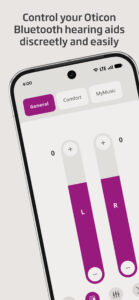
• Adjust the sound volume for each hearing aid together or separately
• Mute surroundings for better focus
• Switch between programs set by your hearing care professional
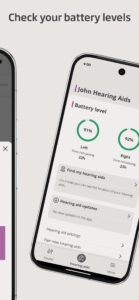
• Check battery levels
• Use SpeechBooster to reduce background noise and enhance speech (available for all hearing aid models except Oticon Opn™)
• Stream calls, music, and podcasts directly to your hearing aids (availability may vary depending on your phone model)
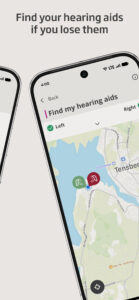
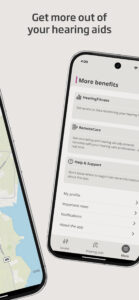
• Find your hearing aids if lost (requires location services to always be turned on)
• Access app support and troubleshooting solutions
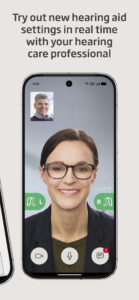
• Meet your hearing care professional for an online visit (by appointment)
• Adjust streaming sounds with streaming equalizer (available for all hearing aid models except Oticon Opn™ and Oticon Siya)
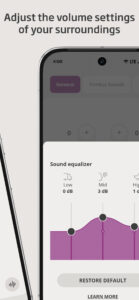
• Adjust sounds around you with sound equalizer (available for Oticon Intent™ and Oticon Real™ models)
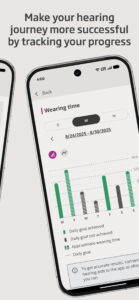
• Track your progress with HearingFitness™ feature (available for Oticon Intent™ and Oticon Real™ models)
• Handle wireless accessories paired with your hearing aids such as TV Adapters, Oticon EduMic or ConnectClip
First use:
You need to pair your hearing aids with this app to use it to control your hearing aids.
App availability:
The app is compatible with most hearing aid models. If you have hearing aids from 2016-2018 and haven't updated them yet, a hearing aid update is required for this app to work. We recommend regular hearing aid updates during your routine check-up with your hearing care professional.
For optimal performance, we recommend updating your device to Android OS 10 or later. To check the latest list of compatible devices, please visit:
www.oticon.com/support/compatibility
• Adjust the sound volume for each hearing aid together or separately
• Mute surroundings for better focus
• Switch between programs set by your hearing care professional
• Check battery levels
• Use SpeechBooster to reduce background noise and enhance speech (available for all hearing aid models except Oticon Opn™)
• Stream calls, music, and podcasts directly to your hearing aids (availability may vary depending on your phone model)
• Find your hearing aids if lost (requires location services to always be turned on)
• Access app support and troubleshooting solutions
• Meet your hearing care professional for an online visit (by appointment)
• Adjust streaming sounds with streaming equalizer (available for all hearing aid models except Oticon Opn™ and Oticon Siya)
• Adjust sounds around you with sound equalizer (available for Oticon Intent™ and Oticon Real™ models)
• Track your progress with HearingFitness™ feature (available for Oticon Intent™ and Oticon Real™ models)
• Handle wireless accessories paired with your hearing aids such as TV Adapters, Oticon EduMic or ConnectClip
First use:
You need to pair your hearing aids with this app to use it to control your hearing aids.
App availability:
The app is compatible with most hearing aid models. If you have hearing aids from 2016-2018 and haven't updated them yet, a hearing aid update is required for this app to work. We recommend regular hearing aid updates during your routine check-up with your hearing care professional.
For optimal performance, we recommend updating your device to Android OS 10 or later. To check the latest list of compatible devices, please visit:
www.oticon.com/support/compatibility
Download Oticon Companion APK
Fast, free and safe download.
APK Permissions 28
- android.permission.ACCESS_ADSERVICES_AD_ID
- android.permission.ACCESS_ADSERVICES_ATTRIBUTION
- android.permission.ACCESS_COARSE_LOCATION
- android.permission.ACCESS_FINE_LOCATION
- android.permission.ACCESS_NETWORK_STATE
- android.permission.BATTERY_STATS
- android.permission.BLUETOOTH
- android.permission.BLUETOOTH_ADMIN
- android.permission.BLUETOOTH_CONNECT
- android.permission.BLUETOOTH_SCAN
- android.permission.CAMERA
- android.permission.FOREGROUND_SERVICE
- android.permission.FOREGROUND_SERVICE_CONNECTED_DEVICE
- android.permission.FOREGROUND_SERVICE_LOCATION
- android.permission.FOREGROUND_SERVICE_MICROPHONE
- android.permission.INTERNET
- android.permission.MODIFY_AUDIO_SETTINGS
- android.permission.PACKAGE_USAGE_STATS
- android.permission.POST_NOTIFICATIONS
- android.permission.READ_PHONE_STATE
- android.permission.RECEIVE_BOOT_COMPLETED
- android.permission.RECORD_AUDIO
- android.permission.REQUEST_IGNORE_BATTERY_OPTIMIZATIONS
- android.permission.VIBRATE
- android.permission.WAKE_LOCK
- com.google.android.finsky.permission.BIND_GET_INSTALL_REFERRER_SERVICE
- com.google.android.gms.permission.AD_ID
- com.oticon.app.DYNAMIC_RECEIVER_NOT_EXPORTED_PERMISSION
APK Verified
The cryptographic signature guarantees that the file is safe to install and was not tampered with in any way.


