
Download PassMate: Wallet for Passes APK 1.0.10 arm64-v8a, armeabi-v7a, x86, x86_64 · Android 24+
Download APK
Verified Safe
This is the arm64-v8a, armeabi-v7a, x86, x86_64 build of PassMate: Wallet for Passes 1.0.10. Pick this build if your device's primary ABI matches.
File size: 36.4 MB • Min Android: 24 • Target Android: 35 • Version code: 15 • Framework: Native (Java/Kotlin) • Permissions: 19
Screenshots






File Information
| Package Name | com.getpassmate.wallet |
|---|---|
| Version Name | 1.0.10 |
| Version Code | 15 |
| Architecture | arm64-v8a, armeabi-v7a, x86, x86_64 |
| Min Android Version | Android 24 (API 35) |
| Main Activity | com.getpassmate.wallet.MainActivity |
| Framework | Native (Java/Kotlin) |
| File Size | 36.42 MB |
| Signature (SHA1) | 1F9C75ECDDA7554DB6571750728DF56CEA11707A |
| File Hash (SHA256) | d1a3646cb941d6f54d61e11d363e31dfce3a23ed006371d161c0f948888d21b5 |
What's New
Fixes the issue where the barcode text is not visible in dark mode.
App Description
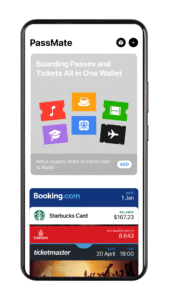
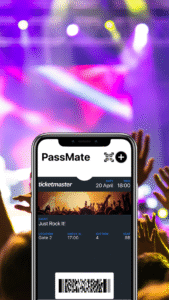
PassMate is a digital wallet designed for Android users who want to open and use Apple Wallet .pkpass files — including boarding passes, tickets, coupons, Apple cards, and other wallet passes originally created for the Apple iPhone Wallet or Passbook. You can easily add, open, and use all kinds of passes on your Android phone, just like iPhone users do with Apple Wallet.
With PassMate, you can easily add, view, and use all your digital cards in one secure pass wallet. Whether it’s flight tickets, student IDs, transit cards, event tickets or membership cards. PassMate delivers a smooth and reliable Apple Wallet experience on Android
Don't have an iPhone? No problem. PassMate unlocks the power of Apple Wallet passes on Android. Just tap to open any .pkpass file — from boarding passes and event tickets to Apple cards and store coupons — and keep them all in your wallet passes app, ready when you need them. Your digital life, organized and always with you.
Supported Pass Types
PassMate supports all commonly used pass formats, including:
* Boarding Passes: Airline tickets for domestic and international flights
* Train Tickets: Tickets issued by public transport, long-distance bus lines, rail operators, and metro systems
* Transit Cards: Digital transportation cards, including metro, tram, and commuter passes
* Apple Cards (non-payment): Store cards, loyalty cards, and digital access cards issued for Apple Pay
* Event Tickets: Passes for concerts, sports events, movies, expos, conferences, and festivals
* Loyalty & Rewards Cards: Membership cards, store loyalty programs, digital punch cards, and gift cards
* Coupons & Discount Cards: Promotional offers, limited-time store coupons, and in-store discounts
* ID & Access Cards: Student IDs, vaccination certificates, digital health passes, conference badges, and more.
Core App Features
* Compatible with Apple Wallet .pkpass files
* Built-in scanner for QR codes, Aztec, PDF417, and Code128 barcodes
* Automatically updates passes when modified by the issuer
* Instant time-based and location-based notifications
* Works fully offline — no connection required after download
* Battery-friendly — no background operations
* Available in 30+ languages
* Privacy-first — no account required, no data collection, no third-party sharing
How It Differs from Other Wallet Apps?
PassMate is a dedicated Passbook Wallet app.
Unlike Google Wallet and Apple Pay, which are focused on financial transactions, PassMate is designed exclusively for handling digital cards and passes.
Use Cases
* Travelers storing boarding passes, bus tickets, train tickets, metro cards, and transit cards in one travel wallet
* Event attendees organizing event tickets for concerts, festivals, expos, conferences, and sports matches
* Shoppers managing loyalty cards, store coupons, gift cards, discounts, and non-payment Apple Cards
* Students and employees using Student IDs, digital ID cards, health passes, access badges, and fitness cards
* Users switching from iPhone to Android needing a secure way to open and manage their Apple Wallet passes
* Interrail, railway, and metro users looking for a unified ticket wallet for their daily commute or international travel
Supported Languages PassMate supports the following languages:
English, German, Spanish, French, Portuguese, Dutch, Russian, Chinese (Simplified & Traditional), Turkish, Arabic, Thai, Hebrew, Danish, Greek, Vietnamese, Polish, Czech, Japanese, Korean, Hindi, Indonesian, Ukrainian, Malay, Romanian, Filipino (Tagalog), Swedish, Italian, Bangla, Urdu, Persian.
About PassMate Alliance
The PassMate Alliance is a collaboration of developers and service providers committed to enhancing the digital wallet passes experience on Android.
Our mission is simple: to build the Best Pass Wallet for Android.
Contact & Support
* Website:
www.getpassmate.com
* Email:
support@getpassmate.com
With PassMate, you can easily add, view, and use all your digital cards in one secure pass wallet. Whether it’s flight tickets, student IDs, transit cards, event tickets or membership cards. PassMate delivers a smooth and reliable Apple Wallet experience on Android
Don't have an iPhone? No problem. PassMate unlocks the power of Apple Wallet passes on Android. Just tap to open any .pkpass file — from boarding passes and event tickets to Apple cards and store coupons — and keep them all in your wallet passes app, ready when you need them. Your digital life, organized and always with you.
Supported Pass Types
PassMate supports all commonly used pass formats, including:
* Boarding Passes: Airline tickets for domestic and international flights
* Train Tickets: Tickets issued by public transport, long-distance bus lines, rail operators, and metro systems
* Transit Cards: Digital transportation cards, including metro, tram, and commuter passes
* Apple Cards (non-payment): Store cards, loyalty cards, and digital access cards issued for Apple Pay
* Event Tickets: Passes for concerts, sports events, movies, expos, conferences, and festivals
* Loyalty & Rewards Cards: Membership cards, store loyalty programs, digital punch cards, and gift cards
* Coupons & Discount Cards: Promotional offers, limited-time store coupons, and in-store discounts
* ID & Access Cards: Student IDs, vaccination certificates, digital health passes, conference badges, and more.
Core App Features
* Compatible with Apple Wallet .pkpass files
* Built-in scanner for QR codes, Aztec, PDF417, and Code128 barcodes
* Automatically updates passes when modified by the issuer
* Instant time-based and location-based notifications
* Works fully offline — no connection required after download
* Battery-friendly — no background operations
* Available in 30+ languages
* Privacy-first — no account required, no data collection, no third-party sharing
How It Differs from Other Wallet Apps?
PassMate is a dedicated Passbook Wallet app.
Unlike Google Wallet and Apple Pay, which are focused on financial transactions, PassMate is designed exclusively for handling digital cards and passes.
Use Cases
* Travelers storing boarding passes, bus tickets, train tickets, metro cards, and transit cards in one travel wallet
* Event attendees organizing event tickets for concerts, festivals, expos, conferences, and sports matches
* Shoppers managing loyalty cards, store coupons, gift cards, discounts, and non-payment Apple Cards
* Students and employees using Student IDs, digital ID cards, health passes, access badges, and fitness cards
* Users switching from iPhone to Android needing a secure way to open and manage their Apple Wallet passes
* Interrail, railway, and metro users looking for a unified ticket wallet for their daily commute or international travel
Supported Languages PassMate supports the following languages:
English, German, Spanish, French, Portuguese, Dutch, Russian, Chinese (Simplified & Traditional), Turkish, Arabic, Thai, Hebrew, Danish, Greek, Vietnamese, Polish, Czech, Japanese, Korean, Hindi, Indonesian, Ukrainian, Malay, Romanian, Filipino (Tagalog), Swedish, Italian, Bangla, Urdu, Persian.
About PassMate Alliance
The PassMate Alliance is a collaboration of developers and service providers committed to enhancing the digital wallet passes experience on Android.
Our mission is simple: to build the Best Pass Wallet for Android.
Contact & Support
* Website:
www.getpassmate.com
* Email:
support@getpassmate.com
Download PassMate: Wallet for Passes APK
Fast, free and safe download.
APK Permissions 19
- android.permission.ACCESS_ADSERVICES_AD_ID
- android.permission.ACCESS_ADSERVICES_ATTRIBUTION
- android.permission.ACCESS_ADSERVICES_CUSTOM_AUDIENCE
- android.permission.ACCESS_BACKGROUND_LOCATION
- android.permission.ACCESS_COARSE_LOCATION
- android.permission.ACCESS_FINE_LOCATION
- android.permission.ACCESS_NETWORK_STATE
- android.permission.CAMERA
- android.permission.FOREGROUND_SERVICE
- android.permission.INTERNET
- android.permission.POST_NOTIFICATIONS
- android.permission.RECEIVE_BOOT_COMPLETED
- android.permission.SCHEDULE_EXACT_ALARM
- android.permission.WAKE_LOCK
- com.android.vending.CHECK_LICENSE
- com.getpassmate.wallet.DYNAMIC_RECEIVER_NOT_EXPORTED_PERMISSION
- com.google.android.c2dm.permission.RECEIVE
- com.google.android.finsky.permission.BIND_GET_INSTALL_REFERRER_SERVICE
- com.google.android.gms.permission.AD_ID
APK Verified
The cryptographic signature guarantees that the file is safe to install and was not tampered with in any way.
Similar in Travel & Local


Frequently Asked Questions about PassMate: Wallet for Passes APK
This variant is built for devices that report `arm64-v8a, armeabi-v7a, x86, x86_64` as their primary ABI. If your device's CPU matches, this is the smallest, fastest version to install.
Yes — the APK's signature has been cryptographically verified against the publisher's signing key. The SHA-256 hash is shown in the File Information panel so you can independently confirm the file matches the original release.
Android 24 (API level 35) or newer. Older devices will refuse the install.
Install a free app like 'CPU-Z' or 'Droid Hardware Info' from the Play Store and look at the ABI / Instruction Set row. Most phones made after 2017 are arm64-v8a; if in doubt, download the universal variant.
All variants are functionally identical — same features, same version. They differ only in which CPU architectures the native code is compiled for, and (sometimes) which screen densities the included graphics target. Pick the one that matches your device for the smallest install size, or pick 'Universal' if you're unsure.