
This is the universal build of AI Photo Editor – GridArt 2.323.186. It contains native libraries for every CPU architecture (arm64-v8a, armeabi-v7a, x86, x86_64), so it installs on any Android device. The trade-off is size — it's larger than per-architecture variants. Pick this one if you're unsure which CPU your phone has, or if you plan to share the APK with multiple devices.
File size: 19.7 MB • Min Android: 24 • Target Android: 34 • Version code: 186000 • Framework: Native (Java/Kotlin) • Permissions: 25
Screenshots

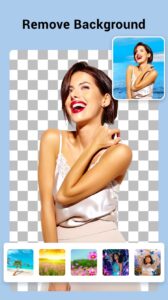
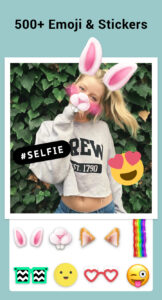
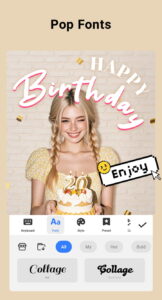
File Information
| Package Name | photoeditor.layout.collagemaker |
|---|---|
| Version Name | 2.323.186 |
| Version Code | 186000 |
| Architecture | Universal |
| Min Android Version | Android 24 (API 34) |
| Main Activity | com.camerasideas.collagemaker.activity.DummyActivity |
| Framework | Native (Java/Kotlin) |
| File Size | 19.72 MB |
| Signature (SHA1) | 9807E76B468F400955B2A742B5AC4BF076B4C7ED |
| File Hash (SHA256) | 49a528bf8b719072749328f56c6ac9a71de790947fe3027892f79c550be46b33 |
What's New
🔍 Ultra HD Enhance is here! Enjoy clearer, sharper photos with incredible detail.
📷 Fresh Filters Out Now! Add dreamy, nostalgic, or breezy tones with our latest looks.
✨ Performance improvements and bug fixes for a smoother experience.
📷 Fresh Filters Out Now! Add dreamy, nostalgic, or breezy tones with our latest looks.
✨ Performance improvements and bug fixes for a smoother experience.
App Description
Collage Maker is your go-to photo collage maker and photo frame app in pics art trip.
Just select several photos in your photo lab, Collage Maker instantly remix them into cool photo collage. Pick the layout you like, edit picture and decorate it with filters, stickers, texts and much more.
AI Photo Enhancer launched! Transform your blurry, damaged or old photos into stunning HD quality with just one tap. Say goodbye to low-quality shots and hello to stunning results!
Features:
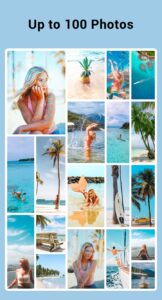
• Combine up to
100 photos
to create pic collage.
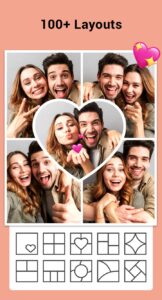
• 100+
Layouts
of frames or grids to choose from!
• Large number of
Background
,
Sticker
,
Font
, and doodle to choose from!
• Add stylish
photo frames
for love, celebration, and everyday moments.
• Change ratio of collage and edit border of collage.
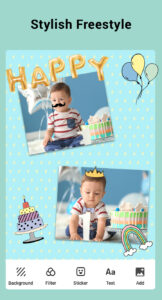
• Make photo collage with Free style or Grid style.
•
Crop
pictures and edit photo with
Filter
,
Text
.
• Insta
square photo
with blur background for Instagram.
• Save photo in high resolution and share pictures to social apps.
📷 Side by Side Photos 📷
Lots of inspirational uses to create side-by-side photos. You can make a before & after SNS cover, create YouTube thumbnails side by side, and even make side-by-side outfit comparison Instagram posts.
🖼 Grid Photo 🖼
Create photo collage with hundreds of layouts in seconds. Custom grid photo size, border and background, you can design layout on your own! So easy to make a beautiful photo collage.
📸 Edit Photo 📸
All-in-one photo editor & photo frame app provides a bunch of editing tools: crop picture, apply filter to picture, add sticker, photo frames, and text to image, draw on image with doodle tool, flip, rotate...
🎨 Freestyle 🎨
Select beautiful background with full screen ratio to create a scrapbook. You can decorate with pictures, stickers, texts, doodles, and share your scrapbook to Instagram Stories and Snapchat Stories.
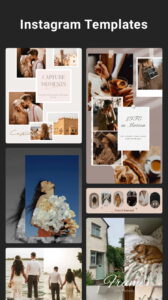
🌟 Story Template 🌟
100+ Stylized templates including Film, Magazine, Ripped Paper… Have fun with this Insta story maker, share your most memorable moments with friends.
📷 Multi-fit 📷
Insta square photo in a blur background or white to fit for Instagram. You can choose multiple ratios, 1:1, 4:5, 9:16 ratios, etc. Easily post entire photo with no crop. You can even square up to 10 photos at one time.
About our permissions:
Collage Maker asks for permissions "READ_EXTERNAL_STORAGE, WRITE_EXTERNAL_STORAGE" to read your photos/videos so that we can edit and save photos. We do not use this permission for any other purpose.
Collage Maker is your go-to photo collage maker, photo frame app and photo editor for Instagram and printing. Follow @gridart.app and remember to post with hashtag #gridart on Instagram. Win chances to be featured and get a ton of likes! If you have any problems or suggestions, feel free to let us know. Email:
photostudio.feedback@gmail.com
Just select several photos in your photo lab, Collage Maker instantly remix them into cool photo collage. Pick the layout you like, edit picture and decorate it with filters, stickers, texts and much more.
AI Photo Enhancer launched! Transform your blurry, damaged or old photos into stunning HD quality with just one tap. Say goodbye to low-quality shots and hello to stunning results!
Features:
• Combine up to
100 photos
to create pic collage.
• 100+
Layouts
of frames or grids to choose from!
• Large number of
Background
,
Sticker
,
Font
, and doodle to choose from!
• Add stylish
photo frames
for love, celebration, and everyday moments.
• Change ratio of collage and edit border of collage.
• Make photo collage with Free style or Grid style.
•
Crop
pictures and edit photo with
Filter
,
Text
.
• Insta
square photo
with blur background for Instagram.
• Save photo in high resolution and share pictures to social apps.
📷 Side by Side Photos 📷
Lots of inspirational uses to create side-by-side photos. You can make a before & after SNS cover, create YouTube thumbnails side by side, and even make side-by-side outfit comparison Instagram posts.
🖼 Grid Photo 🖼
Create photo collage with hundreds of layouts in seconds. Custom grid photo size, border and background, you can design layout on your own! So easy to make a beautiful photo collage.
📸 Edit Photo 📸
All-in-one photo editor & photo frame app provides a bunch of editing tools: crop picture, apply filter to picture, add sticker, photo frames, and text to image, draw on image with doodle tool, flip, rotate...
🎨 Freestyle 🎨
Select beautiful background with full screen ratio to create a scrapbook. You can decorate with pictures, stickers, texts, doodles, and share your scrapbook to Instagram Stories and Snapchat Stories.
🌟 Story Template 🌟
100+ Stylized templates including Film, Magazine, Ripped Paper… Have fun with this Insta story maker, share your most memorable moments with friends.
📷 Multi-fit 📷
Insta square photo in a blur background or white to fit for Instagram. You can choose multiple ratios, 1:1, 4:5, 9:16 ratios, etc. Easily post entire photo with no crop. You can even square up to 10 photos at one time.
About our permissions:
Collage Maker asks for permissions "READ_EXTERNAL_STORAGE, WRITE_EXTERNAL_STORAGE" to read your photos/videos so that we can edit and save photos. We do not use this permission for any other purpose.
Collage Maker is your go-to photo collage maker, photo frame app and photo editor for Instagram and printing. Follow @gridart.app and remember to post with hashtag #gridart on Instagram. Win chances to be featured and get a ton of likes! If you have any problems or suggestions, feel free to let us know. Email:
photostudio.feedback@gmail.com
Download AI Photo Editor – GridArt APK
Fast, free and safe download.
APK Permissions 25
- android.permission.ACCESS_ADSERVICES_AD_ID
- android.permission.ACCESS_ADSERVICES_ATTRIBUTION
- android.permission.ACCESS_ADSERVICES_TOPICS
- android.permission.ACCESS_NETWORK_STATE
- android.permission.ACCESS_WIFI_STATE
- android.permission.CHANGE_NETWORK_STATE
- android.permission.CHANGE_WIFI_STATE
- android.permission.FOREGROUND_SERVICE
- android.permission.INTERNET
- android.permission.POST_NOTIFICATIONS
- android.permission.READ_EXTERNAL_STORAGE
- android.permission.READ_MEDIA_IMAGES
- android.permission.READ_MEDIA_VIDEO
- android.permission.READ_MEDIA_VISUAL_USER_SELECTED
- android.permission.VIBRATE
- android.permission.WAKE_LOCK
- android.permission.WRITE_EXTERNAL_STORAGE
- com.android.vending.BILLING
- com.google.android.apps.photos.permission.GOOGLE_PHOTOS
- com.google.android.c2dm.permission.RECEIVE
- com.google.android.finsky.permission.BIND_GET_INSTALL_REFERRER_SERVICE
- com.google.android.gallery3d.permission.GALLERY_PROVIDER
- com.google.android.gms.permission.AD_ID
- com.google.android.providers.gsf.permission.READ_GSERVICES
- photoeditor.layout.collagemaker.DYNAMIC_RECEIVER_NOT_EXPORTED_PERMISSION
APK Verified
The cryptographic signature guarantees that the file is safe to install and was not tampered with in any way.
Similar in Photography


More by Photo Editor & Collage Maker

Frequently Asked Questions about AI Photo Editor – GridArt APK
This is the universal variant — a single APK that contains native libraries for every CPU architecture. It installs on any Android device but is larger than per-architecture variants.
Yes — the APK's signature has been cryptographically verified against the publisher's signing key. The SHA-256 hash is shown in the File Information panel so you can independently confirm the file matches the original release.
Android 24 (API level 34) or newer. Older devices will refuse the install.
Install a free app like 'CPU-Z' or 'Droid Hardware Info' from the Play Store and look at the ABI / Instruction Set row. Most phones made after 2017 are arm64-v8a; if in doubt, download the universal variant.
All variants are functionally identical — same features, same version. They differ only in which CPU architectures the native code is compiled for, and (sometimes) which screen densities the included graphics target. Pick the one that matches your device for the smallest install size, or pick 'Universal' if you're unsure.