
This is the universal build of AirBrush: Face & Photo Editor 7.7.0. It contains native libraries for every CPU architecture (arm64-v8a, armeabi-v7a, x86, x86_64), so it installs on any Android device. The trade-off is size — it's larger than per-architecture variants. Pick this one if you're unsure which CPU your phone has, or if you plan to share the APK with multiple devices.
File size: 284.4 MB • Min Android: 24 • Target Android: 34 • Version code: 107070000 • Framework: Native (Java/Kotlin) • Permissions: 29
Screenshots




File Information
| Package Name | com.magicv.airbrush |
|---|---|
| Version Name | 7.7.0 |
| Version Code | 107070000 |
| Architecture | Universal |
| Min Android Version | Android 24 (API 34) |
| Main Activity | com.magicv.airbrush.common.StartupActivity |
| Framework | Native (Java/Kotlin) |
| File Size | 284.44 MB |
| Signature (SHA1) | AE49F6B9BDCAF6E8CFA56AAB7EFE13ADBCB3E45A |
| File Hash (SHA256) | b65cf6342dcfa5e632017b0a60514de11faf42a6e628b63f28eb5b576800e953 |
What's New
We've done some minor bug fixes and light upgrades to make your AirBrush experience even better.
Happy creating!
Happy creating!
App Description
Master Your Selfie Game with AirBrush – The Ultimate Photo and Video Editor! With our easy-to-use features, you can master your selfies and photos with tools designed to enhance your natural beauty while maintaining authentic charm.
EXCELLENCE IN EVERY SHOT
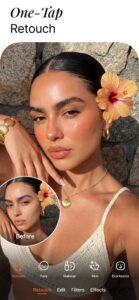
• AI Retouch: Harness the power of artificial intelligence to upgrade your portraits, fine-tuning every detail to perfection.
• Blemish Removal: Effortlessly erase acne and other imperfections, leaving your skin peachy and spotless.
• Smooth: Soften wrinkles and balance skin tones for a youthful glow.
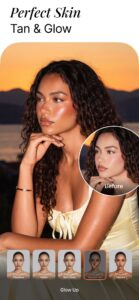
• Highlighter: Bring your finest traits into the spotlight by adding texture or highlighter to make them pop.
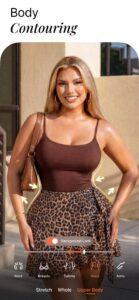
• Reshape: Sculpt your facial and body features effortlessly, ensuring every angle is your best angle.
• Contouring: Skillfully mold your facial contours, ensuring every profile presents you in the best light.
• Eye Enhancer: Overcome red eyes, diminish under-eye shadows, or play with eye colors for a captivating look.
• Teeth: Reveal a brighter smile to catch every moment.
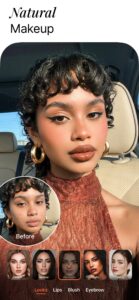
• Virtual Makeup: Apply a range of cosmetics from brows to lips with digital precision that challenges any cosmetic toolkit.
• Hairstyling: Infuse your hair with dimension, try on new hues, or deepen your locks for a striking impression.
SPARK YOUR IMAGINATION
• Background: Soften the background noise or swap sceneries with fluidity.
• AI Eraser: Utilize the Eraser or Stamp to remove unwanted objects and clutter from your shots.
• AI Enhancer: Tweak photo temperature, saturation, and more, letting AI optimize your image balance.
• Filters & Effects: Dare to be different using filters and effects that push the boundaries of creativity.
• AI Repair: Revive lower-quality images with ease, giving each detail a renewed existence.
VIDEO SELFIES REIMAGINED
• Face Retouch: Apply our renowned face retouching to your videos.
• Object Removal: Clear up your scenes by removing distractions.
• Quality Enhancement: Upgrade the clarity of your videos, making every moment crisp and memorable.
ENJOYMENT WITH AI
• Pro Headshots: Generate professional headshots instantly, skipping the studio without compromising on quality.
• Mood Swapper: Change your expressions in seconds – when your smile says it all.
• Style Explorer: See yourself in different styles, discovering portrait variations that showcase your versatility.
Join millions who trust AirBrush to edit their photos and selfie videos with ease, speed, and incredible results. Whether it's for a quick touch-up or a complete digital makeover, AirBrush stands out among apps like Facetune, delivering unparalleled precision and simplicity. Get ready to express yourself, capture every moment, and share your world with confidence.
Download AirBrush now and start creating photos and video selfies that reflect the true beauty of your moments.
DISCOVER EDITING TIPS ON SOCIAL MEDIA!
- Instagram: instagram.com/AirBrushOfficial
- TikTok:
www.tiktok.com/@airbrushofficial
- Facebook: facebook.com/airbrushappofficial
- Twitter: twitter.com/AirbrushApp
---
Terms of Service:
airbrush.com/legal/terms-of-service
Privacy Policy:
airbrush.com/legal/privacy-policy
EXCELLENCE IN EVERY SHOT
• AI Retouch: Harness the power of artificial intelligence to upgrade your portraits, fine-tuning every detail to perfection.
• Blemish Removal: Effortlessly erase acne and other imperfections, leaving your skin peachy and spotless.
• Smooth: Soften wrinkles and balance skin tones for a youthful glow.
• Highlighter: Bring your finest traits into the spotlight by adding texture or highlighter to make them pop.
• Reshape: Sculpt your facial and body features effortlessly, ensuring every angle is your best angle.
• Contouring: Skillfully mold your facial contours, ensuring every profile presents you in the best light.
• Eye Enhancer: Overcome red eyes, diminish under-eye shadows, or play with eye colors for a captivating look.
• Teeth: Reveal a brighter smile to catch every moment.
• Virtual Makeup: Apply a range of cosmetics from brows to lips with digital precision that challenges any cosmetic toolkit.
• Hairstyling: Infuse your hair with dimension, try on new hues, or deepen your locks for a striking impression.
SPARK YOUR IMAGINATION
• Background: Soften the background noise or swap sceneries with fluidity.
• AI Eraser: Utilize the Eraser or Stamp to remove unwanted objects and clutter from your shots.
• AI Enhancer: Tweak photo temperature, saturation, and more, letting AI optimize your image balance.
• Filters & Effects: Dare to be different using filters and effects that push the boundaries of creativity.
• AI Repair: Revive lower-quality images with ease, giving each detail a renewed existence.
VIDEO SELFIES REIMAGINED
• Face Retouch: Apply our renowned face retouching to your videos.
• Object Removal: Clear up your scenes by removing distractions.
• Quality Enhancement: Upgrade the clarity of your videos, making every moment crisp and memorable.
ENJOYMENT WITH AI
• Pro Headshots: Generate professional headshots instantly, skipping the studio without compromising on quality.
• Mood Swapper: Change your expressions in seconds – when your smile says it all.
• Style Explorer: See yourself in different styles, discovering portrait variations that showcase your versatility.
Join millions who trust AirBrush to edit their photos and selfie videos with ease, speed, and incredible results. Whether it's for a quick touch-up or a complete digital makeover, AirBrush stands out among apps like Facetune, delivering unparalleled precision and simplicity. Get ready to express yourself, capture every moment, and share your world with confidence.
Download AirBrush now and start creating photos and video selfies that reflect the true beauty of your moments.
DISCOVER EDITING TIPS ON SOCIAL MEDIA!
- Instagram: instagram.com/AirBrushOfficial
- TikTok:
www.tiktok.com/@airbrushofficial
- Facebook: facebook.com/airbrushappofficial
- Twitter: twitter.com/AirbrushApp
---
Terms of Service:
airbrush.com/legal/terms-of-service
Privacy Policy:
airbrush.com/legal/privacy-policy
Download AirBrush: Face & Photo Editor APK
Fast, free and safe download.
APK Permissions 29
- android.permission.ACCESS_ADSERVICES_AD_ID
- android.permission.ACCESS_ADSERVICES_ATTRIBUTION
- android.permission.ACCESS_ADSERVICES_TOPICS
- android.permission.ACCESS_NETWORK_STATE
- android.permission.ACCESS_WIFI_STATE
- android.permission.CAMERA
- android.permission.FOREGROUND_SERVICE
- android.permission.FOREGROUND_SERVICE_DATA_SYNC
- android.permission.GET_TASKS
- android.permission.INTERNET
- android.permission.MODIFY_AUDIO_SETTINGS
- android.permission.POST_NOTIFICATIONS
- android.permission.READ_MEDIA_IMAGES
- android.permission.READ_MEDIA_VIDEO
- android.permission.READ_MEDIA_VISUAL_USER_SELECTED
- android.permission.RECEIVE_BOOT_COMPLETED
- android.permission.VIBRATE
- android.permission.WAKE_LOCK
- android.permission.WRITE_EXTERNAL_STORAGE
- com.android.launcher.permission.INSTALL_SHORTCUT
- com.android.launcher.permission.UNINSTALL_SHORTCUT
- com.android.vending.BILLING
- com.applovin.array.apphub.permission.BIND_APPHUB_SERVICE
- com.google.android.c2dm.permission.RECEIVE
- com.google.android.finsky.permission.BIND_GET_INSTALL_REFERRER_SERVICE
- com.google.android.gms.permission.AD_ID
- com.magicv.airbrush.DYNAMIC_RECEIVER_NOT_EXPORTED_PERMISSION
- com.magicv.airbrush.MT_ACCOUNT_LOGIN
- com.magicv.airbrush.permission.C2D_MESSAGE
APK Verified
The cryptographic signature guarantees that the file is safe to install and was not tampered with in any way.
Similar in Photography


More by PIXOCIAL TECHNOLOGY (SINGAPORE) PTE. LTD.

Frequently Asked Questions about AirBrush: Face & Photo Editor APK
This is the universal variant — a single APK that contains native libraries for every CPU architecture. It installs on any Android device but is larger than per-architecture variants.
Yes — the APK's signature has been cryptographically verified against the publisher's signing key. The SHA-256 hash is shown in the File Information panel so you can independently confirm the file matches the original release.
Android 24 (API level 34) or newer. Older devices will refuse the install.
Install a free app like 'CPU-Z' or 'Droid Hardware Info' from the Play Store and look at the ABI / Instruction Set row. Most phones made after 2017 are arm64-v8a; if in doubt, download the universal variant.
All variants are functionally identical — same features, same version. They differ only in which CPU architectures the native code is compiled for, and (sometimes) which screen densities the included graphics target. Pick the one that matches your device for the smallest install size, or pick 'Universal' if you're unsure.