
This is the universal build of PlayStation App @7F0B012F. It contains native libraries for every CPU architecture (arm64-v8a, armeabi-v7a, x86, x86_64), so it installs on any Android device. The trade-off is size — it's larger than per-architecture variants. Pick this one if you're unsure which CPU your phone has, or if you plan to share the APK with multiple devices.
File size: 3.1 MB • Min Android: 4 • Target Android: 8 • Version code: 2 • Framework: Native (Java/Kotlin) • Permissions: 3
Screenshots




File Information
| Package Name | com.scee.psxandroid |
|---|---|
| Version Name | @7F0B012F |
| Version Code | 2 |
| Architecture | Universal |
| Min Android Version | Android 4 (API 8) |
| Main Activity | com.digitaljigsaw.psxandroid.activities.SplashActivity |
| Framework | Native (Java/Kotlin) |
| File Size | 3.15 MB |
| Signature (SHA1) | AC8E2694519FD54D3A3F92086B629DCA8FDFFE89 |
| File Hash (SHA256) | ee39286b95e9952f53b35c12358cbf295311e7bdd6bfd961efda3309e4ccfc74 |
What's New
• This update includes fixes and performance improvements.
Recent updates:
• Game Help improvements: Completed and upcoming activities are now included in Game Help, matching what you see on PS5. All upcoming activities have a spoiler tag.
Recent updates:
• Game Help improvements: Completed and upcoming activities are now included in Game Help, matching what you see on PS5. All upcoming activities have a spoiler tag.
App Description
Stay connected to your gaming friends and the games you love to play, wherever you go with PlayStation App. See who's online, voice chat and send messages, and discover deals on PS Store.
Connect with friends
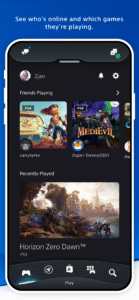
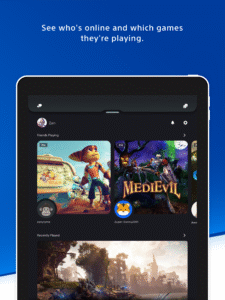
• See who's online and what games they're playing.
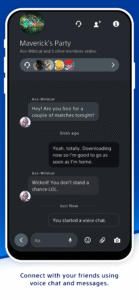
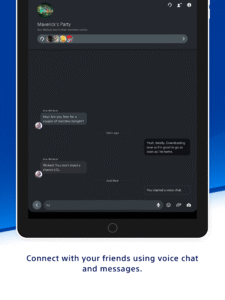
• Voice chat and send messages to your PSN friends, hang out online, and plan your next multiplayer session.
• View other players' profiles and trophy collections.
Discover new games and the latest news
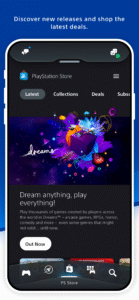
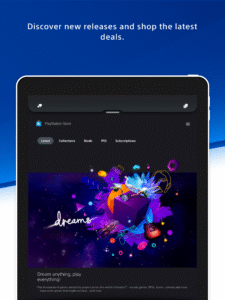
• Shop for new releases, pre-order games, and check out the latest deals and discounts on PlayStation Store.
• Get your daily fix of gaming news from the world of PlayStation.
• Stay up to date with notifications and invitations on your phone lock screen.
Control your console wherever you are
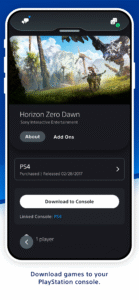
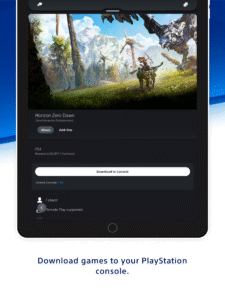
• Download games and add-ons to your console, so they're ready when you are.
• Manage your PS5 console storage if you run out of space while downloading.
• Get ready to play with quick sign-in and remote game launch on your PS5 console.
Account for PlayStation Network required to use this app.
PlayStation terms of service are viewable at
www.playstation.com/legal/psn-terms-of-service/
.
Some features require PS5 or PS4 console.
Content available on PS App may vary by country/region. Some titles shown above may not be available in your country/region.
“PlayStation”, “PlayStation Family Mark”, “PS5”, and “PS4” are registered trademarks or trademarks of Sony Interactive Entertainment Inc.
Connect with friends
• See who's online and what games they're playing.
• Voice chat and send messages to your PSN friends, hang out online, and plan your next multiplayer session.
• View other players' profiles and trophy collections.
Discover new games and the latest news
• Shop for new releases, pre-order games, and check out the latest deals and discounts on PlayStation Store.
• Get your daily fix of gaming news from the world of PlayStation.
• Stay up to date with notifications and invitations on your phone lock screen.
Control your console wherever you are
• Download games and add-ons to your console, so they're ready when you are.
• Manage your PS5 console storage if you run out of space while downloading.
• Get ready to play with quick sign-in and remote game launch on your PS5 console.
Account for PlayStation Network required to use this app.
PlayStation terms of service are viewable at
www.playstation.com/legal/psn-terms-of-service/
.
Some features require PS5 or PS4 console.
Content available on PS App may vary by country/region. Some titles shown above may not be available in your country/region.
“PlayStation”, “PlayStation Family Mark”, “PS5”, and “PS4” are registered trademarks or trademarks of Sony Interactive Entertainment Inc.
Download PlayStation App APK
Fast, free and safe download.
APK Permissions 3
- android.permission.ACCESS_NETWORK_STATE
- android.permission.INTERNET
- android.permission.WRITE_EXTERNAL_STORAGE
APK Verified
The cryptographic signature guarantees that the file is safe to install and was not tampered with in any way.
Similar in Entertainment


More by PlayStation Mobile Inc.


Frequently Asked Questions about PlayStation App APK
This is the universal variant — a single APK that contains native libraries for every CPU architecture. It installs on any Android device but is larger than per-architecture variants.
Yes — the APK's signature has been cryptographically verified against the publisher's signing key. The SHA-256 hash is shown in the File Information panel so you can independently confirm the file matches the original release.
Android 4 (API level 8) or newer. Older devices will refuse the install.
Install a free app like 'CPU-Z' or 'Droid Hardware Info' from the Play Store and look at the ABI / Instruction Set row. Most phones made after 2017 are arm64-v8a; if in doubt, download the universal variant.
All variants are functionally identical — same features, same version. They differ only in which CPU architectures the native code is compiled for, and (sometimes) which screen densities the included graphics target. Pick the one that matches your device for the smallest install size, or pick 'Universal' if you're unsure.