
Download Polarr: Photo Filters & Editor APK 6.11.6 arm64-v8a, armeabi-v7a · Android 26+
Download APK
Verified Safe
This is the arm64-v8a, armeabi-v7a build of Polarr: Photo Filters & Editor 6.11.6. Pick this build if your device's primary ABI matches.
File size: 76.7 MB • Min Android: 26 • Target Android: 35 • Version code: 1754361026 • Framework: Native (Java/Kotlin) • Permissions: 20
Screenshots
File Information
| Package Name | photo.editor.polarr |
|---|---|
| Version Name | 6.11.6 |
| Version Code | 1754361026 |
| Architecture | arm64-v8a, armeabi-v7a |
| Min Android Version | Android 26 (API 35) |
| Main Activity | co.polarr.polarrphotoeditor.EditorActivity |
| Framework | Native (Java/Kotlin) |
| File Size | 76.69 MB |
| Signature (SHA1) | EA5FA711E062601B5CAAB05F4B33667D7F3CEF6F |
| File Hash (SHA256) | c0c654010f02403a217df43508919caa2f33beac7bf9037d04feae62408e1691 |
What's New
Fixed several known issues and improved performance.
App Description
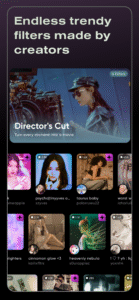
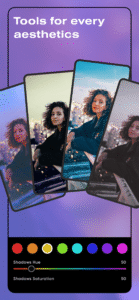
Discover millions of Polarr filters made by Polarr Creators around the world, or create and share your own filters with your friends. Polarr filters are much more than your regular filters. In addition to editing colors, you can include your own overlays, face adjustments, or change particular objects with AI in your Polarr filter. Polarr filters can also be applied on videos with Polarr 24FPS. With Polarr, it's never been easier to share your filters and aesthetics.
Main features:
• Search and discover trendy, new Polarr filters
• Weekly updated Polarr filter collections and Creator Spotlights
• Create and share your own Polarr filters
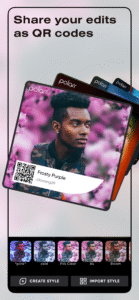
• Scan or produce Polarr filters as QR codes
• Synchronize all your Polarr filters with a Polarr account, for both Polarr and Polarr 24FPS
Included effects for Polarr Filters:
• Selective AI objects: Sky, Person, Background, Vegetation, Building, Ground, Animal, etc
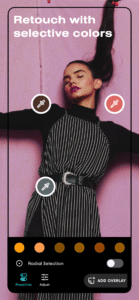
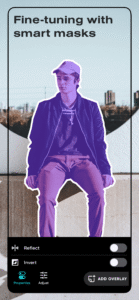
• Selective masks: Brush, Radial, Gradient, Color, Luminance
• Overlays: Gradient, Duotone, Weather, Texture, Backdrops, Custom Overlay, etc
• Retouch: Skin, Liquify, Face shapes (mouth, teeth, nose, chin, etc)
• Global adjustments: Light, Color, HSL, Toning, Effects, Fringing, Details, Curves, Vignette, Grain, LUT
• Productivity: Batch photo exports, Face detection, A.I. object segmentation
===============================
Polarr Subscription Options:
===============================
$3.99 per month
$19.99 per year
You can subscribe to get access to all premium Polarr offered in Polarr. Subscribing to Polarr also unlocks Polarr 24FPS through your Polarr account.
When you start your Polarr subscription with a free trial, once the trial is over, you’ll be charged a subscription fee. Subscriptions are billed monthly or annually at the rate selected depending on the subscription plan.
Monthly or yearly subscriptions unlock the same features in Polarr. Pricing in other countries may vary, and charges may be converted to your local currency depending on the country you live in.
Subscriptions auto-renew at the cost of the chosen package, unless canceled 24-hours in advance before the end of the current period. The subscription fee is charged to your Google Play Store account at confirmation of purchase. You may manage your subscription and turn off auto-renewal by going to your Account Settings after purchase. Any unused portion of a free trial period will be forfeited when the user purchases a subscription during free trial.
Terms of use:
www.polarr.com/policy/termsofservice_v3_en.html
Privacy policy:
www.polarr.com/policy/privacy_v3_en.html
Main features:
• Search and discover trendy, new Polarr filters
• Weekly updated Polarr filter collections and Creator Spotlights
• Create and share your own Polarr filters
• Scan or produce Polarr filters as QR codes
• Synchronize all your Polarr filters with a Polarr account, for both Polarr and Polarr 24FPS
Included effects for Polarr Filters:
• Selective AI objects: Sky, Person, Background, Vegetation, Building, Ground, Animal, etc
• Selective masks: Brush, Radial, Gradient, Color, Luminance
• Overlays: Gradient, Duotone, Weather, Texture, Backdrops, Custom Overlay, etc
• Retouch: Skin, Liquify, Face shapes (mouth, teeth, nose, chin, etc)
• Global adjustments: Light, Color, HSL, Toning, Effects, Fringing, Details, Curves, Vignette, Grain, LUT
• Productivity: Batch photo exports, Face detection, A.I. object segmentation
===============================
Polarr Subscription Options:
===============================
$3.99 per month
$19.99 per year
You can subscribe to get access to all premium Polarr offered in Polarr. Subscribing to Polarr also unlocks Polarr 24FPS through your Polarr account.
When you start your Polarr subscription with a free trial, once the trial is over, you’ll be charged a subscription fee. Subscriptions are billed monthly or annually at the rate selected depending on the subscription plan.
Monthly or yearly subscriptions unlock the same features in Polarr. Pricing in other countries may vary, and charges may be converted to your local currency depending on the country you live in.
Subscriptions auto-renew at the cost of the chosen package, unless canceled 24-hours in advance before the end of the current period. The subscription fee is charged to your Google Play Store account at confirmation of purchase. You may manage your subscription and turn off auto-renewal by going to your Account Settings after purchase. Any unused portion of a free trial period will be forfeited when the user purchases a subscription during free trial.
Terms of use:
www.polarr.com/policy/termsofservice_v3_en.html
Privacy policy:
www.polarr.com/policy/privacy_v3_en.html
Download Polarr: Photo Filters & Editor APK
Fast, free and safe download.
APK Permissions 20
- android.permission.ACCESS_ADSERVICES_AD_ID
- android.permission.ACCESS_ADSERVICES_ATTRIBUTION
- android.permission.ACCESS_ADSERVICES_TOPICS
- android.permission.ACCESS_MEDIA_LOCATION
- android.permission.ACCESS_NETWORK_STATE
- android.permission.CAMERA
- android.permission.FOREGROUND_SERVICE
- android.permission.INTERNET
- android.permission.POST_NOTIFICATIONS
- android.permission.READ_EXTERNAL_STORAGE
- android.permission.READ_MEDIA_IMAGES
- android.permission.USE_CREDENTIALS
- android.permission.WAKE_LOCK
- android.permission.WRITE_EXTERNAL_STORAGE
- com.android.vending.BILLING
- com.google.android.c2dm.permission.RECEIVE
- com.google.android.finsky.permission.BIND_GET_INSTALL_REFERRER_SERVICE
- com.google.android.gms.permission.AD_ID
- com.google.android.providers.gsf.permission.READ_GSERVICES
- photo.editor.polarr.DYNAMIC_RECEIVER_NOT_EXPORTED_PERMISSION
APK Verified
The cryptographic signature guarantees that the file is safe to install and was not tampered with in any way.
Similar in Photography


Frequently Asked Questions about Polarr: Photo Filters & Editor APK
This variant is built for devices that report `arm64-v8a, armeabi-v7a` as their primary ABI. If your device's CPU matches, this is the smallest, fastest version to install.
Yes — the APK's signature has been cryptographically verified against the publisher's signing key. The SHA-256 hash is shown in the File Information panel so you can independently confirm the file matches the original release.
Android 26 (API level 35) or newer. Older devices will refuse the install.
Install a free app like 'CPU-Z' or 'Droid Hardware Info' from the Play Store and look at the ABI / Instruction Set row. Most phones made after 2017 are arm64-v8a; if in doubt, download the universal variant.
All variants are functionally identical — same features, same version. They differ only in which CPU architectures the native code is compiled for, and (sometimes) which screen densities the included graphics target. Pick the one that matches your device for the smallest install size, or pick 'Universal' if you're unsure.