
Download Proxmox Virtual Environment APK 1.8.0 arm64-v8a, armeabi-v7a, x86_64 · Android 23+
Download APK
Verified Safe
This is the arm64-v8a, armeabi-v7a, x86_64 build of Proxmox Virtual Environment 1.8.0. Pick this build if your device's primary ABI matches.
File size: 53.2 MB • Min Android: 23 • Target Android: 34 • Version code: 45 • Framework: Flutter • Permissions: 4
Screenshots
File Information
| Package Name | com.proxmox.app.pve_flutter_frontend |
|---|---|
| Version Name | 1.8.0 |
| Version Code | 45 |
| Architecture | arm64-v8a, armeabi-v7a, x86_64 |
| Min Android Version | Android 23 (API 34) |
| Main Activity | com.proxmox.app.pve_flutter_frontend.MainActivity |
| Framework | Flutter |
| File Size | 53.23 MB |
| Signature (SHA1) | 661A7369A3ED0F1F3345D8954C2E44E5AAE9E711 |
| File Hash (SHA256) | 4cb246fd0e54f94f25f5d9dfbe7b2681928c184962724b7e0c0d1301c463e479 |
What's New
Improved second-factor login compatibility for both very old and latest Proxmox VE versions.
App Description
Log in to your Proxmox Virtual Environment (VE) server and manage virtual machines, containers, hosts, and clusters. Based on the cutting edge Flutter framework you will get a beautiful and blazing fast experience.
Key Features:
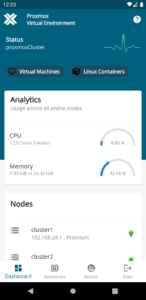
- Overview dashboard of Proxmox VE cluster or node status
- Login manager to connect to different Proxmox VE clusters or nodes
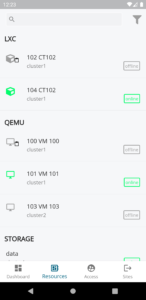
- Search and filter functionality for guest, storage, and nodes
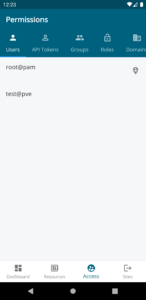
- Overview of users, API token, groups, roles, domains
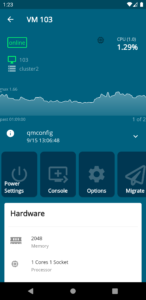
- Manage VM/container power settings (Start, Stop, Reboot, etc.)
- RRD diagrams for nodes and guests
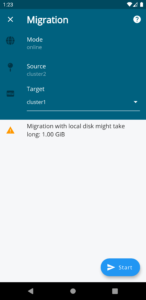
- Migration of guests (offline, online) between cluster nodes
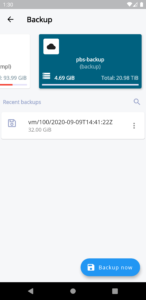
- Back up data to different storages including Proxmox Backup Server
- Storage view to access and or search content
- Task history and current task overview
Proxmox Virtual Environment (VE) is a complete platform for enterprise virtualization based on QEMU/KVM and LXC. You can manage virtual machines, containers, highly available clusters, storage, and networks with an integrated, easy-to-use web interface, via command line, or via the app. The open-source solution enables you to easily virtualize even the most demanding Linux and Windows application workloads, and dynamically scale computing and storage as your needs grow ensuring that your data center adjusts for future growth.
To learn more, please visit
www.proxmox.com/proxmox-ve
Key Features:
- Overview dashboard of Proxmox VE cluster or node status
- Login manager to connect to different Proxmox VE clusters or nodes
- Search and filter functionality for guest, storage, and nodes
- Overview of users, API token, groups, roles, domains
- Manage VM/container power settings (Start, Stop, Reboot, etc.)
- RRD diagrams for nodes and guests
- Migration of guests (offline, online) between cluster nodes
- Back up data to different storages including Proxmox Backup Server
- Storage view to access and or search content
- Task history and current task overview
Proxmox Virtual Environment (VE) is a complete platform for enterprise virtualization based on QEMU/KVM and LXC. You can manage virtual machines, containers, highly available clusters, storage, and networks with an integrated, easy-to-use web interface, via command line, or via the app. The open-source solution enables you to easily virtualize even the most demanding Linux and Windows application workloads, and dynamically scale computing and storage as your needs grow ensuring that your data center adjusts for future growth.
To learn more, please visit
www.proxmox.com/proxmox-ve
Download Proxmox Virtual Environment APK
Fast, free and safe download.
APK Permissions 4
- android.permission.INTERNET
- android.permission.USE_BIOMETRIC
- android.permission.USE_FINGERPRINT
- com.proxmox.app.pve_flutter_frontend.DYNAMIC_RECEIVER_NOT_EXPORTED_PERMISSION
APK Verified
The cryptographic signature guarantees that the file is safe to install and was not tampered with in any way.


Frequently Asked Questions about Proxmox Virtual Environment APK
This variant is built for devices that report `arm64-v8a, armeabi-v7a, x86_64` as their primary ABI. If your device's CPU matches, this is the smallest, fastest version to install.
Yes — the APK's signature has been cryptographically verified against the publisher's signing key. The SHA-256 hash is shown in the File Information panel so you can independently confirm the file matches the original release.
Android 23 (API level 34) or newer. Older devices will refuse the install.
Install a free app like 'CPU-Z' or 'Droid Hardware Info' from the Play Store and look at the ABI / Instruction Set row. Most phones made after 2017 are arm64-v8a; if in doubt, download the universal variant.
All variants are functionally identical — same features, same version. They differ only in which CPU architectures the native code is compiled for, and (sometimes) which screen densities the included graphics target. Pick the one that matches your device for the smallest install size, or pick 'Universal' if you're unsure.