
Download MyQuest for Patients APK 5.4 arm64-v8a, armeabi-v7a, x86, x86_64 · Android 23+
Download APK
Verified Safe
This is the arm64-v8a, armeabi-v7a, x86, x86_64 build of MyQuest for Patients 5.4. Pick this build if your device's primary ABI matches.
File size: 62.6 MB • Min Android: 23 • Target Android: 35 • Version code: 100054 • Framework: Native (Java/Kotlin) • Permissions: 19
Screenshots
File Information
| Package Name | com.myquest |
|---|---|
| Version Name | 5.4 |
| Version Code | 100054 |
| Architecture | arm64-v8a, armeabi-v7a, x86, x86_64 |
| Min Android Version | Android 23 (API 35) |
| Main Activity | com.myquest.view.ui.register.SplashActivity |
| Framework | Native (Java/Kotlin) |
| File Size | 62.65 MB |
| Signature (SHA1) | C160489F6E68F0A6F7844CD482C5F7F7E1C6D290 |
| File Hash (SHA256) | 8875e2fe66b962e9c34a954a3d8b37484cf2c3ace83c76993d0b6a5917a7db2a |
What's New
To protect your personal information, you must verify your identity before you can view your test results.
Various minor enhancements and bug fixes.
Various minor enhancements and bug fixes.
App Description
Take control of your health.
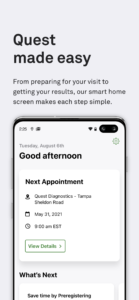
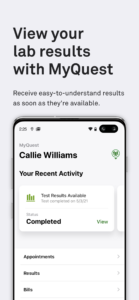
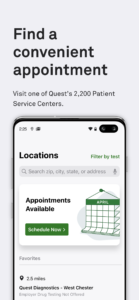
With the MyQuest app from Quest Diagnostics, all your lab results and appointments are at your fingertips – so you have the information you need to stay healthy:
• View your lab results securely and quickly
• Find nearby Quest locations that are convenient for you
• Schedule and manage your appointments
• Manage the health of your loved ones with MyCircle
• Browse and buy your own tests with QuestDirect
• Share your health information with your healthcare providers
• Integrate your results with Apple Health
Did you know that people are more likely to know their WiFi password than important health information, such as their blood type, cholesterol, and blood sugar levels? Take control of your health with the MyQuest app, and view your lab results, manage appointments, and more, all in one place.
Download MyQuest today to get access to an all-new way to manage your healthy journey with Quest.
With the MyQuest app from Quest Diagnostics, all your lab results and appointments are at your fingertips – so you have the information you need to stay healthy:
• View your lab results securely and quickly
• Find nearby Quest locations that are convenient for you
• Schedule and manage your appointments
• Manage the health of your loved ones with MyCircle
• Browse and buy your own tests with QuestDirect
• Share your health information with your healthcare providers
• Integrate your results with Apple Health
Did you know that people are more likely to know their WiFi password than important health information, such as their blood type, cholesterol, and blood sugar levels? Take control of your health with the MyQuest app, and view your lab results, manage appointments, and more, all in one place.
Download MyQuest today to get access to an all-new way to manage your healthy journey with Quest.
Download MyQuest for Patients APK
Fast, free and safe download.
APK Permissions 19
- android.permission.ACCESS_COARSE_LOCATION
- android.permission.ACCESS_FINE_LOCATION
- android.permission.ACCESS_NETWORK_STATE
- android.permission.ACCESS_WIFI_STATE
- android.permission.CALL_PHONE
- android.permission.CAMERA
- android.permission.INTERNET
- android.permission.POST_NOTIFICATIONS
- android.permission.READ_EXTERNAL_STORAGE
- android.permission.RECEIVE_BOOT_COMPLETED
- android.permission.RECORD_AUDIO
- android.permission.USE_BIOMETRIC
- android.permission.USE_FINGERPRINT
- android.permission.VIBRATE
- android.permission.WAKE_LOCK
- android.permission.WRITE_EXTERNAL_STORAGE
- com.google.android.c2dm.permission.RECEIVE
- com.google.android.gms.permission.AD_ID
- com.myquest.DYNAMIC_RECEIVER_NOT_EXPORTED_PERMISSION
APK Verified
The cryptographic signature guarantees that the file is safe to install and was not tampered with in any way.


Frequently Asked Questions about MyQuest for Patients APK
This variant is built for devices that report `arm64-v8a, armeabi-v7a, x86, x86_64` as their primary ABI. If your device's CPU matches, this is the smallest, fastest version to install.
Yes — the APK's signature has been cryptographically verified against the publisher's signing key. The SHA-256 hash is shown in the File Information panel so you can independently confirm the file matches the original release.
Android 23 (API level 35) or newer. Older devices will refuse the install.
Install a free app like 'CPU-Z' or 'Droid Hardware Info' from the Play Store and look at the ABI / Instruction Set row. Most phones made after 2017 are arm64-v8a; if in doubt, download the universal variant.
All variants are functionally identical — same features, same version. They differ only in which CPU architectures the native code is compiled for, and (sometimes) which screen densities the included graphics target. Pick the one that matches your device for the smallest install size, or pick 'Universal' if you're unsure.