
Download Money Manager Expense & Budget APK 4.10.2 GF Universal · Android 23+
Download APK
Verified Safe
This is the universal build of Money Manager Expense & Budget 4.10.2 GF. It contains native libraries for every CPU architecture (arm64-v8a, armeabi-v7a, x86, x86_64), so it installs on any Android device. The trade-off is size — it's larger than per-architecture variants. Pick this one if you're unsure which CPU your phone has, or if you plan to share the APK with multiple devices.
File size: 31.9 MB • Min Android: 23 • Target Android: 35 • Version code: 1097 • Framework: Native (Java/Kotlin) • Permissions: 28
Screenshots
File Information
| Package Name | com.realbyteapps.moneymanagerfree |
|---|---|
| Version Name | 4.10.2 GF |
| Version Code | 1097 |
| Architecture | Universal |
| Min Android Version | Android 23 (API 35) |
| Main Activity | com.realbyte.money.ui.intro.Intro |
| Framework | Native (Java/Kotlin) |
| File Size | 31.89 MB |
| Signature (SHA1) | 4C6F84571FFF3443D754DDB142FA8358E0E89602 |
| File Hash (SHA256) | 2df869b44eeabcaba77ebf38c1e17a13d5415e336f38009102693a1e8a930b6c |
What's New
4.10.x
You can collapse/expand each Account Group on the Accounts tab.
When copying a transaction, it is possible to choose between “today’s date” or “date when entry was recorded".
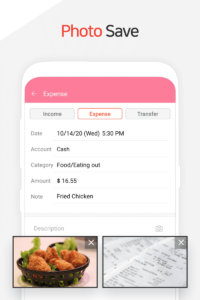
Multiple photos can be attached in one go.
4.9.x
You can edit the exchange rate from the entry page.
The main currency and the sub-currency amounts are displayed together on the entry page.
The feature to update the latest exchange rate has been added.
You can collapse/expand each Account Group on the Accounts tab.
When copying a transaction, it is possible to choose between “today’s date” or “date when entry was recorded".
Multiple photos can be attached in one go.
4.9.x
You can edit the exchange rate from the entry page.
The main currency and the sub-currency amounts are displayed together on the entry page.
The feature to update the latest exchange rate has been added.
App Description
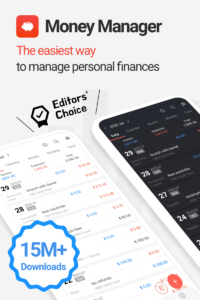
Money Manager - the #1 financial planning, review, expense tracking, and personal asset management app for Android!
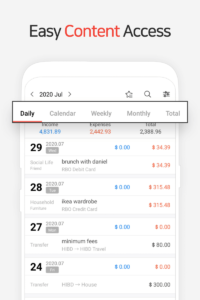
Money Manager makes managing personal finances as easy as pie! Now easily record your personal and business financial transactions, generate spending reports, review your daily, weekly and monthly financial data and manage your assets with Money Manager's spending tracker and budget planner.
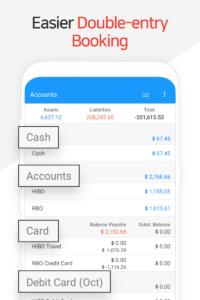
* Applying double entry bookkeeping accounting system
Money Manager facilitates efficient asset management and accounting. It does not just record your money coming in and out of your account but deposits your money into your account as soon as your income is input and draws money from your account as soon as your expense is input.
* Budget and expense management function
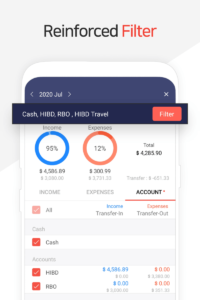
Money Manager shows your budget and expenses by a graph so you can see the amount of your expense against your budget quickly and make suitable financial inferences
* Credit / Debit Card management function
Entering a settlement date, you can see the payment amount and outstanding payment at the asset tab. You can arrange the automatic debit by simply connecting your debit card with your account.
* Passcode
You can check passcode so you can safely manage your financial review account book with Money Manager
* Transfer, direct debit and recurrence function
Transfer between assets is possible, which makes your personal and business asset management more efficient. In addition, you can manage you a salary, insurance, term deposit and loan more easily by setting automatic transfer and recurrence.
* Instant statistics
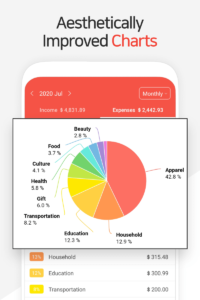
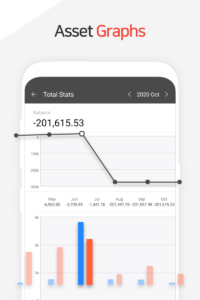
Based on the data entered, you can instantly see your expense by category and changes between each month. And you can see the change of your assets and income/expense indicated by a graph as well.
* Bookmark function
You can easily input your frequent expenses all at once by bookmarking them.
* Backup / Restore
You can make and view backup files in Excel file and backup/restore is possible.
* Other functions
- Change of starting date
- Calculator function (Amount > upper right button)
- Sub Category ON-OFF function
* Paid version *
- No Ads.
- Unlimited Assets (In the free version, limited to 15.)
- Edit PC (
youtu.be/5S4S3EQ3AZE
)
You can view ‘“Money Manager” application using Wi-Fi. You can edit and sort the data by date, category or account group on the screen of your PC. In addition, you can see fluctuations of your accounts indicated on graphs on your PC.
So, what are you waiting for? Download Money Money right now and start managing, tracking, and planning your budget, expenses and personal finances!
Money Manager makes managing personal finances as easy as pie! Now easily record your personal and business financial transactions, generate spending reports, review your daily, weekly and monthly financial data and manage your assets with Money Manager's spending tracker and budget planner.
* Applying double entry bookkeeping accounting system
Money Manager facilitates efficient asset management and accounting. It does not just record your money coming in and out of your account but deposits your money into your account as soon as your income is input and draws money from your account as soon as your expense is input.
* Budget and expense management function
Money Manager shows your budget and expenses by a graph so you can see the amount of your expense against your budget quickly and make suitable financial inferences
* Credit / Debit Card management function
Entering a settlement date, you can see the payment amount and outstanding payment at the asset tab. You can arrange the automatic debit by simply connecting your debit card with your account.
* Passcode
You can check passcode so you can safely manage your financial review account book with Money Manager
* Transfer, direct debit and recurrence function
Transfer between assets is possible, which makes your personal and business asset management more efficient. In addition, you can manage you a salary, insurance, term deposit and loan more easily by setting automatic transfer and recurrence.
* Instant statistics
Based on the data entered, you can instantly see your expense by category and changes between each month. And you can see the change of your assets and income/expense indicated by a graph as well.
* Bookmark function
You can easily input your frequent expenses all at once by bookmarking them.
* Backup / Restore
You can make and view backup files in Excel file and backup/restore is possible.
* Other functions
- Change of starting date
- Calculator function (Amount > upper right button)
- Sub Category ON-OFF function
* Paid version *
- No Ads.
- Unlimited Assets (In the free version, limited to 15.)
- Edit PC (
youtu.be/5S4S3EQ3AZE
)
You can view ‘“Money Manager” application using Wi-Fi. You can edit and sort the data by date, category or account group on the screen of your PC. In addition, you can see fluctuations of your accounts indicated on graphs on your PC.
So, what are you waiting for? Download Money Money right now and start managing, tracking, and planning your budget, expenses and personal finances!
Download Money Manager Expense & Budget APK
Fast, free and safe download.
APK Permissions 28
- android.permission.ACCESS_ADSERVICES_AD_ID
- android.permission.ACCESS_ADSERVICES_ATTRIBUTION
- android.permission.ACCESS_ADSERVICES_TOPICS
- android.permission.ACCESS_NETWORK_STATE
- android.permission.ACCESS_WIFI_STATE
- android.permission.FOREGROUND_SERVICE
- android.permission.INTERNET
- android.permission.POST_NOTIFICATIONS
- android.permission.READ_EXTERNAL_STORAGE
- android.permission.READ_SMS
- android.permission.RECEIVE_BOOT_COMPLETED
- android.permission.RECEIVE_MMS
- android.permission.RECEIVE_SMS
- android.permission.RECEIVE_WAP_PUSH
- android.permission.SCHEDULE_EXACT_ALARM
- android.permission.SEND_MAIL
- android.permission.USE_BIOMETRIC
- android.permission.USE_FINGERPRINT
- android.permission.VIBRATE
- android.permission.WAKE_LOCK
- android.permission.WRITE_EXTERNAL_STORAGE
- com.android.vending.BILLING
- com.android.vending.CHECK_LICENSE
- com.applovin.array.apphub.permission.BIND_APPHUB_SERVICE
- com.google.android.finsky.permission.BIND_GET_INSTALL_REFERRER_SERVICE
- com.google.android.gms.permission.AD_ID
- com.realbyteapps.moneymanagerfree.DYNAMIC_RECEIVER_NOT_EXPORTED_PERMISSION
- com.samsung.android.providers.context.permission.WRITE_USE_APP_FEATURE_SURVEY
APK Verified
The cryptographic signature guarantees that the file is safe to install and was not tampered with in any way.
Similar in Finance


Frequently Asked Questions about Money Manager Expense & Budget APK
This is the universal variant — a single APK that contains native libraries for every CPU architecture. It installs on any Android device but is larger than per-architecture variants.
Yes — the APK's signature has been cryptographically verified against the publisher's signing key. The SHA-256 hash is shown in the File Information panel so you can independently confirm the file matches the original release.
Android 23 (API level 35) or newer. Older devices will refuse the install.
Install a free app like 'CPU-Z' or 'Droid Hardware Info' from the Play Store and look at the ABI / Instruction Set row. Most phones made after 2017 are arm64-v8a; if in doubt, download the universal variant.
All variants are functionally identical — same features, same version. They differ only in which CPU architectures the native code is compiled for, and (sometimes) which screen densities the included graphics target. Pick the one that matches your device for the smallest install size, or pick 'Universal' if you're unsure.