
Download Live Transcribe & Notification APK 8.3.739810924 x86_64 · Android 31+
Download APK
Verified Safe
This is the x86_64 build of Live Transcribe & Notification 8.3.739810924. Intel-architecture builds are useful for Android emulators (BlueStacks, NoxPlayer, Android Studio AVD), Chromebooks running ARC, and the small number of Intel-CPU Android phones. Most physical Android phones should download the ARM variant instead.
File size: 28.9 MB • Min Android: 31 • Target Android: 35 • Version code: 164458 • Framework: Native (Java/Kotlin) • Permissions: 20
Screenshots
File Information
| Package Name | com.google.audio.hearing.visualization.accessibility.scribe |
|---|---|
| Version Name | 8.3.739810924 |
| Version Code | 164458 |
| Architecture | x86_64 |
| Min Android Version | Android 31 (API 35) |
| Main Activity | com.google.audio.hearing.visualization.accessibility.scribe.MainActivity |
| Framework | Native (Java/Kotlin) |
| File Size | 28.93 MB |
| Signature (SHA1) | 16E7D81DBD9BAEC338E32A5D7E13EEC6AF87B6D0 |
| File Hash (SHA256) | d0b94fec0e158bb6f559a2c7a98f50f5a597858181f1272499823802677fc9b4 |
What's New
• Dual screen support on foldable phones. Experiences can vary on different phones.
• Support for more offline languages, including Hindi, Korean, Polish, Portuguese, Russian, Simplified Chinese, Traditional Chinese, Turkish, and Vietnamese.
• Support for more offline languages, including Hindi, Korean, Polish, Portuguese, Russian, Simplified Chinese, Traditional Chinese, Turkish, and Vietnamese.
App Description
Live Transcribe & Sound Notifications makes everyday conversations and surrounding sounds more accessible among people who are deaf and hard of hearing, using just your Android phone.
On most devices, you can open Live Transcribe & Sound Notifications with these steps:
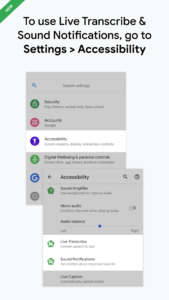
1. Open your device's Settings app
2. Tap Accessibility
3. Depending on which feature you'd like to use, tap Live Transcribe or Sound Notifications
You can also use the accessibility button, gesture, or Quick Settings to start Live Transcribe or Sound Notifications (
https://g.co/a11y/shortcutsFAQ
).
Real-time transcriptions
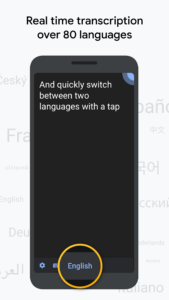
• Get transcriptions in real-time in over 120 languages and dialects. Add custom words that you use frequently, like names or household items.
• Set your phone to vibrate when someone says your name.
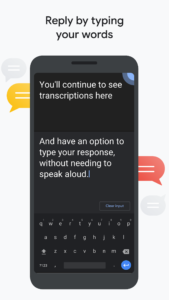
• Type responses in your conversation.
• Use external microphones found in wired headsets, Bluetooth headsets, and USB mics for better audio reception.
• On foldable phones, show transcriptions and typed responses on the outside screen so it's easier to communicate with others.
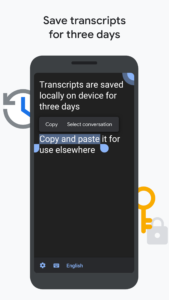
• Choose to save transcriptions for 3 days. Saved transcriptions will stay on your device for 3 days so you can copy and paste them elsewhere. By default, transcriptions are not saved.
Sound Notifications
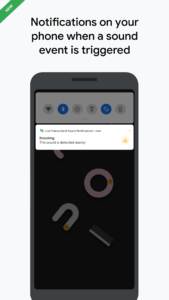
• Get notified about important sounds around you, like when a smoke alarm beeps or baby cries.
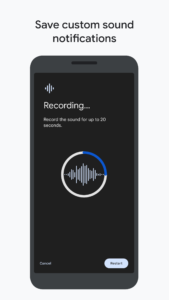
• Add custom sounds to get notified when your appliances beep.
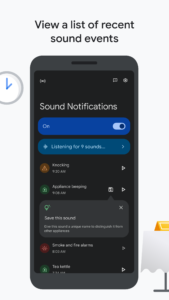
• Review sounds from the past 12 hours to check what was happening around you.
Requirements:
• Android 12 and up
Live Transcribe & Sound Notifications was made in collaboration with Gallaudet University, the premier Deaf and hard of hearing university in the US.
Help & feedback
• To provide feedback and get product updates, join the Accessible Google Group at
https://g.co/a11y/forum
• For help using Live Transcribe & Sound Notifications, connect with us at
https://g.co/disabilitysupport
Permissions notice
Microphone:
Live Transcribe and Sound Notifications needs microphone access to transcribe the speech and sounds around you. The audio is not stored after transcriptions or recognized sounds are processed.
Notifications:
Sound Notifications features require notifications access in order to notify you of sounds.
Nearby devices:
Live Transcribe needs access to nearby devices to connect with your Bluetooth microphones.
On most devices, you can open Live Transcribe & Sound Notifications with these steps:
1. Open your device's Settings app
2. Tap Accessibility
3. Depending on which feature you'd like to use, tap Live Transcribe or Sound Notifications
You can also use the accessibility button, gesture, or Quick Settings to start Live Transcribe or Sound Notifications (
https://g.co/a11y/shortcutsFAQ
).
Real-time transcriptions
• Get transcriptions in real-time in over 120 languages and dialects. Add custom words that you use frequently, like names or household items.
• Set your phone to vibrate when someone says your name.
• Type responses in your conversation.
• Use external microphones found in wired headsets, Bluetooth headsets, and USB mics for better audio reception.
• On foldable phones, show transcriptions and typed responses on the outside screen so it's easier to communicate with others.
• Choose to save transcriptions for 3 days. Saved transcriptions will stay on your device for 3 days so you can copy and paste them elsewhere. By default, transcriptions are not saved.
Sound Notifications
• Get notified about important sounds around you, like when a smoke alarm beeps or baby cries.
• Add custom sounds to get notified when your appliances beep.
• Review sounds from the past 12 hours to check what was happening around you.
Requirements:
• Android 12 and up
Live Transcribe & Sound Notifications was made in collaboration with Gallaudet University, the premier Deaf and hard of hearing university in the US.
Help & feedback
• To provide feedback and get product updates, join the Accessible Google Group at
https://g.co/a11y/forum
• For help using Live Transcribe & Sound Notifications, connect with us at
https://g.co/disabilitysupport
Permissions notice
Microphone:
Live Transcribe and Sound Notifications needs microphone access to transcribe the speech and sounds around you. The audio is not stored after transcriptions or recognized sounds are processed.
Notifications:
Sound Notifications features require notifications access in order to notify you of sounds.
Nearby devices:
Live Transcribe needs access to nearby devices to connect with your Bluetooth microphones.
Download Live Transcribe & Notification APK
Fast, free and safe download.
APK Permissions 20
- android.permission.ACCESS_NETWORK_STATE
- android.permission.BLUETOOTH
- android.permission.BLUETOOTH_ADMIN
- android.permission.BLUETOOTH_CONNECT
- android.permission.FLASHLIGHT
- android.permission.FOREGROUND_SERVICE
- android.permission.FOREGROUND_SERVICE_MICROPHONE
- android.permission.GET_PACKAGE_SIZE
- android.permission.INTERNET
- android.permission.MODIFY_AUDIO_SETTINGS
- android.permission.POST_NOTIFICATIONS
- android.permission.QUERY_ALL_PACKAGES
- android.permission.RECEIVE_BOOT_COMPLETED
- android.permission.RECORD_AUDIO
- android.permission.SYSTEM_ALERT_WINDOW
- android.permission.VIBRATE
- android.permission.WAKE_LOCK
- com.google.android.gms.permission.AD_ID
- com.google.android.providers.gsf.permission.READ_GSERVICES
- com.google.audio.hearing.visualization.accessibility.scribe.DYNAMIC_RECEIVER_NOT_EXPORTED_PERMISSION


Frequently Asked Questions about Live Transcribe & Notification APK
This variant is built for 64-bit Intel (Android emulators, Chromebooks). If your device's CPU matches, this is the smallest, fastest version to install.
Yes — the APK's signature has been cryptographically verified against the publisher's signing key. The SHA-256 hash is shown in the File Information panel so you can independently confirm the file matches the original release.
Android 31 (API level 35) or newer. Older devices will refuse the install.
Install a free app like 'CPU-Z' or 'Droid Hardware Info' from the Play Store and look at the ABI / Instruction Set row. Most phones made after 2017 are arm64-v8a; if in doubt, download the universal variant.
All variants are functionally identical — same features, same version. They differ only in which CPU architectures the native code is compiled for, and (sometimes) which screen densities the included graphics target. Pick the one that matches your device for the smallest install size, or pick 'Universal' if you're unsure.