
Screenshots
File Information
| Package Name | kr.co.rinasoft.howuse |
|---|---|
| Version Name | 5.1.47 |
| Version Code | 650 |
| Architecture | Universal |
| Min Android Version | Android 26 (API 35) |
| Main Activity | kr.co.rinasoft.howuse.MainActivity |
| Framework | Native (Java/Kotlin) |
| File Size | 39.41 MB |
| Signature (SHA1) | 831C2024E92E1680A83A86C0ED96A64B1E98CED9 |
| File Hash (SHA256) | ef5b4d07c8e6f3052c2d736cdc2822f344d43fe09c59b2dcc3df454ae22d4926 |
What's New
Bugfixes and stability improvements.
App Description
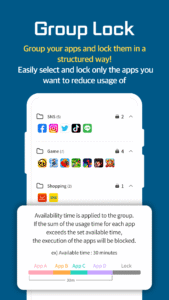
✨✨Group Lock Feature Update✨✨
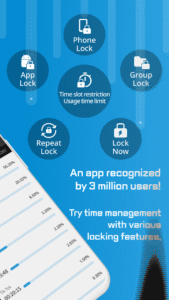
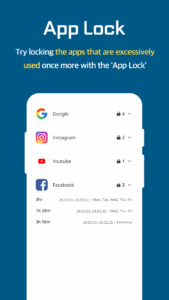
Tired of setting locks on each app individually? Try managing them all at once with Group Lock!
How about organizing by the same category and trying a lock setting?
Group lock apps that steal your unnecessary time like games, social media, etc., and use your precious time more meaningfully ^3^
Advertisement
Remove ads, dark theme, and more with
Premium
How much time do you use your smartphone in a day?
If you habitually turn on your smartphone as soon as you wake up, use it while eating, and even before going to bed, then 'Ubhind' is an essential app for you!
The more you use your smartphone, the higher the likelihood of mental and physical health issues!
if you know you should reduce your usage time but struggle to control yourself due to lack of willpower, try 'Ubhind' :)
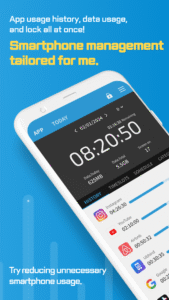
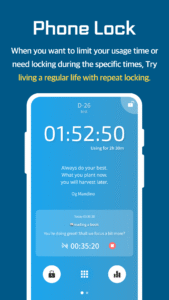
With 'Ubhind', you can set specific times for phone and app usage and lock them to reduce your smartphone usage time. You can also get detailed insights into your usage time and frequency.
Repeat lock, all-day lock, timed lock, and group locking specific apps, etc, 'Ubhind' has very diverse setting options!
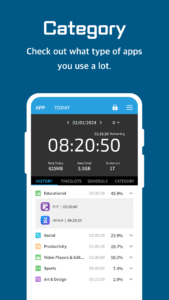
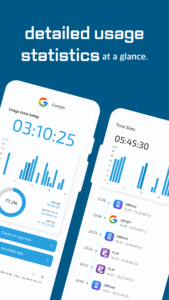
All data can be viewed in detailed statistics and graphs.
Register the good habits you've always wanted to create and see how much you've achieved and how much time you've spent on them!
If you plan and achieve habits, at some point you'll find yourself naturally doing them ♬
Get a quick overview of daily app usage, smartphone usage time, and habit achievement rate at a glance!
Curious about the usage of people in your age group or the overall users? Take a look at user comparisons!
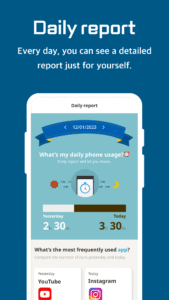
Get a detailed insight into your daily total smartphone usage with the Daily Report!
The smartphone is used 67% of the world's population, which it has become deeply ingrained in our lives 📱
Let's cultivate healthy smartphone habits and make them a part of our lifestyle! UBhind will be there to support you every step of the way (۶•̀ᴗ•́)۶
Explore personalized features to reduce your smartphone usage time.
- App usage time
- Smartphone usage time and locks
- App usage time and locks
- Detailed statistics of app usage
- Creating good habits
- Daily report
- User comparison
- Quote of the day
- Unused app management and organization
*Reasons for permssion request**
Even if you don't agree to optional access permissions, you can still use the service excluding those permissions.
[Required]
Usage Data Access
- It is used to retrieve the currently running apps.
Draw over other apps
- It is used to display lock screen when using lock feature.
Make and manage phone calls
- It is used to retrieve the device ID.
- It is used to unlock the screen during phone calls.
Notifications (Android 13 and above)
- Displays notifications.
- Used for maintaining and displaying the measurement status.
[Optional]
Search accounts
- It is used for premium features.
Accessibility
- It is used to assist the lock feature.
Device administrator
- It is used for power-saving mode operations.
Photos, media, and file access
- It is used to store usage information.
- It is used to allow selecting photos, when customizing lock screen.
Stop Optimization of Battery Usage
- Used for the smooth operation of measurement and lock features.
Precise Alarms (Android 14)
- Used to accurately receive start and end notifications for locking
Accessibility Feature (AccessibilityService API) Usage Announcement
The UBhind app uses the accessibility feature for the following reasons:
You have the option to not use this feature, and it will not affect the functionality of other features.
- Accessibility is used to prevent the use of multi/pop-up windows to access the app during lock.
- Data transmitted through accessibility is not collected, processed, stored, or transmitted separately.
Show more
Show less
Tired of setting locks on each app individually? Try managing them all at once with Group Lock!
How about organizing by the same category and trying a lock setting?
Group lock apps that steal your unnecessary time like games, social media, etc., and use your precious time more meaningfully ^3^
Advertisement
Remove ads, dark theme, and more with
Premium
How much time do you use your smartphone in a day?
If you habitually turn on your smartphone as soon as you wake up, use it while eating, and even before going to bed, then 'Ubhind' is an essential app for you!
The more you use your smartphone, the higher the likelihood of mental and physical health issues!
if you know you should reduce your usage time but struggle to control yourself due to lack of willpower, try 'Ubhind' :)
With 'Ubhind', you can set specific times for phone and app usage and lock them to reduce your smartphone usage time. You can also get detailed insights into your usage time and frequency.
Repeat lock, all-day lock, timed lock, and group locking specific apps, etc, 'Ubhind' has very diverse setting options!
All data can be viewed in detailed statistics and graphs.
Register the good habits you've always wanted to create and see how much you've achieved and how much time you've spent on them!
If you plan and achieve habits, at some point you'll find yourself naturally doing them ♬
Get a quick overview of daily app usage, smartphone usage time, and habit achievement rate at a glance!
Curious about the usage of people in your age group or the overall users? Take a look at user comparisons!
Get a detailed insight into your daily total smartphone usage with the Daily Report!
The smartphone is used 67% of the world's population, which it has become deeply ingrained in our lives 📱
Let's cultivate healthy smartphone habits and make them a part of our lifestyle! UBhind will be there to support you every step of the way (۶•̀ᴗ•́)۶
Explore personalized features to reduce your smartphone usage time.
- App usage time
- Smartphone usage time and locks
- App usage time and locks
- Detailed statistics of app usage
- Creating good habits
- Daily report
- User comparison
- Quote of the day
- Unused app management and organization
*Reasons for permssion request**
Even if you don't agree to optional access permissions, you can still use the service excluding those permissions.
[Required]
Usage Data Access
- It is used to retrieve the currently running apps.
Draw over other apps
- It is used to display lock screen when using lock feature.
Make and manage phone calls
- It is used to retrieve the device ID.
- It is used to unlock the screen during phone calls.
Notifications (Android 13 and above)
- Displays notifications.
- Used for maintaining and displaying the measurement status.
[Optional]
Search accounts
- It is used for premium features.
Accessibility
- It is used to assist the lock feature.
Device administrator
- It is used for power-saving mode operations.
Photos, media, and file access
- It is used to store usage information.
- It is used to allow selecting photos, when customizing lock screen.
Stop Optimization of Battery Usage
- Used for the smooth operation of measurement and lock features.
Precise Alarms (Android 14)
- Used to accurately receive start and end notifications for locking
Accessibility Feature (AccessibilityService API) Usage Announcement
The UBhind app uses the accessibility feature for the following reasons:
You have the option to not use this feature, and it will not affect the functionality of other features.
- Accessibility is used to prevent the use of multi/pop-up windows to access the app during lock.
- Data transmitted through accessibility is not collected, processed, stored, or transmitted separately.
Show more
Show less
Download UBhind(App lock/Screen time) APK
Fast, free and safe download.
APK Permissions 33
- android.permission.ACCESS_ADSERVICES_AD_ID
- android.permission.ACCESS_ADSERVICES_ATTRIBUTION
- android.permission.ACCESS_ADSERVICES_TOPICS
- android.permission.ACCESS_NETWORK_STATE
- android.permission.ACCESS_NOTIFICATION_POLICY
- android.permission.ACCESS_WIFI_STATE
- android.permission.CAMERA
- android.permission.FOREGROUND_SERVICE
- android.permission.FOREGROUND_SERVICE_SPECIAL_USE
- android.permission.INTERNET
- android.permission.PACKAGE_USAGE_STATS
- android.permission.POST_NOTIFICATIONS
- android.permission.QUERY_ALL_PACKAGES
- android.permission.READ_EXTERNAL_STORAGE
- android.permission.READ_MEDIA_IMAGES
- android.permission.READ_PHONE_STATE
- android.permission.RECEIVE_BOOT_COMPLETED
- android.permission.REQUEST_DELETE_PACKAGES
- android.permission.REQUEST_IGNORE_BATTERY_OPTIMIZATIONS
- android.permission.SCHEDULE_EXACT_ALARM
- android.permission.SUBSCRIBE_TO_KEYGUARD_LOCKED_STATE
- android.permission.SYSTEM_ALERT_WINDOW
- android.permission.USE_FULL_SCREEN_INTENT
- android.permission.VIBRATE
- android.permission.WAKE_LOCK
- android.permission.WRITE_EXTERNAL_STORAGE
- com.android.alarm.permission.SET_ALARM
- com.android.vending.BILLING
- com.google.android.c2dm.permission.RECEIVE
- com.google.android.finsky.permission.BIND_GET_INSTALL_REFERRER_SERVICE
- com.google.android.gms.permission.AD_ID
- com.google.android.providers.gsf.permission.READ_GSERVICES
- kr.co.rinasoft.howuse.DYNAMIC_RECEIVER_NOT_EXPORTED_PERMISSION
APK Verified
The cryptographic signature guarantees that the file is safe to install and was not tampered with in any way.


