
This is the arm64-v8a build of Roborock 4.52.04 — the modern 64-bit ARM build that runs on virtually every Android phone released since 2017. It's smaller and faster than the universal variant because Android only loads the native code your CPU actually needs. If your phone is from the last 8 years, this is the right pick.
File size: 68.4 MB • Min Android: 24 • Target Android: 35 • Version code: 100732 • Framework: React Native • Permissions: 28
Screenshots
File Information
| Package Name | com.roborock.smart |
|---|---|
| Version Name | 4.52.04 |
| Version Code | 100732 |
| Architecture | arm64-v8a |
| Min Android Version | Android 24 (API 35) |
| Main Activity | com.roborock.smart.refactor.ui.splash.SplashActivity |
| Framework | React Native |
| File Size | 68.42 MB |
| Signature (SHA1) | CB3BAD8546DD08D339883AB303FAC2117F71315E |
| File Hash (SHA256) | 6956e7563ccc3d5a794d5a1f928723bcae28b1189423c3a4c28a87069d3b1e7d |
What's New
What's New:
When logging into your Roborock account with a password, entering the wrong password multiple times will temporarily disable password login to help protect your account.
Improvements:
The Log In and Sign Up pages have been combined for a smoother experience. If the phone number or email address hasn’t been used before and is successfully verified, a new account will be created automatically.
When logging into your Roborock account with a password, entering the wrong password multiple times will temporarily disable password login to help protect your account.
Improvements:
The Log In and Sign Up pages have been combined for a smoother experience. If the phone number or email address hasn’t been used before and is successfully verified, a new account will be created automatically.
App Description
*Feature support varies by product
Cutting-Edge Software and Hardware:
- PreciSense: Precision LIDAR navigation for efficient home cleaning.
- Sensient: A sensor matrix for safer movement around the home.
- OpticEye: Highly accurate vision-based motion control and navigation
- ReactiveAI: Artificial intelligence for recognizing and avoiding common home objects.
- VibraRise: More effective mopping through sonic vibration, with a mop that can be automatically lifted off the floor.
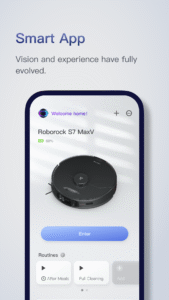
The Roborock app has been designed to give you total control over your Roborock robot, from home layout to cleaning schedules, cleaning strength, and more. Once you've set it up the way you want it, you can leave your robot to work.
---- Feature Highlights ----
SERIOUSLY SMART MAPPING
After it's first run around your home, your Roborock robot will show you your floorplan and automatically divide your rooms, unlocking a world of customizations.
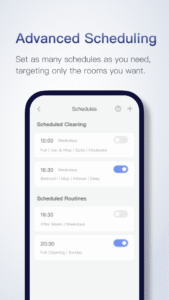
ADVANCED SCHEDULING
Set multiple schedules from hourly to daily to weekly, hitting different rooms with each one. You can clean the kitchen after breakfast and even the whole house when everyone's gone out.
CUSTOMIZABLE CLEANING
Tailor cleaning to the demands of each room. Crank up suction for the nursery, use more water on tiled kitchens, and lower suction when you need things quiet. The control is yours.
ZONE CLEANING
Draw up to five zones, and clean each zone up to three times, for when you want to tackle more stubborn dirt or just don't need entire rooms cleaned.
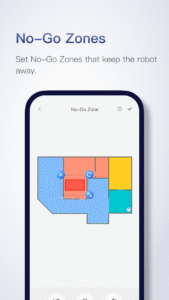
NO-GO ZONES
Use up to 10 No-Go Zones and 10 Invisible Walls to avoid thick carpets, keep robots away from delicate art, and more—all without a single hardware add-on.
MULTI-LEVEL MAPPING
Save up to four maps in your home and tailor cleaning to match each floor. Your robot will recognize the floor it's on automatically, so you can simply watch it work.
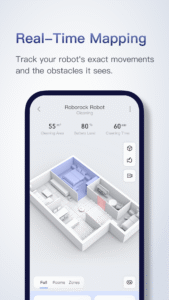
REAL-TIME VIEWING
Watch your robot move through your home, seeing the exact route it's taken and any obstacles it has avoided along the way.
Feature Compatibility:
- Multi-Level Mapping is available on [TBC] only
- Obstacle avoidance is available on S6 MaxV only
- Room specific suction scheduling is available on [TBC] only
- Room specific mopping is available on S6 MaxV and S5 Max only.
Contact Us
Customer Service Phone: 400-900-1755 (Chinese Mainland)
E-mail:
service@roborock.com
(Chinese Mainland),
support@roborock-eu.com
(EU),
support@roborock.com
(Other Areas)
Cutting-Edge Software and Hardware:
- PreciSense: Precision LIDAR navigation for efficient home cleaning.
- Sensient: A sensor matrix for safer movement around the home.
- OpticEye: Highly accurate vision-based motion control and navigation
- ReactiveAI: Artificial intelligence for recognizing and avoiding common home objects.
- VibraRise: More effective mopping through sonic vibration, with a mop that can be automatically lifted off the floor.
The Roborock app has been designed to give you total control over your Roborock robot, from home layout to cleaning schedules, cleaning strength, and more. Once you've set it up the way you want it, you can leave your robot to work.
---- Feature Highlights ----
SERIOUSLY SMART MAPPING
After it's first run around your home, your Roborock robot will show you your floorplan and automatically divide your rooms, unlocking a world of customizations.
ADVANCED SCHEDULING
Set multiple schedules from hourly to daily to weekly, hitting different rooms with each one. You can clean the kitchen after breakfast and even the whole house when everyone's gone out.
CUSTOMIZABLE CLEANING
Tailor cleaning to the demands of each room. Crank up suction for the nursery, use more water on tiled kitchens, and lower suction when you need things quiet. The control is yours.
ZONE CLEANING
Draw up to five zones, and clean each zone up to three times, for when you want to tackle more stubborn dirt or just don't need entire rooms cleaned.
NO-GO ZONES
Use up to 10 No-Go Zones and 10 Invisible Walls to avoid thick carpets, keep robots away from delicate art, and more—all without a single hardware add-on.
MULTI-LEVEL MAPPING
Save up to four maps in your home and tailor cleaning to match each floor. Your robot will recognize the floor it's on automatically, so you can simply watch it work.
REAL-TIME VIEWING
Watch your robot move through your home, seeing the exact route it's taken and any obstacles it has avoided along the way.
Feature Compatibility:
- Multi-Level Mapping is available on [TBC] only
- Obstacle avoidance is available on S6 MaxV only
- Room specific suction scheduling is available on [TBC] only
- Room specific mopping is available on S6 MaxV and S5 Max only.
Contact Us
Customer Service Phone: 400-900-1755 (Chinese Mainland)
E-mail:
service@roborock.com
(Chinese Mainland),
support@roborock-eu.com
(EU),
support@roborock.com
(Other Areas)
Download Roborock APK
Fast, free and safe download.
APK Permissions 28
- android.permission.ACCESS_COARSE_LOCATION
- android.permission.ACCESS_FINE_LOCATION
- android.permission.ACCESS_NETWORK_STATE
- android.permission.ACCESS_WIFI_STATE
- android.permission.BLUETOOTH
- android.permission.BLUETOOTH_ADMIN
- android.permission.BLUETOOTH_CONNECT
- android.permission.BLUETOOTH_SCAN
- android.permission.CAMERA
- android.permission.CHANGE_NETWORK_STATE
- android.permission.CHANGE_WIFI_MULTICAST_STATE
- android.permission.CHANGE_WIFI_STATE
- android.permission.FLASHLIGHT
- android.permission.FOREGROUND_SERVICE
- android.permission.INTERNET
- android.permission.MODIFY_AUDIO_SETTINGS
- android.permission.POST_NOTIFICATIONS
- android.permission.READ_EXTERNAL_STORAGE
- android.permission.READ_MEDIA_IMAGES
- android.permission.RECEIVE_BOOT_COMPLETED
- android.permission.RECORD_AUDIO
- android.permission.SCHEDULE_EXACT_ALARM
- android.permission.VIBRATE
- android.permission.WAKE_LOCK
- com.google.android.c2dm.permission.RECEIVE
- com.google.android.finsky.permission.BIND_GET_INSTALL_REFERRER_SERVICE
- com.google.android.providers.gsf.permission.READ_GSERVICES
- com.roborock.smart.DYNAMIC_RECEIVER_NOT_EXPORTED_PERMISSION
APK Verified
The cryptographic signature guarantees that the file is safe to install and was not tampered with in any way.


Frequently Asked Questions about Roborock APK
This variant is built for 64-bit ARM (most Android phones made since 2017). If your device's CPU matches, this is the smallest, fastest version to install.
Yes — the APK's signature has been cryptographically verified against the publisher's signing key. The SHA-256 hash is shown in the File Information panel so you can independently confirm the file matches the original release.
Android 24 (API level 35) or newer. Older devices will refuse the install.
Install a free app like 'CPU-Z' or 'Droid Hardware Info' from the Play Store and look at the ABI / Instruction Set row. Most phones made after 2017 are arm64-v8a; if in doubt, download the universal variant.
All variants are functionally identical — same features, same version. They differ only in which CPU architectures the native code is compiled for, and (sometimes) which screen densities the included graphics target. Pick the one that matches your device for the smallest install size, or pick 'Universal' if you're unsure.