
This is the universal build of Rogers Xfinity 5.57.1-8. It contains native libraries for every CPU architecture (arm64-v8a, armeabi-v7a, x86, x86_64), so it installs on any Android device. The trade-off is size — it's larger than per-architecture variants. Pick this one if you're unsure which CPU your phone has, or if you plan to share the APK with multiple devices.
File size: 296.9 MB • Min Android: 29 • Target Android: 35 • Version code: 55701008 • Framework: Native (Java/Kotlin) • Permissions: 32
Screenshots
File Information
| Package Name | com.rogers.ignitewifi |
|---|---|
| Version Name | 5.57.1-8 |
| Version Code | 55701008 |
| Architecture | Universal |
| Min Android Version | Android 29 (API 35) |
| Main Activity | com.xfinity.digitalhome.features.launch.splash.SplashActivity |
| Framework | Native (Java/Kotlin) |
| File Size | 296.89 MB |
| Signature (SHA1) | 0BF26EB502A61AE18B37B5E03E5A3B8D2CA25BEC |
| File Hash (SHA256) | c36a81da84bd7b723741789a11010ed8f6f779d650347ff34f014c7162add311 |
What's New
We’ve been hard at work making improvements to the Rogers Xfinity app. This update brings you improvements and bug fixes.
We appreciate you using our app. Leave us a comment and let us know how we're doing.
Check out the latest features, download our app.
We appreciate you using our app. Leave us a comment and let us know how we're doing.
Check out the latest features, download our app.
App Description
Rogers Xfinity is here. Connecting you to more of what you love. The Ignite HomeConnect app has been updated to the Rogers Xfinity app.
Included exclusively with Rogers Xfinity plans and TV bundles featuring the Rogers Xfinity Gateway in Ontario, New Brunswick, and Newfoundland.
You’re in control with Rogers Xfinity. Easily manage and protect your home WiFi and connected devices from anywhere, at any time.
Stay in the know – see who’s online at home from anywhere, at anytime
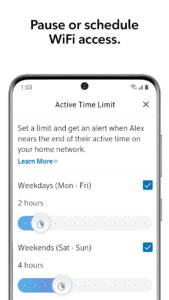
• Pause or schedule WiFi whenever you choose – create Downtime Schedules or set Active Time Limits
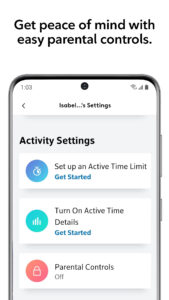
• Protect your loved ones – activate easy Parental Controls and Active Time Details for added peace of mind
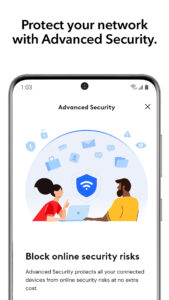
• Get our most secure WiFi – turn on Advanced Security for worry-free protection of all connected devices; automatically block online threats 24/7 and get alerts about suspicious activity
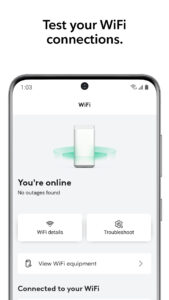
• Test your WiFi connections – ensure you’re getting the best WiFi for all your connected devices without having to call tech support
• Never forget your WiFi password again – quickly check, update or share your WiFi passport
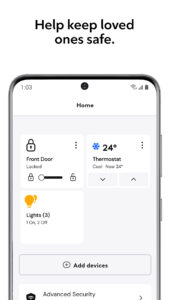
• One app that does it all – link and control smart lighting, thermostats and doorlocks from popular brands
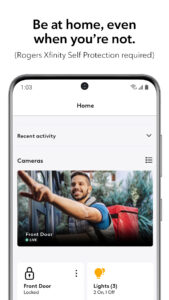
• Add Rogers Xfinity Self Protection to any Rogers Xfinity Internet plan and keep an eye on your home with 24/7 home monitoring right at your fingertips.
Getting Started
• Not sure if you have the Rogers Xfinity Gateway? Visit rogers.com/myrogers and check under “internet”
• Download and install the Rogers Xfinity app on your smartphone
• Launch the app and sign in using your MyRogers username and password
• Select “Remember username” for even faster sign-in next time
Requirements
• Rogers Xfinity Gateway, included exclusively with Rogers Xfinity Bundles and Internet packages from Rogers in Ontario, New Brunswick and Newfoundland. (For British Columbia, Alberta, Saskatchewan and Manitoba, please download “Rogers Xfinity (Shaw)”
• My Rogers username and password to access the app
• App designed for smartphone use only
For more information see rogers.com/rogers-xfinity-app
Included exclusively with Rogers Xfinity plans and TV bundles featuring the Rogers Xfinity Gateway in Ontario, New Brunswick, and Newfoundland.
You’re in control with Rogers Xfinity. Easily manage and protect your home WiFi and connected devices from anywhere, at any time.
Stay in the know – see who’s online at home from anywhere, at anytime
• Pause or schedule WiFi whenever you choose – create Downtime Schedules or set Active Time Limits
• Protect your loved ones – activate easy Parental Controls and Active Time Details for added peace of mind
• Get our most secure WiFi – turn on Advanced Security for worry-free protection of all connected devices; automatically block online threats 24/7 and get alerts about suspicious activity
• Test your WiFi connections – ensure you’re getting the best WiFi for all your connected devices without having to call tech support
• Never forget your WiFi password again – quickly check, update or share your WiFi passport
• One app that does it all – link and control smart lighting, thermostats and doorlocks from popular brands
• Add Rogers Xfinity Self Protection to any Rogers Xfinity Internet plan and keep an eye on your home with 24/7 home monitoring right at your fingertips.
Getting Started
• Not sure if you have the Rogers Xfinity Gateway? Visit rogers.com/myrogers and check under “internet”
• Download and install the Rogers Xfinity app on your smartphone
• Launch the app and sign in using your MyRogers username and password
• Select “Remember username” for even faster sign-in next time
Requirements
• Rogers Xfinity Gateway, included exclusively with Rogers Xfinity Bundles and Internet packages from Rogers in Ontario, New Brunswick and Newfoundland. (For British Columbia, Alberta, Saskatchewan and Manitoba, please download “Rogers Xfinity (Shaw)”
• My Rogers username and password to access the app
• App designed for smartphone use only
For more information see rogers.com/rogers-xfinity-app
Download Rogers Xfinity APK
Fast, free and safe download.
APK Permissions 32
- android.permission.ACCESS_ADSERVICES_AD_ID
- android.permission.ACCESS_COARSE_LOCATION
- android.permission.ACCESS_FINE_LOCATION
- android.permission.ACCESS_NETWORK_STATE
- android.permission.ACCESS_WIFI_STATE
- android.permission.BLUETOOTH
- android.permission.BLUETOOTH_ADMIN
- android.permission.BLUETOOTH_CONNECT
- android.permission.BLUETOOTH_SCAN
- android.permission.BLUETOTH_SCAN
- android.permission.CAMERA
- android.permission.CHANGE_NETWORK_STATE
- android.permission.CHANGE_WIFI_MULTICAST_STATE
- android.permission.CHANGE_WIFI_STATE
- android.permission.FOREGROUND_SERVICE
- android.permission.HIGH_SAMPLING_RATE_SENSORS
- android.permission.INTERNET
- android.permission.MODIFY_AUDIO_SETTINGS
- android.permission.POST_NOTIFICATIONS
- android.permission.READ_EXTERNAL_STORAGE
- android.permission.READ_PHONE_STATE
- android.permission.RECEIVE_BOOT_COMPLETED
- android.permission.RECORD_AUDIO
- android.permission.REORDER_TASKS
- android.permission.USE_BIOMETRIC
- android.permission.USE_FINGERPRINT
- android.permission.VIBRATE
- android.permission.WAKE_LOCK
- android.permission.WRITE_EXTERNAL_STORAGE
- com.google.android.c2dm.permission.RECEIVE
- com.google.android.finsky.permission.BIND_GET_INSTALL_REFERRER_SERVICE
- com.rogers.ignitewifi.DYNAMIC_RECEIVER_NOT_EXPORTED_PERMISSION
APK Verified
The cryptographic signature guarantees that the file is safe to install and was not tampered with in any way.
Similar in Tools


Frequently Asked Questions about Rogers Xfinity APK
This is the universal variant — a single APK that contains native libraries for every CPU architecture. It installs on any Android device but is larger than per-architecture variants.
Yes — the APK's signature has been cryptographically verified against the publisher's signing key. The SHA-256 hash is shown in the File Information panel so you can independently confirm the file matches the original release.
Android 29 (API level 35) or newer. Older devices will refuse the install.
Install a free app like 'CPU-Z' or 'Droid Hardware Info' from the Play Store and look at the ABI / Instruction Set row. Most phones made after 2017 are arm64-v8a; if in doubt, download the universal variant.
All variants are functionally identical — same features, same version. They differ only in which CPU architectures the native code is compiled for, and (sometimes) which screen densities the included graphics target. Pick the one that matches your device for the smallest install size, or pick 'Universal' if you're unsure.