
This is the universal build of RTR-NetTest 3G/4G/5G IPv4/6 4.16.10. It contains native libraries for every CPU architecture (arm64-v8a, armeabi-v7a, x86, x86_64), so it installs on any Android device. The trade-off is size — it's larger than per-architecture variants. Pick this one if you're unsure which CPU your phone has, or if you plan to share the APK with multiple devices.
File size: 10.2 MB • Min Android: 26 • Target Android: 35 • Version code: 41610 • Framework: Native (Java/Kotlin) • Permissions: 16
Screenshots
File Information
| Package Name | at.alladin.rmbt.android |
|---|---|
| Version Name | 4.16.10 |
| Version Code | 41610 |
| Architecture | Universal |
| Min Android Version | Android 26 (API 35) |
| Main Activity | at.rtr.rmbt.android.ui.activity.HomeActivity |
| Framework | Native (Java/Kotlin) |
| File Size | 10.19 MB |
| Signature (SHA1) | 50876441CABC9CA22114C51F0F7F72ECBABA7696 |
| File Hash (SHA256) | ca01159e97c9c9a1f3a10e79f37ea3678c603daad45e5c864d6f60f92309874b |
What's New
From version
4.16.8
:
Upgrade to latest SDK, minor fixes
4.16.8
:
Upgrade to latest SDK, minor fixes
App Description
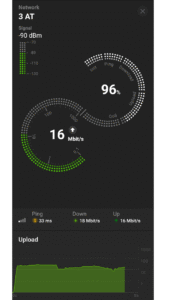
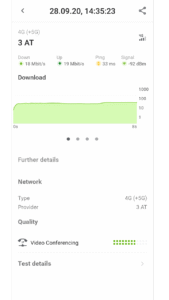
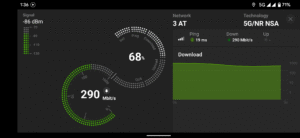
The RTR-NetTest (in German: RTR-Netztest) measures, in addition to the speed of your current internet connection (upload, download, ping, signal strength), also a number of quality parameters (VoIP, unmodified content, web page, transparent connection, DNS, ports).
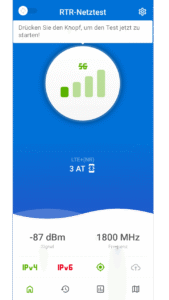
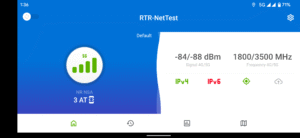
When starting the app several symbols provide information about your Internet connection: mobile data or WLAN connection, background data transmission, IP address and location. The start button initiates the RTR-NetTest. The speed test is followed by QoS tests. QoS stands for Quality of Service. Horizontal bars show the progress of the QoS tests. Once all tests are completed, the results as well as other detailed information can be viewed in the summary. The menu is located on the left and allows access to home, history, map, statistics, help, information and settings.
The app of the Austrian Regulatory Authority for Broadcasting and Telecommunications (RTR) includes:
- an option to retrieve individual test results and the possibility to synchronise the results of different devices and to display them in the browser ("history")
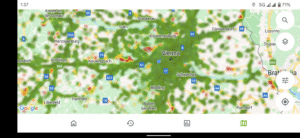
- a map view of all test results with filter options by measurement parameters, statistics, internet providers and devices ("map")
- a display of the five most recent tests, statistics on the results of the Internet providers and all used devices/browsers with filter options by quantile, measurement parameters and measurement period ("statistics")
- quality parameters (e.g. signal strength, connectivity on different ports, modifications during data transmission, transmission duration for a reference web page)
- a traffic light rating of the measuring result
Other features of the app:
- 2G (GSM), 3G (UMTS, HSPA), 4G (LTE) and 5G(NR) connections are supported; both for IPv4 and IPv6
- test results are available as open data - see
www.netztest.at/en/Opendata
- the source code is available at
github.com/rtr-nettest/open-rmbt
For further information about RTR’s app, detailed FAQs are available.
When starting the app several symbols provide information about your Internet connection: mobile data or WLAN connection, background data transmission, IP address and location. The start button initiates the RTR-NetTest. The speed test is followed by QoS tests. QoS stands for Quality of Service. Horizontal bars show the progress of the QoS tests. Once all tests are completed, the results as well as other detailed information can be viewed in the summary. The menu is located on the left and allows access to home, history, map, statistics, help, information and settings.
The app of the Austrian Regulatory Authority for Broadcasting and Telecommunications (RTR) includes:
- an option to retrieve individual test results and the possibility to synchronise the results of different devices and to display them in the browser ("history")
- a map view of all test results with filter options by measurement parameters, statistics, internet providers and devices ("map")
- a display of the five most recent tests, statistics on the results of the Internet providers and all used devices/browsers with filter options by quantile, measurement parameters and measurement period ("statistics")
- quality parameters (e.g. signal strength, connectivity on different ports, modifications during data transmission, transmission duration for a reference web page)
- a traffic light rating of the measuring result
Other features of the app:
- 2G (GSM), 3G (UMTS, HSPA), 4G (LTE) and 5G(NR) connections are supported; both for IPv4 and IPv6
- test results are available as open data - see
www.netztest.at/en/Opendata
- the source code is available at
github.com/rtr-nettest/open-rmbt
For further information about RTR’s app, detailed FAQs are available.
Download RTR-NetTest 3G/4G/5G IPv4/6 APK
Fast, free and safe download.
APK Permissions 16
- android.permission.ACCESS_BACKGROUND_LOCATION
- android.permission.ACCESS_COARSE_LOCATION
- android.permission.ACCESS_FINE_LOCATION
- android.permission.ACCESS_NETWORK_STATE
- android.permission.ACCESS_WIFI_STATE
- android.permission.FOREGROUND_SERVICE
- android.permission.FOREGROUND_SERVICE_DATA_SYNC
- android.permission.FOREGROUND_SERVICE_LOCATION
- android.permission.FOREGROUND_SERVICE_SPECIAL_USE
- android.permission.INTERNET
- android.permission.POST_NOTIFICATIONS
- android.permission.READ_PHONE_STATE
- android.permission.RECEIVE_BOOT_COMPLETED
- android.permission.REORDER_TASKS
- android.permission.WAKE_LOCK
- at.alladin.rmbt.android.DYNAMIC_RECEIVER_NOT_EXPORTED_PERMISSION
APK Verified
The cryptographic signature guarantees that the file is safe to install and was not tampered with in any way.


Frequently Asked Questions about RTR-NetTest 3G/4G/5G IPv4/6 APK
This is the universal variant — a single APK that contains native libraries for every CPU architecture. It installs on any Android device but is larger than per-architecture variants.
Yes — the APK's signature has been cryptographically verified against the publisher's signing key. The SHA-256 hash is shown in the File Information panel so you can independently confirm the file matches the original release.
Android 26 (API level 35) or newer. Older devices will refuse the install.
Install a free app like 'CPU-Z' or 'Droid Hardware Info' from the Play Store and look at the ABI / Instruction Set row. Most phones made after 2017 are arm64-v8a; if in doubt, download the universal variant.
All variants are functionally identical — same features, same version. They differ only in which CPU architectures the native code is compiled for, and (sometimes) which screen densities the included graphics target. Pick the one that matches your device for the smallest install size, or pick 'Universal' if you're unsure.