
This is the universal build of SA Group Text Lite 3.7.4. It contains native libraries for every CPU architecture (arm64-v8a, armeabi-v7a, x86, x86_64), so it installs on any Android device. The trade-off is size — it's larger than per-architecture variants. Pick this one if you're unsure which CPU your phone has, or if you plan to share the APK with multiple devices.
File size: 9.0 MB • Min Android: 26 • Target Android: 36 • Version code: 128 • Framework: Native (Java/Kotlin) • Permissions: 17
Screenshots
File Information
| Package Name | com.samapp.excelsms.excelsmslite |
|---|---|
| Version Name | 3.7.4 |
| Version Code | 128 |
| Architecture | Universal |
| Min Android Version | Android 26 (API 36) |
| Main Activity | com.samapp.excelsms.excelsmslite.ExcelSMSLiteActivity |
| Framework | Native (Java/Kotlin) |
| File Size | 8.99 MB |
| Signature (SHA1) | BB94ABDFE5DAB07B0694BC024009D4D130C96949 |
| File Hash (SHA256) | 9b1067769686fc3d9cd70c3bb85d54b1e94f459565d20e29f73283bf5eee053a |
What's New
1. Updated target API to 36 and optimized UI for Android 15 compatibility.
App Description
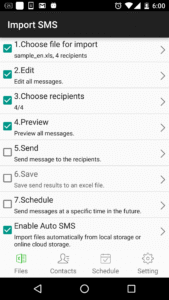
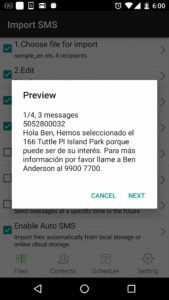
SA Group Text is the most efficient way to send group messages. You can add recipient names and phone numbers in an Excel file. You can enter static or personalized text messages right in the Excel spreadsheet. For example, if you enter “Hi {first name}, ...” in a message, the app will take the first name of the recipients and personalize the message, generating text such as “Hi David, …” , “Hi Michael, …”…
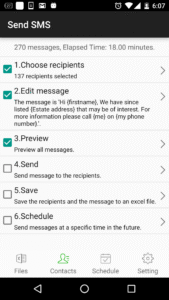
SA Group Text is also an easy way to send text messages to the contacts on your Phone. Just pick groups or individual contacts, type in a static or personalized message and send it.
Who uses SA Group Text ?
★ Small Businesses
★ Religious Groups
★ Retail
★ Nightlife - Bars & Nightclubs
★ Restaurants
★ Banks/Financial Institutions
★ Insurance Companies
★ Event Marketers (With hundreds (or even thousands) of people attending your events)
★ Traditional Media
★ Schools
★ Social Groups
★ Real Estate
With SA Group Text you can :
★ Import group Text from an Excel file via USB/Email.
★ Create your own groups in an Excel spreadsheet and send messages to them.
★ Insert tags ({firstname},{lastname},{company} etc) in your text message in order to create personalized messages. When you use this function, each message has a personal touch. For example:
Dear {firstname}, Welcome to our dinner party.
★ Use any Excel-compatible applications to create your group text messages.
★ Send SMS to as many recipients as you need within your Excel file
★ Create a formatted Excel file easily. The file can contain only two columns : Mobile and Message. You can find more example spreadsheets on the app’s website.
★ Create flexible group SMS in your spreadsheet.
For example “{family} Family – Practice Tomorrow at 5pm for little {kidname}!” becomes “David Family – Practice Tomorrow at 5pm for little Johnny!”. The names change over and over again.
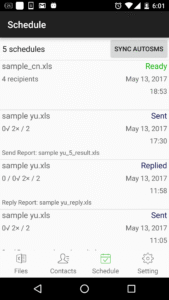
★ Schedule your messages you want to send at a specific time.
★ Set the time range of when you want your text message to send.
★ Support for Dual SIM devices (Android 5.1 or later).
★ Pause and resume schedules. You have to long press the schedule to access pause/resume option.
★ Import and send more 10,000 personalized messages in one time.
★ Send unsent messages. If the app is terminated while sending group sms, the app can continue the sending schedule after you launch the app.
★ Make send report and reply report.
★ If you provide the recipient's email address in the excel file , the same message will be sent to their email address.
In order to send messages via email, you have to
a. Enable send mail in the app’s setting page.
b. set up an email account to send messages from it.
c. add “Subject” and “EmailAddress” in the excel file. you can see the file sample-mail.xls in the app for detail.
Due to SMS limitation, each app can only send 100 messages within an hour. You need to install SA Group text plug-in to extend the SMS limitation.
After download plug-ins, please go to your phone’s settings, then go to app manager, grant Send SMS permission to these plug-ins.
You also have to grant Run in background permission to the app and all plug-ins. Here's the way for some models to grant Run in background permission.
Huawei
go to Settings -> Battery -> Launch -> SA Group Text app
turn on Auto-launch and Run in background
Samsung
go to Settings -> Apps -> Special access -> Optimise battery usage -> All apps -> turn off SA Group Text
Vivo
go to Settings -> More Settings -> Applications -> All -> SA Group Text -> Permission -> Single Permission Setting -> Autostart
XiaoMi
Permissions -> SA Group Text -> Start in background
SA Group Text is also an easy way to send text messages to the contacts on your Phone. Just pick groups or individual contacts, type in a static or personalized message and send it.
Who uses SA Group Text ?
★ Small Businesses
★ Religious Groups
★ Retail
★ Nightlife - Bars & Nightclubs
★ Restaurants
★ Banks/Financial Institutions
★ Insurance Companies
★ Event Marketers (With hundreds (or even thousands) of people attending your events)
★ Traditional Media
★ Schools
★ Social Groups
★ Real Estate
With SA Group Text you can :
★ Import group Text from an Excel file via USB/Email.
★ Create your own groups in an Excel spreadsheet and send messages to them.
★ Insert tags ({firstname},{lastname},{company} etc) in your text message in order to create personalized messages. When you use this function, each message has a personal touch. For example:
Dear {firstname}, Welcome to our dinner party.
★ Use any Excel-compatible applications to create your group text messages.
★ Send SMS to as many recipients as you need within your Excel file
★ Create a formatted Excel file easily. The file can contain only two columns : Mobile and Message. You can find more example spreadsheets on the app’s website.
★ Create flexible group SMS in your spreadsheet.
For example “{family} Family – Practice Tomorrow at 5pm for little {kidname}!” becomes “David Family – Practice Tomorrow at 5pm for little Johnny!”. The names change over and over again.
★ Schedule your messages you want to send at a specific time.
★ Set the time range of when you want your text message to send.
★ Support for Dual SIM devices (Android 5.1 or later).
★ Pause and resume schedules. You have to long press the schedule to access pause/resume option.
★ Import and send more 10,000 personalized messages in one time.
★ Send unsent messages. If the app is terminated while sending group sms, the app can continue the sending schedule after you launch the app.
★ Make send report and reply report.
★ If you provide the recipient's email address in the excel file , the same message will be sent to their email address.
In order to send messages via email, you have to
a. Enable send mail in the app’s setting page.
b. set up an email account to send messages from it.
c. add “Subject” and “EmailAddress” in the excel file. you can see the file sample-mail.xls in the app for detail.
Due to SMS limitation, each app can only send 100 messages within an hour. You need to install SA Group text plug-in to extend the SMS limitation.
After download plug-ins, please go to your phone’s settings, then go to app manager, grant Send SMS permission to these plug-ins.
You also have to grant Run in background permission to the app and all plug-ins. Here's the way for some models to grant Run in background permission.
Huawei
go to Settings -> Battery -> Launch -> SA Group Text app
turn on Auto-launch and Run in background
Samsung
go to Settings -> Apps -> Special access -> Optimise battery usage -> All apps -> turn off SA Group Text
Vivo
go to Settings -> More Settings -> Applications -> All -> SA Group Text -> Permission -> Single Permission Setting -> Autostart
XiaoMi
Permissions -> SA Group Text -> Start in background
Download SA Group Text Lite APK
Fast, free and safe download.
APK Permissions 17
- android.permission.ACCESS_ADSERVICES_AD_ID
- android.permission.ACCESS_ADSERVICES_ATTRIBUTION
- android.permission.ACCESS_ADSERVICES_TOPICS
- android.permission.ACCESS_NETWORK_STATE
- android.permission.ACCESS_WIFI_STATE
- android.permission.FOREGROUND_SERVICE
- android.permission.GET_ACCOUNTS
- android.permission.INTERNET
- android.permission.MANAGE_ACCOUNTS
- android.permission.POST_NOTIFICATIONS
- android.permission.READ_CONTACTS
- android.permission.RECEIVE_BOOT_COMPLETED
- android.permission.SCHEDULE_EXACT_ALARM
- android.permission.USE_CREDENTIALS
- android.permission.WAKE_LOCK
- com.google.android.gms.permission.AD_ID
- com.samapp.excelsms.excelsmslite.DYNAMIC_RECEIVER_NOT_EXPORTED_PERMISSION
APK Verified
The cryptographic signature guarantees that the file is safe to install and was not tampered with in any way.
Similar in Business


Frequently Asked Questions about SA Group Text Lite APK
This is the universal variant — a single APK that contains native libraries for every CPU architecture. It installs on any Android device but is larger than per-architecture variants.
Yes — the APK's signature has been cryptographically verified against the publisher's signing key. The SHA-256 hash is shown in the File Information panel so you can independently confirm the file matches the original release.
Android 26 (API level 36) or newer. Older devices will refuse the install.
Install a free app like 'CPU-Z' or 'Droid Hardware Info' from the Play Store and look at the ABI / Instruction Set row. Most phones made after 2017 are arm64-v8a; if in doubt, download the universal variant.
All variants are functionally identical — same features, same version. They differ only in which CPU architectures the native code is compiled for, and (sometimes) which screen densities the included graphics target. Pick the one that matches your device for the smallest install size, or pick 'Universal' if you're unsure.