
Download Samsung Device Care APK 13.8.60.4 arm64-v8a, armeabi-v7a · Android 30+
Download APK
Verified Safe
This is the arm64-v8a, armeabi-v7a build of Samsung Device Care 13.8.60.4. Pick this build if your device's primary ABI matches.
File size: 23.4 MB • Min Android: 30 • Target Android: 35 • Version code: 1386004100 • Framework: Native (Java/Kotlin) • Permissions: 61
Screenshots
File Information
| Package Name | com.samsung.android.lool |
|---|---|
| Version Name | 13.8.60.4 |
| Version Code | 1386004100 |
| Architecture | arm64-v8a, armeabi-v7a |
| Min Android Version | Android 30 (API 35) |
| Framework | Native (Java/Kotlin) |
| File Size | 23.40 MB |
| Signature (SHA1) | 29C647CBCC9A5FBD6C0C961E05712BD15352A1F5 |
| File Hash (SHA256) | d10e14bb4e79fd899dd31f3ab57653780e7a0eddb2fa9d38992582bbf9d82123 |
What's New
- Minor bug fixes
App Description
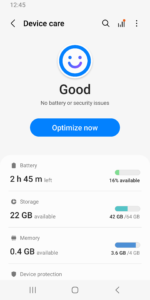
For a more pleasant experience while using your Galaxy smartphone, try the "Device Care" app by Samsung Electronics. With the "Device Care" app, anyone can easily keep their smartphone in good condition. The intuitive screen layout and interactions help the user check the condition of their device at a single glance and maintain their smartphone easily without expert knowledge, as it enables them to take prompt actions if problems, such as malware (viruses, spyware), arise.
Some Galaxy devices may not support some of the features outlined below.
App updates via the Google Play store are only available on some devices.
[Main features]
- Reports the current condition of a customer's smartphone on a 100-point scale;
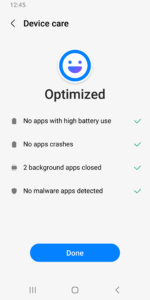
- Optimizes a smartphone in one simple click;
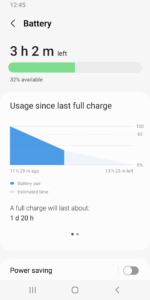
- Analyzes battery usage on a per-app basis and saves battery power by checking unused apps via App power monitor;
- Identifies battery-draining apps;
- Provides Power saving mode and Maximum power saving mode to ensure that the user can enjoy their smartphone for an extended period of time;
- Manages and frees up Memory efficiently;
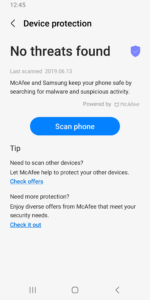
- Detects malware (viruses, spyware) and provides real-time protection for smartphones;
- Offers two widget types for customer convenience.
This app requires the following permissions:
You can still use the app's basic functions without allowing the optional permissions.
[Required permissions]
• Notifications: Used to notify you about updates and events
Some Galaxy devices may not support some of the features outlined below.
App updates via the Google Play store are only available on some devices.
[Main features]
- Reports the current condition of a customer's smartphone on a 100-point scale;
- Optimizes a smartphone in one simple click;
- Analyzes battery usage on a per-app basis and saves battery power by checking unused apps via App power monitor;
- Identifies battery-draining apps;
- Provides Power saving mode and Maximum power saving mode to ensure that the user can enjoy their smartphone for an extended period of time;
- Manages and frees up Memory efficiently;
- Detects malware (viruses, spyware) and provides real-time protection for smartphones;
- Offers two widget types for customer convenience.
This app requires the following permissions:
You can still use the app's basic functions without allowing the optional permissions.
[Required permissions]
• Notifications: Used to notify you about updates and events
Download Samsung Device Care APK
Fast, free and safe download.
APK Permissions 61
- android.permission.ACCESS_NETWORK_STATE
- android.permission.ACCESS_WIFI_STATE
- android.permission.BATTERY_STATS
- android.permission.CONTROL_KEYGUARD
- android.permission.DELETE_PACKAGES
- android.permission.FOREGROUND_SERVICE
- android.permission.FOREGROUND_SERVICE_SPECIAL_USE
- android.permission.GET_TASKS
- android.permission.INTERACT_ACROSS_USERS
- android.permission.INTERACT_ACROSS_USERS_FULL
- android.permission.INTERNAL_DELETE_CACHE_FILES
- android.permission.INTERNET
- android.permission.KILL_BACKGROUND_PROCESSES
- android.permission.MANAGE_DEVICE_ADMINS
- android.permission.MANAGE_USERS
- android.permission.MASTER_CLEAR
- android.permission.NFC
- android.permission.POST_NOTIFICATIONS
- android.permission.READ_PRIVILEGED_PHONE_STATE
- android.permission.READ_SEARCH_INDEXABLES
- android.permission.REBOOT
- android.permission.RECEIVE_BOOT_COMPLETED
- android.permission.SYSTEM_ALERT_WINDOW
- android.permission.VIBRATE
- android.permission.WAKE_LOCK
- android.permission.WRITE_SECURE_SETTINGS
- com.android.launcher.permission.INSTALL_SHORTCUT
- com.android.launcher.permission.READ_SETTINGS
- com.samsung.android.app.clockpack.LOCK_PROVIDER
- com.samsung.android.app.routines.permission.READ_ROUTINE_INFO
- com.samsung.android.app.tips.permission.USE_INTENT_SERVICE
- com.samsung.android.game.gamehome.permission.INVOKE
- com.samsung.android.launcher.permission.READ_SETTINGS
- com.samsung.android.lool.DYNAMIC_RECEIVER_NOT_EXPORTED_PERMISSION
- com.samsung.android.permission.READ_SCPM
- com.samsung.android.permission.RUN_DISK_DEFRAGMENTATION
- com.samsung.android.permission.SEM_APP_RESTRICTION
- com.samsung.android.permission.WRITE_SCPM
- com.samsung.android.rubin.app.ui.permission.LAUNCH_RUBIN_SETTING
- com.samsung.android.rubin.context.permission.READ_CONTEXT_MANAGER
- com.samsung.android.rubin.persona.permission.READ_PERSONA_MANAGER
- com.samsung.android.samsungaccount.permission.ACCOUNT_MANAGER
- com.samsung.android.settings.analyzestorage.permission
- com.samsung.android.sm.permission.BIND_DEVICE_SECURITY
- com.samsung.android.voc.diagnosis.provider.READ_DIAGNOSIS_RESULT
- com.samsung.memorysaver.READ_MS_DATA
- com.samsung.permission.HQM_NOTIFICATION_PERMISSION
- com.samsung.permission.HRM_EXT
- com.samsung.permission.mpsm.INVOKE_MPSM_METHOD
- com.samsung.permission.READ_IAFD_DATA
- com.samsung.permission.READ_SEC_COMMON_POLICY
- com.samsung.permission.READ_SM_DATA
- com.samsung.permission.WRITE_IAFD_DATA
- com.samsung.permission.WRITE_SM_DATA
- com.samsung.sdm.permission.DMSERVICE
- com.samsung.sea.retailagent.permission.RETAILMODE
- com.sec.android.diagmonagent.permission.PROVIDER
- com.sec.android.provider.badge.permission.READ
- com.sec.android.provider.badge.permission.WRITE
- com.sec.android.settings.permission.SOFT_RESET
- com.wssnps.permission.COM_WSSNPS
APK Verified
The cryptographic signature guarantees that the file is safe to install and was not tampered with in any way.
Similar in Tools


More by Samsung Electronics Co., Ltd.


Frequently Asked Questions about Samsung Device Care APK
This variant is built for devices that report `arm64-v8a, armeabi-v7a` as their primary ABI. If your device's CPU matches, this is the smallest, fastest version to install.
Yes — the APK's signature has been cryptographically verified against the publisher's signing key. The SHA-256 hash is shown in the File Information panel so you can independently confirm the file matches the original release.
Android 30 (API level 35) or newer. Older devices will refuse the install.
Install a free app like 'CPU-Z' or 'Droid Hardware Info' from the Play Store and look at the ABI / Instruction Set row. Most phones made after 2017 are arm64-v8a; if in doubt, download the universal variant.
All variants are functionally identical — same features, same version. They differ only in which CPU architectures the native code is compiled for, and (sometimes) which screen densities the included graphics target. Pick the one that matches your device for the smallest install size, or pick 'Universal' if you're unsure.