
Screenshots
File Information
| Package Name | com.samsung.accessory.atticmgr |
|---|---|
| Version Name | 6.0.25062751 |
| Version Code | 2025062751 |
| Architecture | arm64-v8a, armeabi-v7a, x86, x86_64 |
| Min Android Version | Android 24 (API 34) |
| Framework | Native (Java/Kotlin) |
| File Size | 18.93 MB |
| Signature (SHA1) | 9CA5170F381919DFE0446FCDAB18B19A143B3163 |
| File Hash (SHA256) | 065449c664f9e6e4746b811e8383369d0ef91db45c38b0947849375d1098c66d |
What's New
Improved system stability and reliability
App Description
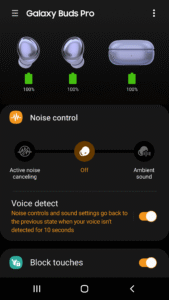
The Galaxy Buds Pro Manager allows you to use features such as device settings and status view when connected to a Galaxy Buds Pro device.
This application does not work alone because this is a component of the Galaxy Wearable application.
The Galaxy Wearable application has to be installed first for the Galaxy Buds Pro Manager application to operate normally.
※ Please allow the permissions of the Galaxy Buds Pro Manager in Android Settings to use all the features in Android 7.0 or later.
Settings > Applications > Galaxy Buds Pro Manager > Permissions
※ Access rights information
The following permissions are required for the app service. For optional permissions, the default functionality of the service is turned on, but not allowed.
[Required Permissions]
- Notifications : Purpose for confirming voice notification function
- Contacts : Purpose for confirming Contacts information for voice notification function
- Phone : Purpose for confirming Contacts information for voice notification function
- Calendar : Purpose for checking Calendar information for using voice notification function
- Call logs : Purpose for confirming Call logs information for voice notification function
- Nearby devices : Purpose for confirming to search Buds Devices
- SMS: Purpose for confirming SMS contents for voice notification
[Optional Permissions]
-None
Previously allowed permissions can be reset on Apps menu in device settings after software update.
This application does not work alone because this is a component of the Galaxy Wearable application.
The Galaxy Wearable application has to be installed first for the Galaxy Buds Pro Manager application to operate normally.
※ Please allow the permissions of the Galaxy Buds Pro Manager in Android Settings to use all the features in Android 7.0 or later.
Settings > Applications > Galaxy Buds Pro Manager > Permissions
※ Access rights information
The following permissions are required for the app service. For optional permissions, the default functionality of the service is turned on, but not allowed.
[Required Permissions]
- Notifications : Purpose for confirming voice notification function
- Contacts : Purpose for confirming Contacts information for voice notification function
- Phone : Purpose for confirming Contacts information for voice notification function
- Calendar : Purpose for checking Calendar information for using voice notification function
- Call logs : Purpose for confirming Call logs information for voice notification function
- Nearby devices : Purpose for confirming to search Buds Devices
- SMS: Purpose for confirming SMS contents for voice notification
[Optional Permissions]
-None
Previously allowed permissions can be reset on Apps menu in device settings after software update.
Download Galaxy Buds Pro Manager APK
Fast, free and safe download.
APK Permissions 8
- android.permission.READ_LOGS
- android.permission.READ_PHONE_STATE
- android.permission.RECEIVE_BOOT_COMPLETED
- com.netflix.partner
- com.samsung.accessory.budsunitemgr.permission.SIGNATURE
- com.samsung.android.app.aodservice.permission.SUB_SCREEN_PROVIDER
- com.samsung.android.oneconnect.permission.START_SERVICE
- com.samsung.android.voicewakeup.permission.EXECUTE_EXTERNAL_SERVICE
APK Verified
The cryptographic signature guarantees that the file is safe to install and was not tampered with in any way.


