
Download Samsung One Hand Operation + APK 8.5.11.0 arm64-v8a, armeabi-v7a · Android 33+
Download APK
Verified Safe
This is the arm64-v8a, armeabi-v7a build of Samsung One Hand Operation + 8.5.11.0. Pick this build if your device's primary ABI matches.
File size: 8.0 MB • Min Android: 33 • Target Android: 36 • Version code: 851100000 • Framework: Native (Java/Kotlin) • Permissions: 51
Screenshots
File Information
| Package Name | com.samsung.android.sidegesturepad |
|---|---|
| Version Name | 8.5.11.0 |
| Version Code | 851100000 |
| Architecture | arm64-v8a, armeabi-v7a |
| Min Android Version | Android 33 (API 36) |
| Main Activity | com.samsung.android.sidegesturepad.settings.SGPSettingsActivity |
| Framework | Native (Java/Kotlin) |
| File Size | 8.00 MB |
| Signature (SHA1) | 9CA5170F381919DFE0446FCDAB18B19A143B3163 |
| File Hash (SHA256) | ff2a8ca731fdf1ff05dbcfaeedfc2ea839678a3261a4273161068f499d45b0e1 |
What's New
Bug fixes & stability improvements.
[Version 8.5.11]
- Fix brightness control malfunction issue in Quick tools.
- Bug fixes and stability improvements.
[Version 8.5.11]
- Fix brightness control malfunction issue in Quick tools.
- Bug fixes and stability improvements.
App Description
With this app you can easily use your device with your thumb gesture.
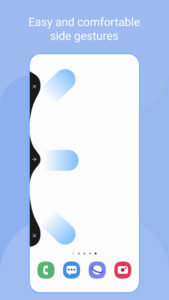
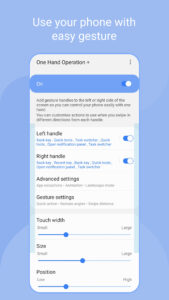
When the feature is set, a thin gesture handle is added to the left/right side of the screen.
Swipe this handle to execute the defined functions. The default function is the most frequently used back button.
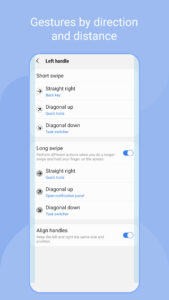
You can set various functions for horizontal/diagonal up/down diagonal gestures.
Once you get used to using short swipe gestures, you can set more features for long swipe gestures.
Depending on the size of your hand, the thickness of your thumb, or the shape of the bumper case you are using, different handle settings are provided to optimize gesture recognition.
The handle receives the user's touch event on top of the running app. It can interfere with running applications. Therefore, it is recommended to set the handle as thin as possible for gesture recognition.
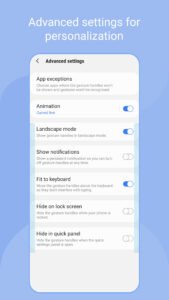
If the touch interference is severe with running application such as game, you can set [App exceptions] in [Advanced Settings], then the gesture handles will not work when the app is running.
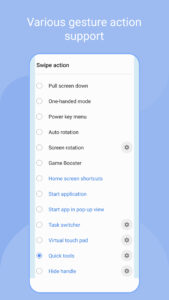
Currently available functions are as follows, and we plan to provide additional function upgrades.
- Back key
- Home key
- Recent key
- Menu key
- Apps screen
- Previous app
- Forward ( web browser )
- Open notification panel
- Open quick panel
- Screen off
- Close app
- Flashlight
- Split screen view
- Assistance app
- Finder search
- Screenshot
- Show/hide navigation bar
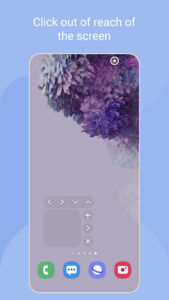
- Pull screen down
- One-handed mode
- Power key menu
- Home screen shortcuts
- Start application
- Start app in pop-up view
- Move screen
- Widget pop-up
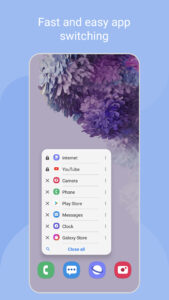
- Task switcher
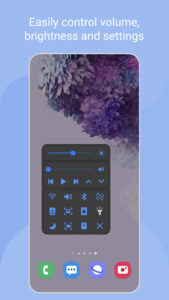
- Quick tools
- Virtual touch pad
- Floating navigation buttons
- Keyboard shortcuts
Enjoy the convenience of gestures on your phone and tablet with this app.
Thank you.
When the feature is set, a thin gesture handle is added to the left/right side of the screen.
Swipe this handle to execute the defined functions. The default function is the most frequently used back button.
You can set various functions for horizontal/diagonal up/down diagonal gestures.
Once you get used to using short swipe gestures, you can set more features for long swipe gestures.
Depending on the size of your hand, the thickness of your thumb, or the shape of the bumper case you are using, different handle settings are provided to optimize gesture recognition.
The handle receives the user's touch event on top of the running app. It can interfere with running applications. Therefore, it is recommended to set the handle as thin as possible for gesture recognition.
If the touch interference is severe with running application such as game, you can set [App exceptions] in [Advanced Settings], then the gesture handles will not work when the app is running.
Currently available functions are as follows, and we plan to provide additional function upgrades.
- Back key
- Home key
- Recent key
- Menu key
- Apps screen
- Previous app
- Forward ( web browser )
- Open notification panel
- Open quick panel
- Screen off
- Close app
- Flashlight
- Split screen view
- Assistance app
- Finder search
- Screenshot
- Show/hide navigation bar
- Pull screen down
- One-handed mode
- Power key menu
- Home screen shortcuts
- Start application
- Start app in pop-up view
- Move screen
- Widget pop-up
- Task switcher
- Quick tools
- Virtual touch pad
- Floating navigation buttons
- Keyboard shortcuts
Enjoy the convenience of gestures on your phone and tablet with this app.
Thank you.
Download Samsung One Hand Operation + APK
Fast, free and safe download.
APK Permissions 51
- android.permission.BLUETOOTH
- android.permission.BLUETOOTH_ADMIN
- android.permission.BLUETOOTH_CONNECT
- android.permission.CHANGE_OVERLAY_PACKAGES
- android.permission.DEVICE_POWER
- android.permission.EXPAND_STATUS_BAR
- android.permission.FLASHLIGHT
- android.permission.FORCE_STOP_PACKAGES
- android.permission.INJECT_EVENTS
- android.permission.INTERACT_ACROSS_USERS_FULL
- android.permission.INTERNAL_SYSTEM_WINDOW
- android.permission.MANAGE_ACTIVITY_TASKS
- android.permission.MANAGE_USERS
- android.permission.MEDIA_CONTENT_CONTROL
- android.permission.MODIFY_DAY_NIGHT_MODE
- android.permission.MODIFY_PHONE_STATE
- android.permission.MONITOR_INPUT
- android.permission.PACKAGE_USAGE_STATS
- android.permission.QUERY_ALL_PACKAGES
- android.permission.READ_PRIVILEGED_PHONE_STATE
- android.permission.READ_PROJECTION_STATE
- android.permission.RECEIVE_BOOT_COMPLETED
- android.permission.REORDER_TASKS
- android.permission.REQUEST_IGNORE_BATTERY_OPTIMIZATIONS
- android.permission.RETRIEVE_WINDOW_CONTENT
- android.permission.SET_ACTIVITY_WATCHER
- android.permission.SET_ORIENTATION
- android.permission.SET_PROCESS_LIMIT
- android.permission.START_ANY_ACTIVITY
- android.permission.START_TASKS_FROM_RECENTS
- android.permission.STATUS_BAR_SERVICE
- android.permission.STOP_APP_SWITCHES
- android.permission.UPDATE_DEVICE_STATS
- android.permission.WAKE_LOCK
- android.permission.WRITE_SECURE_SETTINGS
- android.permission.WRITE_SETTINGS
- com.samsung.android.app.aodservice.permission.BROADCAST_RECEIVER
- com.samsung.android.app.appsedge.permission.OPEN_APP_PICKER
- com.samsung.android.app.cocktailbarservice.permission.ACCESS_PANEL
- com.samsung.android.app.routines.permission.READ_ROUTINE_INFO
- com.samsung.android.app.screenrecorder.permission.ACCESS_SCREEN_RECORDER_SVC
- com.samsung.android.game.gametools.permission.UI_REQUEST
- com.samsung.android.permission.CHANGE_DISPLAY_COLOR
- com.samsung.android.permission.FREEZE_TASK_DISPLAY_AREA
- com.samsung.android.permission.MONITOR_INPUT
- com.samsung.android.permission.READ_FRAME_BUFFER_IGNORE_POLICY
- com.samsung.android.scs.ai.search.permission.WRITE
- com.samsung.android.sidegesturepad.DYNAMIC_RECEIVER_NOT_EXPORTED_PERMISSION
- com.samsung.android.smartsuggestions.search.permission.READ
- com.samsung.android.smartsuggestions.search.permission.WRITE
- com.samsung.kidshome.broadcast.DEFAULT_HOME_CHANGE_PERMISSION
APK Verified
The cryptographic signature guarantees that the file is safe to install and was not tampered with in any way.
Similar in Tools


More by Samsung Electronics Co., Ltd.


Frequently Asked Questions about Samsung One Hand Operation + APK
This variant is built for devices that report `arm64-v8a, armeabi-v7a` as their primary ABI. If your device's CPU matches, this is the smallest, fastest version to install.
Yes — the APK's signature has been cryptographically verified against the publisher's signing key. The SHA-256 hash is shown in the File Information panel so you can independently confirm the file matches the original release.
Android 33 (API level 36) or newer. Older devices will refuse the install.
Install a free app like 'CPU-Z' or 'Droid Hardware Info' from the Play Store and look at the ABI / Instruction Set row. Most phones made after 2017 are arm64-v8a; if in doubt, download the universal variant.
All variants are functionally identical — same features, same version. They differ only in which CPU architectures the native code is compiled for, and (sometimes) which screen densities the included graphics target. Pick the one that matches your device for the smallest install size, or pick 'Universal' if you're unsure.