
Download Samsung Health APK 6.30.1.003 arm64-v8a, armeabi-v7a · Android 29+
Download APK
Verified Safe
This is the arm64-v8a, armeabi-v7a build of Samsung Health 6.30.1.003. Pick this build if your device's primary ABI matches.
File size: 291.6 MB • Min Android: 29 • Target Android: 36 • Version code: 6301003 • Framework: Native (Java/Kotlin)
Screenshots
File Information
| Package Name | com.sec.android.app.shealth |
|---|---|
| Version Name | 6.30.1.003 |
| Version Code | 6301003 |
| Architecture | arm64-v8a, armeabi-v7a |
| Min Android Version | Android 29 (API 36) |
| Main Activity | com.samsung.android.app.shealth.home.HomeMainActivity |
| Framework | Native (Java/Kotlin) |
| File Size | 291.59 MB |
| Signature (SHA1) | 9741A0F330DC2E8619B76A2597F308C37DBE30A2 |
| File Hash (SHA256) | 2c814bb22e3b8ecc9ae5e718790a4140feeb0758e813ea027806351da2966dfa |
What's New
•Rewards in the Together Challenges have adopted a new design!
Take on new challenges and discover how the rewards have changed
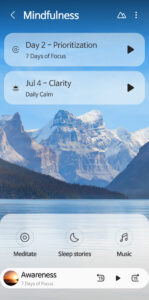
•The Mindfulness feature now offers an even simpler mood check-in, breathing exercises, and helpful tips!
Easily track your mood to lower stress and feel calm every day
•You can now track your Body Temperature to monitor changes in your body at a glance! (When connecting to a device measured by a 3rd party or SDK)
•Various bug fixes and improvements applied.
Take on new challenges and discover how the rewards have changed
•The Mindfulness feature now offers an even simpler mood check-in, breathing exercises, and helpful tips!
Easily track your mood to lower stress and feel calm every day
•You can now track your Body Temperature to monitor changes in your body at a glance! (When connecting to a device measured by a 3rd party or SDK)
•Various bug fixes and improvements applied.
App Description
Start healthy habits for yourself with Samsung Health.
Samsung Health has various features to help you manage your health. As the app allows you to automatically record many activities, creating a healthy lifestyle is easier and simpler than ever.
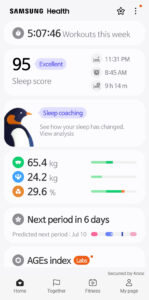
Check various health records on the home screen. Easily add and edit the items that you want to manage such as daily steps and activity time.
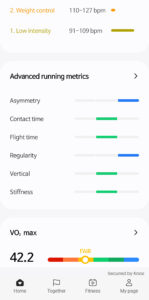
Record and manage your fitness activities, such as running, cycling, swimming, etc. Also, Galaxy Watch wearables user can now exercise more effectively through Life Fitness, Technogym and Corehealth.
Create healthy eating habits by recording your daily meals and snacks with Samsung Health.
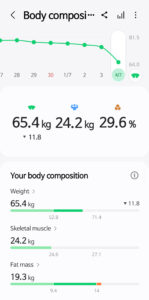
Work hard and always maintain your best condition with Samsung Health. Set goals that work for your own level, and keep track of your daily condition including your activity amount, workout intensity, heart rate, stress, oxygen level in the blood, etc.
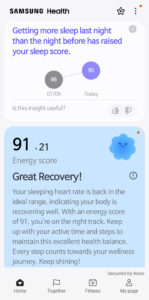
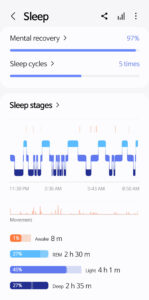
Monitor your sleep patterns in more detail with Galaxy Watch. Make your mornings more refreshing by improving the quality of your sleep through sleep levels and sleep scores.
Challenge yourself against your friends and family to become healthier in a more fun and interactive way with Samsung Health Together.
Samsung Health has prepared videos of expert coaches who will teach you new fitness programs including stretching, weight loss, and more.
Discover meditation tools on Mindfulness that will help you relieve stress throughout your day. (Some contents are only available through an optional paid subscription. Content is available in English, German, Spanish, French, Portuguese and Korean.)
Cycle tracking offers helpful support in menstrual cycle tracking, related symptom management and personalized insights and contents through your partner, Natural Cycles.
Samsung Health protects your private health data securely. All Samsung Galaxy models released after August 2016, Knox enabled Samsung Health service will be available. Please note that Knox enabled Samsung Health service will not be available from rooted mobile.
Tablets and some mobile devices are not supported, and detailed features may vary depending on the user’s country of residence, region, network carrier, model of the device, etc.
Requires Android 10.0 or later. Supports over 70 languages, including English, French, and Chinese. An English language version is available for the rest of the world.
Please note that Samsung Health is intended for fitness and wellness purposes only and is not intended for use in the diagnosis of disease or other conditions, or in the cure, mitigation, treatment, or prevention of disease.
The following permissions are required for the app service. For optional permissions, the default functionality of the service is turned on, but not allowed.
Optional permissions
- Location : Used to collect your location data using the trackers(exercises & steps), Used to display a route map for exercise, and to display the weather during exercise
- Body Sensors : Used to measure heart rate, oxygen saturation, and stress (HR&Stress : Galaxy S5~Galaxy S10 / SpO2 : Galaxy Note4~Galaxy S10)
- Photos and videos(storage) : You can import/export your exercise data, save exercise photos, save/load food photos
- Contacts : Used to check if you are logged into your Samsung account, and to create a friend list for Together
- Camera : Used to scan QR codes when you add friends using the Together, and to take photos of foods, and to recognize numbers on a blood glucose meter&blood pressure monitor(Available in some countries only)
- Physical activity : Used to count your steps and to detect workouts
- Microphone : Used to record audio for snore detection
- Nearby devices : Used to scan for and connect to nearby devices, including Galaxy Watches and other accessories
- Notifications : Used to provide you with timely information
- Phone : Used to confirm your phone number for Together.
Samsung Health has various features to help you manage your health. As the app allows you to automatically record many activities, creating a healthy lifestyle is easier and simpler than ever.
Check various health records on the home screen. Easily add and edit the items that you want to manage such as daily steps and activity time.
Record and manage your fitness activities, such as running, cycling, swimming, etc. Also, Galaxy Watch wearables user can now exercise more effectively through Life Fitness, Technogym and Corehealth.
Create healthy eating habits by recording your daily meals and snacks with Samsung Health.
Work hard and always maintain your best condition with Samsung Health. Set goals that work for your own level, and keep track of your daily condition including your activity amount, workout intensity, heart rate, stress, oxygen level in the blood, etc.
Monitor your sleep patterns in more detail with Galaxy Watch. Make your mornings more refreshing by improving the quality of your sleep through sleep levels and sleep scores.
Challenge yourself against your friends and family to become healthier in a more fun and interactive way with Samsung Health Together.
Samsung Health has prepared videos of expert coaches who will teach you new fitness programs including stretching, weight loss, and more.
Discover meditation tools on Mindfulness that will help you relieve stress throughout your day. (Some contents are only available through an optional paid subscription. Content is available in English, German, Spanish, French, Portuguese and Korean.)
Cycle tracking offers helpful support in menstrual cycle tracking, related symptom management and personalized insights and contents through your partner, Natural Cycles.
Samsung Health protects your private health data securely. All Samsung Galaxy models released after August 2016, Knox enabled Samsung Health service will be available. Please note that Knox enabled Samsung Health service will not be available from rooted mobile.
Tablets and some mobile devices are not supported, and detailed features may vary depending on the user’s country of residence, region, network carrier, model of the device, etc.
Requires Android 10.0 or later. Supports over 70 languages, including English, French, and Chinese. An English language version is available for the rest of the world.
Please note that Samsung Health is intended for fitness and wellness purposes only and is not intended for use in the diagnosis of disease or other conditions, or in the cure, mitigation, treatment, or prevention of disease.
The following permissions are required for the app service. For optional permissions, the default functionality of the service is turned on, but not allowed.
Optional permissions
- Location : Used to collect your location data using the trackers(exercises & steps), Used to display a route map for exercise, and to display the weather during exercise
- Body Sensors : Used to measure heart rate, oxygen saturation, and stress (HR&Stress : Galaxy S5~Galaxy S10 / SpO2 : Galaxy Note4~Galaxy S10)
- Photos and videos(storage) : You can import/export your exercise data, save exercise photos, save/load food photos
- Contacts : Used to check if you are logged into your Samsung account, and to create a friend list for Together
- Camera : Used to scan QR codes when you add friends using the Together, and to take photos of foods, and to recognize numbers on a blood glucose meter&blood pressure monitor(Available in some countries only)
- Physical activity : Used to count your steps and to detect workouts
- Microphone : Used to record audio for snore detection
- Nearby devices : Used to scan for and connect to nearby devices, including Galaxy Watches and other accessories
- Notifications : Used to provide you with timely information
- Phone : Used to confirm your phone number for Together.
Download Samsung Health APK
Fast, free and safe download.
APK Verified
The cryptographic signature guarantees that the file is safe to install and was not tampered with in any way.
Similar in Health & Fitness


More by Samsung Electronics Co., Ltd.


Frequently Asked Questions about Samsung Health APK
This variant is built for devices that report `arm64-v8a, armeabi-v7a` as their primary ABI. If your device's CPU matches, this is the smallest, fastest version to install.
Yes — the APK's signature has been cryptographically verified against the publisher's signing key. The SHA-256 hash is shown in the File Information panel so you can independently confirm the file matches the original release.
Android 29 (API level 36) or newer. Older devices will refuse the install.
Install a free app like 'CPU-Z' or 'Droid Hardware Info' from the Play Store and look at the ABI / Instruction Set row. Most phones made after 2017 are arm64-v8a; if in doubt, download the universal variant.
All variants are functionally identical — same features, same version. They differ only in which CPU architectures the native code is compiled for, and (sometimes) which screen densities the included graphics target. Pick the one that matches your device for the smallest install size, or pick 'Universal' if you're unsure.