
Download Samsung Clock APK 12.4.07.22 arm64-v8a, armeabi-v7a · Android 35+
Download APK
Verified Safe
This is the arm64-v8a, armeabi-v7a build of Samsung Clock 12.4.07.22. Pick this build if your device's primary ABI matches.
File size: 35.8 MB • Min Android: 35 • Target Android: 35 • Version code: 1240722100 • Framework: Native (Java/Kotlin) • Permissions: 26
Screenshots
File Information
| Package Name | com.sec.android.app.clockpackage |
|---|---|
| Version Name | 12.4.07.22 |
| Version Code | 1240722100 |
| Architecture | arm64-v8a, armeabi-v7a |
| Min Android Version | Android 35 (API 35) |
| Main Activity | com.sec.android.app.clockpackage.ClockPackage |
| Framework | Native (Java/Kotlin) |
| File Size | 35.77 MB |
| Signature (SHA1) | 9CA5170F381919DFE0446FCDAB18B19A143B3163 |
| File Hash (SHA256) | 2fe9160cba68d77e64f2967496ed555fbf1b7605c85ba328f3919c6a3999328c |
What's New
Improved and stabilized some features
App Description
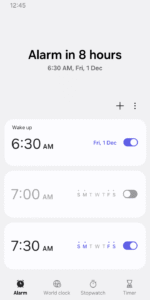
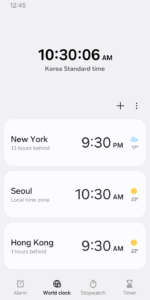
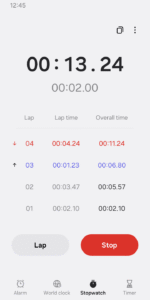
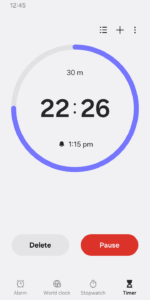
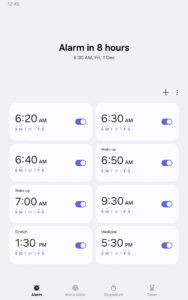
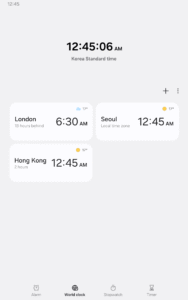
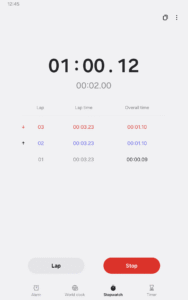
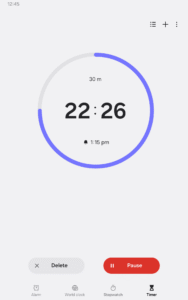
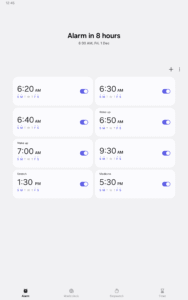
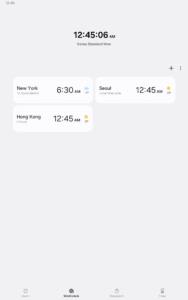
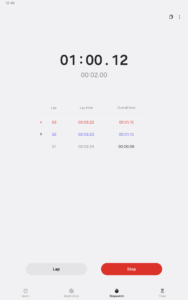
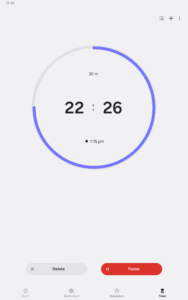
The Clock app provides Alarm, World Clock, Stopwatch, and Timer features. Use the Clock app to manage your time efficiently, as well as check the weather by city.
• Alarm
This feature allows you to assign dates to alarms, and repeat alarms can skip one day and be turned on again. The Snooze feature allows you to create the same effect as setting multiple alarms.
• World Clock
This feature allows you to check the time and weather by city. Quickly confirm the location of a specific city with the globe.
• Stopwatch
This feature allows you to record the elapsed time for each section and copy the recorded value.
• Timer
This feature allows you to save frequently used timer times as preset timers, as well as run multiple timers simultaneously.
The following permissions are required to use this app, but you can use the basic features of the app without allowing these permissions.
Optional permissions
• Music and audio: Used to open sounds saved on your phone or tablet for alarms and timer alerts
• Notifications: Used to show ongoing timers and notify you about upcoming and missed alarms
• Photos and videos: Used to select images and videos for alarm backgrounds(Android 14 and higher)
• Alarm
This feature allows you to assign dates to alarms, and repeat alarms can skip one day and be turned on again. The Snooze feature allows you to create the same effect as setting multiple alarms.
• World Clock
This feature allows you to check the time and weather by city. Quickly confirm the location of a specific city with the globe.
• Stopwatch
This feature allows you to record the elapsed time for each section and copy the recorded value.
• Timer
This feature allows you to save frequently used timer times as preset timers, as well as run multiple timers simultaneously.
The following permissions are required to use this app, but you can use the basic features of the app without allowing these permissions.
Optional permissions
• Music and audio: Used to open sounds saved on your phone or tablet for alarms and timer alerts
• Notifications: Used to show ongoing timers and notify you about upcoming and missed alarms
• Photos and videos: Used to select images and videos for alarm backgrounds(Android 14 and higher)
Download Samsung Clock APK
Fast, free and safe download.
APK Permissions 26
- android.permission.DISABLE_KEYGUARD
- android.permission.INTERACT_ACROSS_USERS
- android.permission.MANAGE_ACTIVITY_TASKS
- android.permission.POST_NOTIFICATIONS
- android.permission.READ_DREAM_STATE
- android.permission.READ_MEDIA_AUDIO
- android.permission.READ_PRIVILEGED_PHONE_STATE
- android.permission.REAL_GET_TASKS
- android.permission.STOP_APP_SWITCHES
- android.permission.USE_EXACT_ALARM
- android.permission.WRITE_EXTERNAL_STORAGE
- com.samsung.android.app.routines.permission.WRITE_MODE_INFO
- com.samsung.android.launcher.permission.READ_SETTINGS
- com.samsung.android.permission.CHANGE_DISPLAY_COLOR
- com.samsung.android.providers.context.permission.WRITE_USE_APP_FEATURE_SURVEY
- com.samsung.android.providers.media.READ
- com.samsung.android.rubin.persona.permission.READ_PERSONA_MANAGER
- com.samsung.android.settings.autopoweronoff.AUTOPOWERONOFF_RECEIVER
- com.samsung.permission.PALM_MOTION
- com.samsung.permission.WRITE_DW_DATA
- com.sec.android.app.calendar.permission.OPEN_CALENDAR_SETTINGS
- com.sec.android.app.clockpackage.DYNAMIC_RECEIVER_NOT_EXPORTED_PERMISSION
- com.sec.android.app.clockpackage.permission.READ_ALARM
- com.sec.android.diagmonagent.permission.DIAGMON
- com.sec.android.diagmonagent.permission.PROVIDER
- com.sec.android.settings.permission.SOFT_RESET
APK Verified
The cryptographic signature guarantees that the file is safe to install and was not tampered with in any way.
Similar in Tools


More by Samsung Electronics Co., Ltd.


Frequently Asked Questions about Samsung Clock APK
This variant is built for devices that report `arm64-v8a, armeabi-v7a` as their primary ABI. If your device's CPU matches, this is the smallest, fastest version to install.
Yes — the APK's signature has been cryptographically verified against the publisher's signing key. The SHA-256 hash is shown in the File Information panel so you can independently confirm the file matches the original release.
Android 35 (API level 35) or newer. Older devices will refuse the install.
Install a free app like 'CPU-Z' or 'Droid Hardware Info' from the Play Store and look at the ABI / Instruction Set row. Most phones made after 2017 are arm64-v8a; if in doubt, download the universal variant.
All variants are functionally identical — same features, same version. They differ only in which CPU architectures the native code is compiled for, and (sometimes) which screen densities the included graphics target. Pick the one that matches your device for the smallest install size, or pick 'Universal' if you're unsure.