Samsung E-Paper

Download Samsung E-Paper APK

com.samsung.android.ePaperApp · by Samsung Electronics Co., Ltd.

Latest Version: 1.1.99_5042_0925 • Updated: Jan 10, 2026
Download Samsung E-Paper APK
v1.1.99_5042_0925 · APK

Screenshots

About Samsung E-Paper

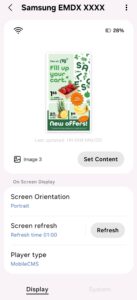
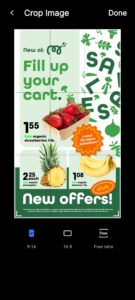
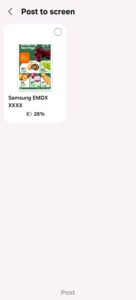
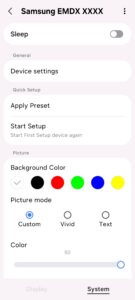
Install this application to use Samsung Color E-Paper in a smart way. You can view and choose device setting options provided from Samsung Color E-Paper, which includes detailed setting menu such as Display/Picture/Power/Security. After finish setting, save it as a preset, and deploy it to multiple devices at once. Even more, you can simply edit & deploy contents to Samsung Color E-Paper, using the contents stored in your mobile phone. Make a slideshow and schedule using the contents, so that the contents could be updated at the designated time suitable for your business environment. Before deployment, you can check how your contents will be shown on the E-Paper screen through preview feature.

All Samsung E-Paper APK versions

Frequently Asked Questions

Yes. Every Samsung E-Paper APK on APK.now is automatically scanned and the cryptographic signature is verified against the original publisher's certificate (Samsung Electronics Co., Ltd.). Files that fail verification are removed before they ever reach the catalog.

Enable 'Install from unknown sources' for your browser (or the file manager you use to open the APK) under Settings → Apps → Special access. Tap the downloaded Samsung E-Paper APK, confirm the prompts, and Android installs it just like any app from the Play Store.

The latest Samsung E-Paper version available on APK.now is 1.1.99_5042_0925. We track new releases from Samsung Electronics Co., Ltd. continuously and add them to the catalog as soon as they pass verification.

Yes — every Samsung E-Paper APK and every version on APK.now is free to download. We never gate downloads behind sign-up, surveys, or paywalls.

APK.now keeps a full archive of every Samsung E-Paper release, including older versions that the Play Store has already replaced. The APKs work on devices without Google Play Services (Huawei, GrapheneOS, Amazon Fire) and are signature-verified so you can be confident the file is genuine.