
This is the arm64-v8a, armeabi-v7a build of Samsung Email 6.2.01.1. Pick this build if your device's primary ABI matches.
File size: 57.0 MB • Min Android: 28 • Target Android: 35 • Version code: 620100001 • Framework: Native (Java/Kotlin) • Permissions: 32
Screenshots
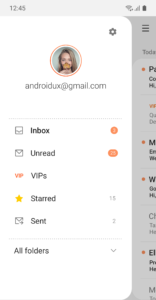
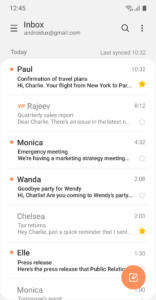
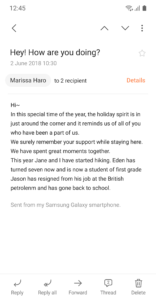
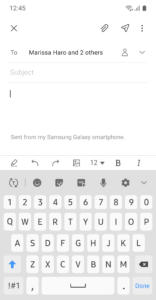
File Information
| Package Name | com.samsung.android.email.provider |
|---|---|
| Version Name | 6.2.01.1 |
| Version Code | 620100001 |
| Architecture | arm64-v8a, armeabi-v7a |
| Min Android Version | Android 28 (API 35) |
| Main Activity | com.samsung.android.email.ui.activity.MessageListXL |
| Framework | Native (Java/Kotlin) |
| File Size | 56.99 MB |
| Signature (SHA1) | 9CA5170F381919DFE0446FCDAB18B19A143B3163 |
| File Hash (SHA256) | bd32d5d7fc55c2b603bde59d897dcf0949ae244ae02a420205b530b29cd5ddc8 |
What's New
.Support OneUI 7
. Fix issue related to attachment in Calendar event
. Fix issue related to attachment in Calendar event
App Description
This update is available for Samsung Mobile with Android OS.
Samsung Email enables users to manage multiple personal and business email accounts seamlessly. Samsung Email also offers EAS integration for business, encryption using S/MIME to safeguard data and ease-of-use features such as insightful notifications, SPAM management. Furthermore, organizations can administer various policies as needed.
Key features
· POP3 and IMAP support for managing personal email accounts
· Exchange ActiveSync (EAS) integration for synchronizing Exchange Server based business email, calendars, contacts and tasks
· Encryption using S/MIME for secure email communication
Additional features
· Customizable user experience with notifications, schedule synchronization, SPAM management, and combined mailboxes
· Policy administration with comprehensive, built-in EAS support
· Conversation and thread view to read related mail
--- Regarding the App Access Permission ---
The following permissions are required for the app service. For optional permissions, the default functionality of the service is turned on, but not allowed.
[Required permissions]
- None
[Optional permissions]
- Camera: Used to attach photos to email
- Location: Used to attach current location information to email
- Contacts: Used to link email recipients/senders with contacts and synchronize contact information when using Microsoft Exchange account
- Calendar: Used to synchronize calendar infomation when using Microsoft Exchange account
- Notification : Used to display notification when sending or receiving emails
- Music and audio (Android 13 or higher) : Used to attach or save files such as music and audio
- File and Media (Android 12) : Used to attach(insert) or save files and media.
- Storage (Android 11 or less) : Used to attach(insert) or save files
[Privacy Policy]
v3.account.samsung.com/policies/privacy-notices/latest
[Supported E-mail]
b2b.sec@samsung.com
Samsung Email enables users to manage multiple personal and business email accounts seamlessly. Samsung Email also offers EAS integration for business, encryption using S/MIME to safeguard data and ease-of-use features such as insightful notifications, SPAM management. Furthermore, organizations can administer various policies as needed.
Key features
· POP3 and IMAP support for managing personal email accounts
· Exchange ActiveSync (EAS) integration for synchronizing Exchange Server based business email, calendars, contacts and tasks
· Encryption using S/MIME for secure email communication
Additional features
· Customizable user experience with notifications, schedule synchronization, SPAM management, and combined mailboxes
· Policy administration with comprehensive, built-in EAS support
· Conversation and thread view to read related mail
--- Regarding the App Access Permission ---
The following permissions are required for the app service. For optional permissions, the default functionality of the service is turned on, but not allowed.
[Required permissions]
- None
[Optional permissions]
- Camera: Used to attach photos to email
- Location: Used to attach current location information to email
- Contacts: Used to link email recipients/senders with contacts and synchronize contact information when using Microsoft Exchange account
- Calendar: Used to synchronize calendar infomation when using Microsoft Exchange account
- Notification : Used to display notification when sending or receiving emails
- Music and audio (Android 13 or higher) : Used to attach or save files such as music and audio
- File and Media (Android 12) : Used to attach(insert) or save files and media.
- Storage (Android 11 or less) : Used to attach(insert) or save files
[Privacy Policy]
v3.account.samsung.com/policies/privacy-notices/latest
[Supported E-mail]
b2b.sec@samsung.com
Download Samsung Email APK
Fast, free and safe download.
APK Permissions 32
- android.permission.ACCESS_COARSE_LOCATION
- android.permission.BLUETOOTH_ADMIN
- android.permission.CAMERA
- android.permission.CHANGE_WIFI_STATE
- android.permission.FOREGROUND_SERVICE_DATA_SYNC
- android.permission.INVOKE_CARRIER_SETUP
- android.permission.MANAGE_ACCOUNTS
- android.permission.MASTER_CLEAR
- android.permission.POST_NOTIFICATIONS
- android.permission.READ_MEDIA_AUDIO
- android.permission.READ_OWNER_DATA
- android.permission.READ_PRIVILEGED_PHONE_STATE
- android.permission.REAL_GET_TASKS
- android.permission.REQUEST_IGNORE_BATTERY_OPTIMIZATIONS
- android.permission.sec.MDM_EXCHANGE
- android.permission.USE_CREDENTIALS
- android.permission.WRITE_MEDIA_STORAGE
- com.samsung.accessory.permission.TRANSPORTING_NOTIFICATION_ITEM
- com.samsung.android.knox.permission.KNOX_LDAP
- com.samsung.android.knox.permission.KNOX_PROXY_ADMIN_INTERNAL
- com.samsung.android.permission.GET_SECRET_PACKAGE_LIST
- com.samsung.android.providers.context.permission.WRITE_EXCHANGE_EMAIL
- com.samsung.android.providers.context.permission.WRITE_USE_APP_FEATURE_SURVEY
- com.samsung.android.sdk.email.permission.ADDON_SELECTED_BROADCAST
- com.samsung.cmh.data.READ
- com.samsung.systemui.POPUP_UI_PERMISSION
- com.sec.android.app.gallery3d.fileprovider.READ
- com.sec.android.app.gallery3d.READ
- com.sec.android.app.myfiles.permission.MOVE_TO_KNOX_BY_DND
- com.sec.android.email.EMAIL_ACCOUNT_SETUP
- com.sec.android.email.permission.DEBUG
- com.sec.android.settings.permission.SOFT_RESET
APK Verified
The cryptographic signature guarantees that the file is safe to install and was not tampered with in any way.
Similar in Productivity


More by Samsung Electronics Co., Ltd.


Frequently Asked Questions about Samsung Email APK
This variant is built for devices that report `arm64-v8a, armeabi-v7a` as their primary ABI. If your device's CPU matches, this is the smallest, fastest version to install.
Yes — the APK's signature has been cryptographically verified against the publisher's signing key. The SHA-256 hash is shown in the File Information panel so you can independently confirm the file matches the original release.
Android 28 (API level 35) or newer. Older devices will refuse the install.
Install a free app like 'CPU-Z' or 'Droid Hardware Info' from the Play Store and look at the ABI / Instruction Set row. Most phones made after 2017 are arm64-v8a; if in doubt, download the universal variant.
All variants are functionally identical — same features, same version. They differ only in which CPU architectures the native code is compiled for, and (sometimes) which screen densities the included graphics target. Pick the one that matches your device for the smallest install size, or pick 'Universal' if you're unsure.