
Download Samsung Voice Recorder APK 21.5.80.32 arm64-v8a, armeabi-v7a · Android 35+
Download APK
Verified Safe
This is the arm64-v8a, armeabi-v7a build of Samsung Voice Recorder 21.5.80.32. Pick this build if your device's primary ABI matches.
File size: 31.9 MB • Min Android: 35 • Target Android: 36 • Version code: 2021580320 • Framework: Native (Java/Kotlin) • Permissions: 17
Screenshots
File Information
| Package Name | com.sec.android.app.voicenote |
|---|---|
| Version Name | 21.5.80.32 |
| Version Code | 2021580320 |
| Architecture | arm64-v8a, armeabi-v7a |
| Min Android Version | Android 35 (API 36) |
| Main Activity | com.sec.android.app.voicenote.main.VNMainActivity |
| Framework | Native (Java/Kotlin) |
| File Size | 31.86 MB |
| Signature (SHA1) | 9CA5170F381919DFE0446FCDAB18B19A143B3163 |
| File Hash (SHA256) | 44a263284f127c9e4d1cb41aa58c0a06c6a72052b2c94e0973ecaf94669b9164 |
What's New
v21.5.72.03 for V OS
App Description
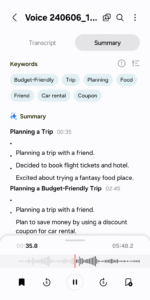
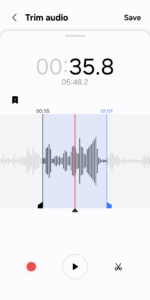
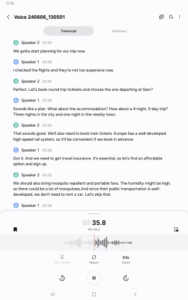
Samsung Voice Recorder is designed to provide you an easy and wonderful recording experience with high quality sound, while also offering playback and editing capabilities.
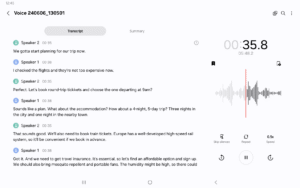
For your everyday needs, we developed a “Voice Memo” recording mode so that you can convert your voice to text (Speech to text).
Available recording modes are:
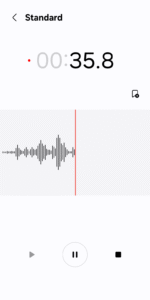
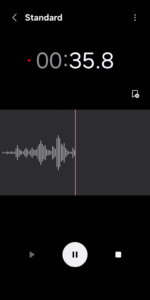
[STANDARD] It provides pleasantly simple recording interface.
[INTERVIEW] Two microphones located on the top and bottom of your device will be activated to capture you and your interviewer (or interviewee)'s voices, it also displays dual waveform accordingly.
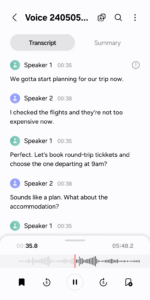
[VOICE MEMO] Records your voice and then convert it to on-screen text, so called STT.
Before starting the record, you may configure
□ Directory path (If external SD-card is available)
During recording,
□ You can reject incoming calls while recording.
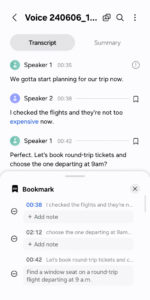
□ BOOKMARK the points you want to mark.
□ Background recording is also supported by simply pressing HOME button.
Once saved, these actions below can be performed:
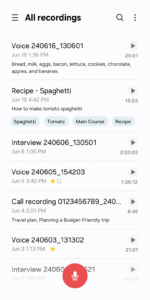
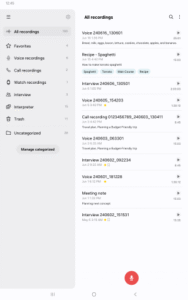
□ Both mini player and full player can be launched from Recordings LIST.
* Built-in sound player supports media controls such as Skip muted, play speed and Repeat mode.
□ Edit: Rename and Delete
□ Share your recordings with your friends via Email, Messages, etc.
* Not Support S5, Note4 Android M-OS
* Available recording mode depends on Device Model
* This is Samsung Device's Preloaded Application which is pre-installed app.
The following permissions are required for the app service. For optional permissions, the default functionality of the service is turned on, but not allowed.
Required permissions
. Microphone: Used for recording function
. Music and Audio(Storage) : Used to save recorded files
Optional permissions
. Nearby devices: Used to get Bluetooth headset information to authorise the Bluetooth mic recording function
. Notifications: Used to send notifications
For your everyday needs, we developed a “Voice Memo” recording mode so that you can convert your voice to text (Speech to text).
Available recording modes are:
[STANDARD] It provides pleasantly simple recording interface.
[INTERVIEW] Two microphones located on the top and bottom of your device will be activated to capture you and your interviewer (or interviewee)'s voices, it also displays dual waveform accordingly.
[VOICE MEMO] Records your voice and then convert it to on-screen text, so called STT.
Before starting the record, you may configure
□ Directory path (If external SD-card is available)
During recording,
□ You can reject incoming calls while recording.
□ BOOKMARK the points you want to mark.
□ Background recording is also supported by simply pressing HOME button.
Once saved, these actions below can be performed:
□ Both mini player and full player can be launched from Recordings LIST.
* Built-in sound player supports media controls such as Skip muted, play speed and Repeat mode.
□ Edit: Rename and Delete
□ Share your recordings with your friends via Email, Messages, etc.
* Not Support S5, Note4 Android M-OS
* Available recording mode depends on Device Model
* This is Samsung Device's Preloaded Application which is pre-installed app.
The following permissions are required for the app service. For optional permissions, the default functionality of the service is turned on, but not allowed.
Required permissions
. Microphone: Used for recording function
. Music and Audio(Storage) : Used to save recorded files
Optional permissions
. Nearby devices: Used to get Bluetooth headset information to authorise the Bluetooth mic recording function
. Notifications: Used to send notifications
Download Samsung Voice Recorder APK
Fast, free and safe download.
APK Permissions 17
- android.permission.BLUETOOTH_ADMIN
- android.permission.FOREGROUND_SERVICE_MICROPHONE
- android.permission.MEDIA_CONTENT_CONTROL
- android.permission.READ_MEDIA_AUDIO
- android.permission.REQUEST_IGNORE_BATTERY_OPTIMIZATIONS
- com.samsung.android.aicore.permission.BIND_DOWNLOAD_SERVICE
- com.samsung.android.intellivoiceservice.ai.asr.permission.SYSTEM_SPEECH_RECOGNITION_SERVICE_CONFIG_PROVIDER
- com.samsung.android.intellivoiceservice.aitranslator.permission.BIND_TRANSLATION
- com.samsung.android.intellivoiceservice.common.permission.CONFIG_PROVIDER
- com.samsung.android.intellivoiceservice.permission.BIND_SUGGESTION_SERVICE
- com.samsung.android.scloud.backup.lib.read
- com.samsung.android.visual.cloudcore.permission.BIND_PORTRAIT_SERVICE
- com.samsung.android.visual.cloudcore.permission.SUPPORTED_FEATURE_PROVIDER
- com.sec.android.diagmonagent.permission.DIAGMON
- com.sec.android.permission.LAUNCH_PERSONAL_PAGE_SERVICE
- com.sec.android.permission.VOIP_INTERFACE
- com.sec.android.settings.permission.SOFT_RESET
APK Verified
The cryptographic signature guarantees that the file is safe to install and was not tampered with in any way.
Similar in Tools


More by Samsung Electronics Co., Ltd.


Frequently Asked Questions about Samsung Voice Recorder APK
This variant is built for devices that report `arm64-v8a, armeabi-v7a` as their primary ABI. If your device's CPU matches, this is the smallest, fastest version to install.
Yes — the APK's signature has been cryptographically verified against the publisher's signing key. The SHA-256 hash is shown in the File Information panel so you can independently confirm the file matches the original release.
Android 35 (API level 36) or newer. Older devices will refuse the install.
Install a free app like 'CPU-Z' or 'Droid Hardware Info' from the Play Store and look at the ABI / Instruction Set row. Most phones made after 2017 are arm64-v8a; if in doubt, download the universal variant.
All variants are functionally identical — same features, same version. They differ only in which CPU architectures the native code is compiled for, and (sometimes) which screen densities the included graphics target. Pick the one that matches your device for the smallest install size, or pick 'Universal' if you're unsure.