
Download Smart Tutor for SAMSUNG Mobile APK 1.5 (build 382) arm64-v8a · Android 18+
Download APK
Verified Safe
This is the arm64-v8a build of Smart Tutor for SAMSUNG Mobile 1.5 (build 382) — the modern 64-bit ARM build that runs on virtually every Android phone released since 2017. It's smaller and faster than the universal variant because Android only loads the native code your CPU actually needs. If your phone is from the last 8 years, this is the right pick.
File size: 22.6 MB • Min Android: 18 • Target Android: 33 • Version code: 382 • Framework: Native (Java/Kotlin) • Permissions: 54
Screenshots
File Information
| Package Name | com.rsupport.rs.activity.rsupport.aas2 |
|---|---|
| Version Name | 1.5 (build 382) |
| Version Code | 382 |
| Architecture | arm64-v8a |
| Min Android Version | Android 18 (API 33) |
| Main Activity | com.rsupport.rs.activity.edit.IntroActivity |
| Framework | Native (Java/Kotlin) |
| File Size | 22.55 MB |
| Signature (SHA1) | 9CA5170F381919DFE0446FCDAB18B19A143B3163 |
| File Hash (SHA256) | 808f9fe991d6c41a377b2fb95080dda88337ca7f5317e16d53f49b45e6152395 |
What's New
From version
1.5 (build 302)
:
• Overall stability of functions improved.
1.5 (build 302)
:
• Overall stability of functions improved.
App Description
Description
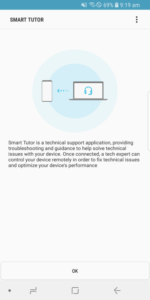
Smart Tutor is an easy, quick and safe means of consulting for Android™ smart phone and tablet series. It can be used to diagnose your device remotely in order to optimize device performance and give functional advice.
Diagnoses can be requested for the following:
• Data transfer, backup and restore
• New features advice
• Software update check
• Account settings (Samsung/Google™/email/etc.)
How to get started
1. Download the "Smart Tutor" from Google play store and install on our Android device.
* From Galaxy S5, please download Smart Tutor via the Galaxy Essential widget
(this features may differ by region or nations.)
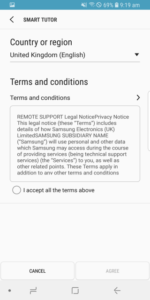
2. Make a phone call to the SAMSUNG Contact center. After agreeing "Terms and Conditions",
the phone number of contact center will be displayed.(Because it is depending on country)
3. Enter the 6 digits connection code given by a tech expert.
4. Once connected, a tech expert will diagnose your mobile.
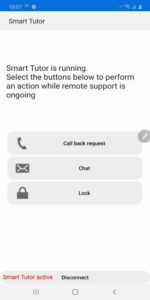
5. If you want to terminate "Smart Tutor", please tap "Disconnect" menu.
Benefit
• Safety & Reliable
Don't worry about exposing our private information."Smart Tutor" restricts a tech expert
from accessing applications with customer's private information such as Gallery, Message,
e-mail and other throughout special features.
• Convenient & Easy
Provide remote support from our Android device quickly and easily if we can use 3G/4G or Wi-Fi.
• Features
Screen Share / Chat / Screen Lock / Application Lock
Requirement & Note
1. "Smart Tutor" works with Android OS(Above Android 2.3.6)
2. "Google Experience Device" is not supported such as "Galaxy Nexus"
3. Connection in 3G/4G Network will be chargeable according to your network data fee agreement with
your operator/Telecom. Before the connection, ensure to check Wi-Fi availability for free support
Smart Tutor is an easy, quick and safe means of consulting for Android™ smart phone and tablet series. It can be used to diagnose your device remotely in order to optimize device performance and give functional advice.
Diagnoses can be requested for the following:
• Data transfer, backup and restore
• New features advice
• Software update check
• Account settings (Samsung/Google™/email/etc.)
How to get started
1. Download the "Smart Tutor" from Google play store and install on our Android device.
* From Galaxy S5, please download Smart Tutor via the Galaxy Essential widget
(this features may differ by region or nations.)
2. Make a phone call to the SAMSUNG Contact center. After agreeing "Terms and Conditions",
the phone number of contact center will be displayed.(Because it is depending on country)
3. Enter the 6 digits connection code given by a tech expert.
4. Once connected, a tech expert will diagnose your mobile.
5. If you want to terminate "Smart Tutor", please tap "Disconnect" menu.
Benefit
• Safety & Reliable
Don't worry about exposing our private information."Smart Tutor" restricts a tech expert
from accessing applications with customer's private information such as Gallery, Message,
e-mail and other throughout special features.
• Convenient & Easy
Provide remote support from our Android device quickly and easily if we can use 3G/4G or Wi-Fi.
• Features
Screen Share / Chat / Screen Lock / Application Lock
Requirement & Note
1. "Smart Tutor" works with Android OS(Above Android 2.3.6)
2. "Google Experience Device" is not supported such as "Galaxy Nexus"
3. Connection in 3G/4G Network will be chargeable according to your network data fee agreement with
your operator/Telecom. Before the connection, ensure to check Wi-Fi availability for free support
Download Smart Tutor for SAMSUNG Mobile APK
Fast, free and safe download.
APK Permissions 54
- android.permission.ACCESS_COARSE_LOCATION
- android.permission.ACCESS_FINE_LOCATION
- android.permission.ACCESS_NETWORK_STATE
- android.permission.ACCESS_WIFI_STATE
- android.permission.BATTERY_STATS
- android.permission.BLUETOOTH
- android.permission.BLUETOOTH_ADMIN
- android.permission.BLUETOOTH_CONNECT
- android.permission.BLUETOOTH_SCAN
- android.permission.BODY_SENSORS
- android.permission.BODY_SENSORS_BACKGROUND
- android.permission.CALL_PHONE
- android.permission.CAPTURE_VIDEO_OUTPUT
- android.permission.CHANGE_NETWORK_STATE
- android.permission.CHANGE_WIFI_STATE
- android.permission.DELETE_PACKAGES
- android.permission.DUMP
- android.permission.EXPAND_STATUS_BAR
- android.permission.FOREGROUND_SERVICE
- android.permission.GET_ACCOUNTS
- android.permission.GET_PACKAGE_SIZE
- android.permission.GET_TASKS
- android.permission.INJECT_EVENTS
- android.permission.INTERACT_ACROSS_USERS_FULL
- android.permission.INTERNET
- android.permission.KILL_BACKGROUND_PROCESSES
- android.permission.MANAGE_NETWORK_POLICY
- android.permission.MODIFY_AUDIO_SETTINGS
- android.permission.NFC
- android.permission.PACKAGE_USAGE_STATS
- android.permission.QUERY_ALL_PACKAGES
- android.permission.READ_CALL_LOG
- android.permission.READ_EXTERNAL_STORAGE
- Android.permission.READ_EXTERNAL_STORAGE
- android.permission.READ_FRAME_BUFFER
- android.permission.READ_NETWORK_USAGE_HISTORY
- android.permission.READ_PHONE_NUMBERS
- android.permission.READ_PHONE_STATE
- android.permission.READ_PRIVILEGED_PHONE_STATE
- android.permission.READ_SYNC_SETTINGS
- android.permission.REAL_GET_TASKS
- android.permission.REORDER_TASKS
- android.permission.RESTART_PACKAGES
- android.permission.STATUS_BAR_SERVICE
- android.permission.SYSTEM_ALERT_WINDOW
- android.permission.WAKE_LOCK
- Android.permission.WRITE_EXTERNAL_STORAGE
- android.permission.WRITE_EXTERNAL_STORAGE
- android.permission.WRITE_SETTINGS
- android.permission.WRITE_SYNC_SETTINGS
- com.samsung.android.dqagent.permission.READ_CS_DB
- com.samsung.android.dqagent.permission.WRITE_CS_DB
- com.samsung.permission.LAUNCH_SOFTWARE_UPDATE
- com.sec.phone.permission.SEC_FACTORY_PHONE
APK Verified
The cryptographic signature guarantees that the file is safe to install and was not tampered with in any way.
Similar in Tools


More by Samsung Electronics Co., Ltd.


Frequently Asked Questions about Smart Tutor for SAMSUNG Mobile APK
This variant is built for 64-bit ARM (most Android phones made since 2017). If your device's CPU matches, this is the smallest, fastest version to install.
Yes — the APK's signature has been cryptographically verified against the publisher's signing key. The SHA-256 hash is shown in the File Information panel so you can independently confirm the file matches the original release.
Android 18 (API level 33) or newer. Older devices will refuse the install.
Install a free app like 'CPU-Z' or 'Droid Hardware Info' from the Play Store and look at the ABI / Instruction Set row. Most phones made after 2017 are arm64-v8a; if in doubt, download the universal variant.
All variants are functionally identical — same features, same version. They differ only in which CPU architectures the native code is compiled for, and (sometimes) which screen densities the included graphics target. Pick the one that matches your device for the smallest install size, or pick 'Universal' if you're unsure.