
This is the universal build of Samsung Food: Meal Planner 2.45.0. It contains native libraries for every CPU architecture (arm64-v8a, armeabi-v7a, x86, x86_64), so it installs on any Android device. The trade-off is size — it's larger than per-architecture variants. Pick this one if you're unsure which CPU your phone has, or if you plan to share the APK with multiple devices.
File size: 47.8 MB • Min Android: 24 • Target Android: 35 • Version code: 29421 • Framework: Native (Java/Kotlin) • Permissions: 38
Screenshots




File Information
| Package Name | com.foodient.whisk |
|---|---|
| Version Name | 2.45.0 |
| Version Code | 29421 |
| Architecture | Universal |
| Min Android Version | Android 24 (API 35) |
| Main Activity | com.foodient.whisk.entry.AppActivity |
| Framework | Native (Java/Kotlin) |
| File Size | 47.80 MB |
| Signature (SHA1) | 5C6074FBE3FE9291E9B4FC85925EE650EE9022ED |
| File Hash (SHA256) | 4a9e4630f137323034423b5ad50cd312aa2b3e492aa3cc727cf604ef5c42aa53 |
What's New
support@samsungfood.com
.
App Description
It’s food, your way.
Samsung Food features give you a single platform to:
-
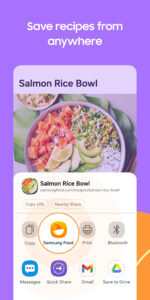
Save recipes from anywhere:
Yes, really, any website. One tap lets you save and organize all your recipes and access them instantly, whether it’s a family secret or a food blog find. No need to take screenshots or copy and paste recipes into notes again.
-
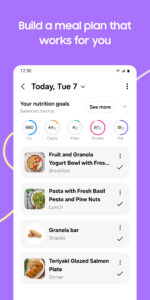
Create and share meal plans:
Use meal plans to add breakfast, lunch, dinner and snacks for the week. Share them with family or friends so everyone knows what’s on the menu. Simplify your meal planning for the week - save money, save time, and avoid food waste.
-
Browse thousands of recipes for inspiration:
Can't decide what to cook? Browse our database of over 160 000 recipes, and filter by cuisine, cook time, skill level, and more.
-
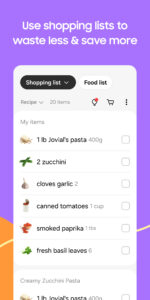
Automatic grocery lists:
Tap to make grocery lists from the recipes you want to cook. Easily add or remove items and organize your list by aisle for speedy shopping. Or create a shared shopping list with everybody in your house.
-
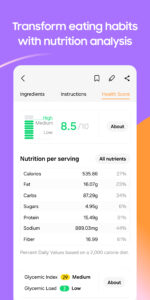
Detailed nutritional information:
Get detailed nutritional information and calorie counts on every recipe. That includes recipes where you change or substitute ingredients, and recipes you submit yourself. Whether you want to make healthier choices, lose weight, gain muscle, or just know what’s in your food and make informed choices about your diet, accurate nutritional information makes it possible.
-
Search for recipes by ingredients:
No need for a trip to the store. Find recipes you can cook using the ingredients you already have (or need to use up fast!) in your fridge or pantry. Reduce food waste, make proper use of leftovers, and save money and time by using what you already have on hand.
-
Edit recipes for your own needs:
Add notes and comments about the things that you want to change so you remember for next time. Substitute ingredients, change quantities, or add notes about the cooking methods. You can also easily and automatically convert from metric to imperial and vice versa. Go ahead and personalize the recipes in your recipe box.
-
Get groceries delivered:
Convert your automatic shopping list into an online food order with just a couple of taps, and enjoy groceries delivered to your door.
-
Smart Cooking:
Appliance control means you can use SmartThings to pre-warm ovens and set timers with just a tap.
-
Connect with other foodies:
search, join, and contribute to communities for foodies of all types. Follow food creators and other home cooks to get inspiration. Share and receive cooking tips and kitchen tricks. Add recipe reviews or comments to help other foodies and support your favorite creators. Improve your cooking and be encouraged by the Samsung Food community.
If you have any questions, please email us at
support@samsungfood.com
.
Fast, free and safe download.
APK Permissions 38
- android.permission.ACCESS_ADSERVICES_AD_ID
- android.permission.ACCESS_ADSERVICES_ATTRIBUTION
- android.permission.ACCESS_ADSERVICES_TOPICS
- android.permission.ACCESS_NETWORK_STATE
- android.permission.CAMERA
- android.permission.DETECT_SCREEN_CAPTURE
- android.permission.FOREGROUND_SERVICE
- android.permission.GET_ACCOUNTS
- android.permission.INTERNET
- android.permission.POST_NOTIFICATIONS
- android.permission.READ_APP_BADGE
- android.permission.READ_CONTACTS
- android.permission.READ_EXTERNAL_STORAGE
- android.permission.READ_MEDIA_IMAGES
- android.permission.REORDER_TASKS
- android.permission.VIBRATE
- android.permission.WAKE_LOCK
- android.permission.WRITE_EXTERNAL_STORAGE
- com.anddoes.launcher.permission.UPDATE_COUNT
- com.android.vending.BILLING
- com.foodient.whisk.DYNAMIC_RECEIVER_NOT_EXPORTED_PERMISSION
- com.google.android.c2dm.permission.RECEIVE
- com.google.android.finsky.permission.BIND_GET_INSTALL_REFERRER_SERVICE
- com.google.android.gms.permission.AD_ID
- com.htc.launcher.permission.READ_SETTINGS
- com.htc.launcher.permission.UPDATE_SHORTCUT
- com.huawei.android.launcher.permission.CHANGE_BADGE
- com.huawei.android.launcher.permission.READ_SETTINGS
- com.huawei.android.launcher.permission.WRITE_SETTINGS
- com.majeur.launcher.permission.UPDATE_BADGE
- com.oppo.launcher.permission.READ_SETTINGS
- com.oppo.launcher.permission.WRITE_SETTINGS
- com.sec.android.provider.badge.permission.READ
- com.sec.android.provider.badge.permission.WRITE
- com.sonyericsson.home.permission.BROADCAST_BADGE
- com.sonymobile.home.permission.PROVIDER_INSERT_BADGE
- me.everything.badger.permission.BADGE_COUNT_READ
- me.everything.badger.permission.BADGE_COUNT_WRITE
APK Verified
The cryptographic signature guarantees that the file is safe to install and was not tampered with in any way.
Other Variants
This release has multiple variants (e.g. diff architectures).
arm64-v8a, armeabi-v7a, x86, x86_64


